Resources
Industry insights, product updates & customer wins
Stay up to date with industry insights, customer stories, and product improvements—everything to help you quote faster and run smoother.
Success stories
0
min read
From quoting crunches to streamlined processes: Tempus Tools empowers growth of J&T Steel Sales
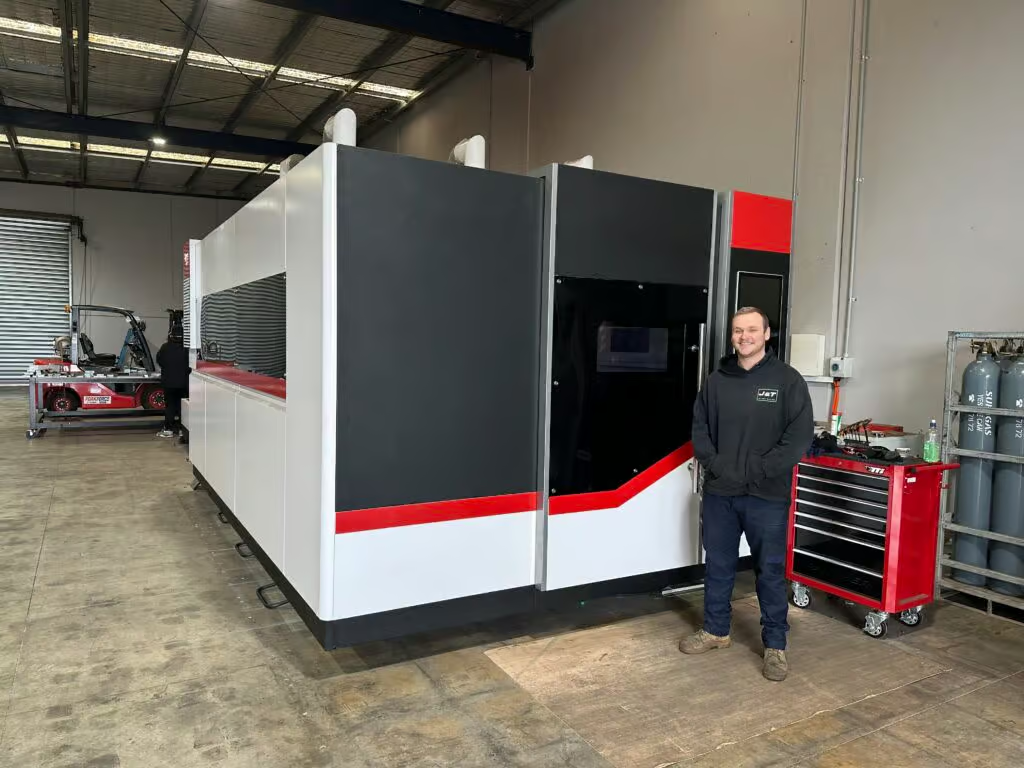
As J&T Steel Sales expanded into the fast-growing laser cutting market, outdated spreadsheet-based quoting quickly became a bottleneck for delivering fast, reliable service. By adopting Tempus Tools, the team streamlined quoting, order tracking, and invoicing—freeing up time, improving consistency, and supporting the company’s growth as they scale their laser cutting operations.
Expanding Australian metal fabrication specialist, J&T Steel Sales, has found that improved productivity and new equipment is only half the battle to boost customer service and sales – equally important is eliminating the outdated processes used to track and prepare quotes, delivery, and invoices.
J&T Steel Sales began as a small plate processing business in Victoria with a CNC Plasma machine, where staff used spreadsheets to develop quotes for customers, but the company has now made the move into the high demand laser cutting market.
Part of the motivation for the expansion was a need in the market for better lead times on laser cut metal products, including aluminium, stainless steel, and carbon steel.
“We had customers come and beg us to purchase a laser machine, because they were fed up with the long lead times that were becoming increasingly common for laser cut products,” explains Luke Patterson, Operations Manager, J&T Steel Sales.
“So we invested in a laser cutting machine, and prepared to grow our business to the next level. But with this change, we needed a quick and efficient software solution to export a presentable quote that we can forward directly to customers in a timely fashion. Spreadsheets just weren’t going to work anymore, so we did some research and found Tempus Tools,” he said.
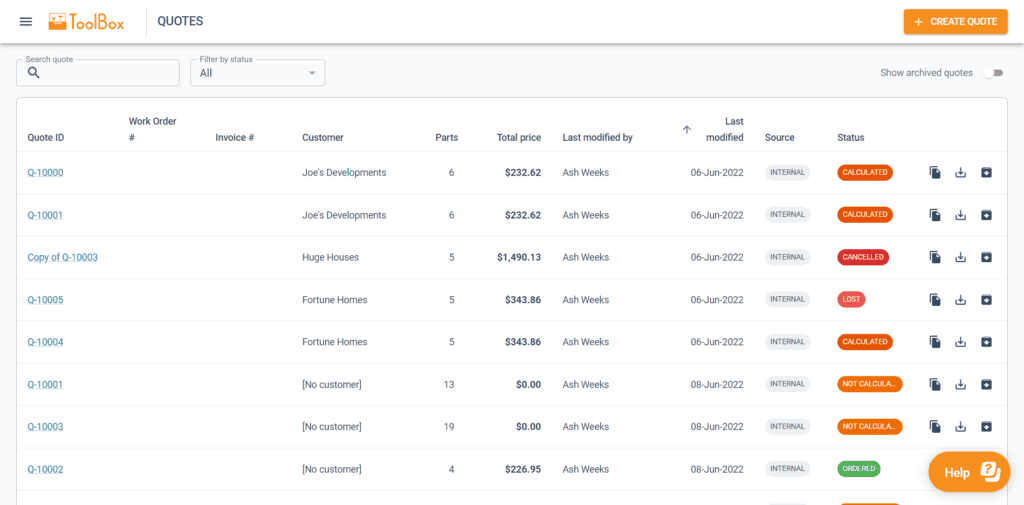
Laser cutting quoting software streamlines operationsTempus Tools, is a multi-functional laser cutting quoting software that is provided using a SaaS (Software as a Service) model. Tempus Tools was developed specifically for the laser cutting industry, and is designed to save job shops time, and make quoting more efficient, accurate, and consistent.
“Tempus Tools has allowed us to streamline not only the quoting aspect, but also the tracking of active orders as well as invoicing,” says Luke.
“It has been able to take most of the heavy lifting in cutting back on excess paper waste in our offices, whilst also creating a digital paper trail to be able to track material usage and stock.”
Since purchasing the laser cutting machine, J&T Steel Sales has committed to getting customers their parts when they need them, calling it “the J&T Guarantee”.
“Tempus Tools has helped us immensely in delivering this guarantee to our customers. It has taken the stresses and late night quoting crunches and completely streamlined the process, freeing up more time for us to be able to focus on growing the business,” says Luke.
“In the past, expanding our customer base meant we would fall increasingly behind when it came to invoicing and quoting. Now, with Tempus Tools, we really feel we have found a software that not only services us now, but also allows us room to grow in the future.”
Service is key
Luke explains that in his business, customer service is the key to success. Customers have good memories, and they value pricing consistency, accuracy, and reliability.
“Being a service-focused business, it’s something I look for in our suppliers too. In my opinion, the Tempus Tools team has been exceptional when it comes to responsiveness and availability to work through any challenges I’m experiencing,” he says.
“Coming from a small business ourselves it was an incredibly refreshing experience to have team members visit our workshop, and to also feel listened to when it came to our concerns or feedback for the future development of Tempus Tools.”
“I met Mark Washington (Sales & Support) and Felipe Lechuga (Director) from Tempus Tools at a local manufacturing expo earlier this year, and they took the time to visit our job shop and discuss the functionality of Tempus Tools, and what more it could be doing for us. I was very impressed, and I’m grateful for all the support.”
A bright future
J&T Steel Sales has seen steady growth since moving into the laser cutting business, and Luke has plans to continue this trend.
“Our future plans are not only to focus on bringing in new customers – ideally ones that require repeat work – but also to let all our customers know about our bending and fabrication facility, so they know we can provide an end-to-end manufacturing solution,” he says.
“Tempus Tools has a huge range of useful features, and the development team is always working on new functionality that can benefit job shops like ours, so it is a key component of our growth plans.”
To learn more about Tempus Tools, please click here.
Read blog
Product updates
0
min read
Tempus Tools’ Google Drive integration: 6 ways to supercharge your job shop efficiency
Last month Tempus Tools released a powerful new feature: seamless integration with Google Drive.
Since then, we’ve heard from lots of customers about the innovative ways they have implemented this integration in their job shops, and we wanted to share the best six with you to inspire you to use the feature in your shop.
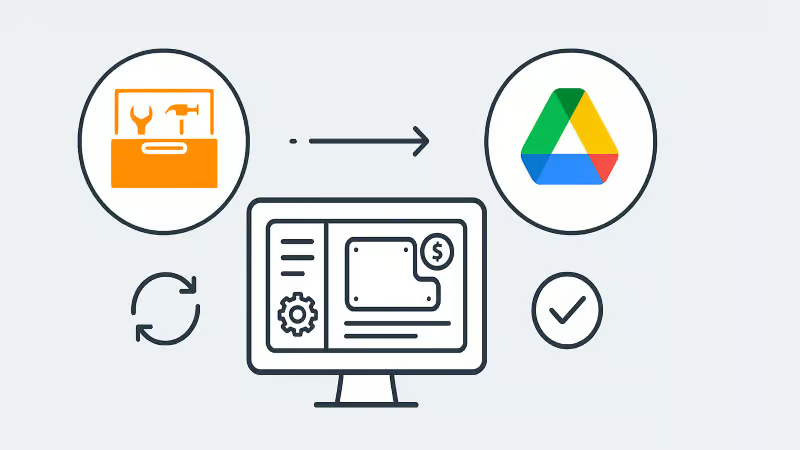
First, a quick recap: with the Google Drive integration, all your quote data (in CSV format) and production-ready part files can be automatically saved to your chosen Google Drive folder. From here, they can be exported to any number of programs or that data can be manipulated for many use cases, opening up a world of automation, reporting and connectivity for your job shop. We’ve also put together a quick video to show the integration in action.
1. Automate quote data collection for reporting
With every quote automatically saved, you can easily compile and analyse your quote performance over time. Use Google Sheets or your favourite analytics tool to track:
- win/loss rates
- performance across material types
- average order size
- breakdown of secondary processes contributions
This data-driven approach helps you identify trends, optimise pricing and improve customer response times.
2. Connect with ERP/MRP and other business systems
Some apps have native integration with Google Drive, which makes taking in quote data and parts easy, but many need a formal API. Luckily, Google Drive comes with its own API.
Some users have used the Google Drive API to build automations that push quote data directly into ERP, MRP or order management systems. This can streamline order processing, reduce manual data entry and ensure your production schedule is always up to date.
3. Organise your orders by material type
Use the exported quote data to create a parts planner that groups jobs by common material type. This enables you to:
- batch similar jobs for more efficient material usage
- reduce changeover times on machines
- optimise purchasing and inventory management
A simple Google Sheets script or integration with a dashboard tool can make this process nearly automatic.
4. Integrate with project management tools
Connect your quote data with popular tools like ClickUp, Monday.com or Airtable. Build custom dashboards and planners for your factory, visualise job statuses and assign tasks to your team-all based on real-time quoting data. These tools don’t require coding or a developer and anyone can work wonders. These types of projects boost collaboration on the shop floor and keep everyone aligned on priorities.
5. Create a scheduling calendar from time calculations
Use the time estimates in your quote data to automatically populate a production calendar. With a Google Calendar integration, you can:
- visualise machine and operator workloads
- identify bottlenecks before they happen
- easily adjust schedules as new jobs come in
This proactive scheduling helps you deliver on time, every time.
6. Enable automated notifications and workflows
Set up Google Drive triggers (using tools like Zapier or Google Apps Script) to notify your team when new quotes are confirmed as orders, or to kick off downstream processes-like updating CRM records or ordering materials.
Getting started is easy
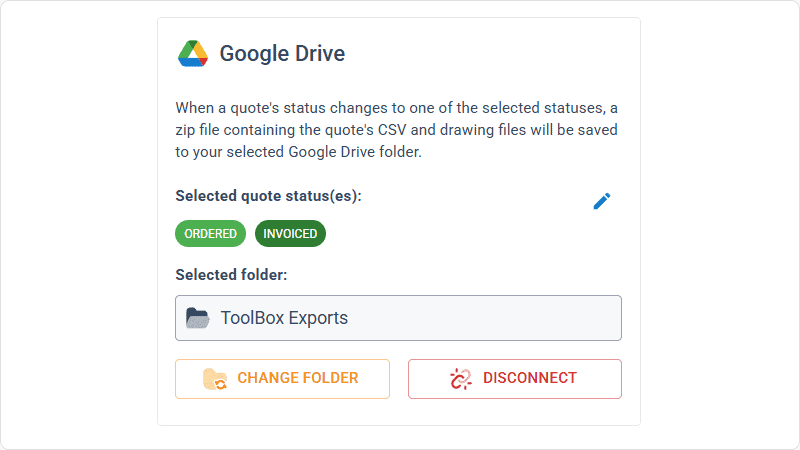
- Go to Settings > Organisation settings > Integrations in your Tempus Tools Tempus Tools account
- Connect your Google Drive and select your preferred folder
- Choose the quote statuses that will trigger automatic file saving
- Start building automations and workflows that fit your shop’s needs
This integration is designed to be flexible-whether you want to automate reporting, connect with business systems, or simply keep your files organised, Tempus Tools and Google Drive make it possible.
Ready to enhance your job shop efficiency? Try the new Google Drive integration today.
Read blog

Articles
0
min read
Is expensive, non-dedicated software holding you back from effortless laser cutting quoting?
Laser cutting is a precise task, requiring machinery tailored to specific requirements. Profitability is significantly boosted by the ability to be able to respond quickly to customer requests for quotes (RFQs), and efficiently deliver the product.
“With the time and energy often spent on selecting the right laser cutting machine, it’s amazing how often software is overlooked as a driver of productivity,” says Tempus Tools Head of Global Sales, Mark Washington.

“Sometimes laser cutting companies are stuck using software that wasn’t specifically designed for job shops, but it’s all that their team is used to using. Other times, expensive software is implemented, but only a small fraction of the features are actually used,” he says.
“And in many cases, it becomes so complex that a specialist is hired to manage quoting via the software – but what happens if they leave the company?”
Tempus Tools is the creator of dedicated quoting software, Tempus Tools, which can provide fast, accurate, and consistent laser cutting quotes that are professionally presented, ready to send back to the customer.
“Using software that isn’t specifically designed for laser cutting is like using a cricket bat to play tennis. It might get the job done, but it would be far more efficient and accurate with the tools designed for the job!” says Mark (pictured, right).
“In addition to providing quotes in minutes, Tempus Tools can also produce production documents with the click of a button, to add further efficiency to running a job shop floor,” he adds.
A shift in the industry
With customers demanding faster service, the industry is shifting to tailored laser cutting quoting solutions, to enhance their RFQ response times, and Mark sees this as part of a larger global trend.
“It’s evident across a number of industries – smarter players want to utilise technologies specifically targeted to their industry to out-pace competitors. And laser cutting job shops are enthusiastically getting on board with this trend,” he says.
“Tempus Tools has been specifically designed for laser cutting job shops. It’s quick to set up, intuitive, and user-friendly, so the entire team can use it with minimal training, instead of relying on one specialist.”
Tempus Tools cloud-based laser cutting quoting software can be set up with information on material price, cutting time, labour, and other relevant information, to generate quotes quickly and accurately, with repeatability.
“The Tempus Tools team has decades of experience in the laser cutting industry, from the shop floor, through to management, and running their own laser cutting enterprises, so we know the industry inside out – and we can support through setup and every step of the journey, for no additional charges,” adds Mark.
“A major inhibitor of laser cutting quoting software has often been cost, with powerful software that can do it all costing thousands per month. But if you only need dedicated laser cutting quoting software, our plans start from US$100 per month, and are packed full of features you will actually use,” he says.
Switching software – overcoming challenges
Even with the knowledge of the benefits of dedicated laser cutting quoting software, job shops can be hesitant about the time involved in switching, says Mark. He notes some of the main concerns:
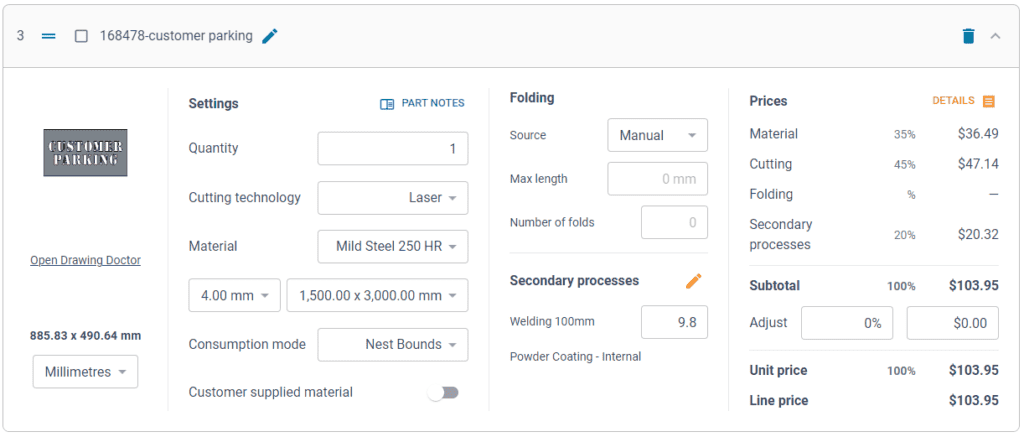
- Time – often job shops have tried other software implementations and it’s taken months, and they just cannot afford to spend that time again. But Tempus Tools isn’t like other software. For a job shop with one laser, press brake, and standard secondary processes, set up takes less than 90 minutes.
- Staff training – job shops often believe their staff don’t have the time or capacity to learn a whole new software. But again, Tempus Tools is different. It’s designed to be user-friendly, easy to learn, and staff end up doing their jobs more efficiently, and enjoying the features right away.
- Hidden costs – this is a big factor for any software, and job shops are highly alert to cheap upfront costs, followed by lots of add-ons. No one likes to be “nickel and dimed”. For Tempus Tools, it’s a monthly or yearly subscription, and that’s all. No extra charges for support, upgrades, or training. Features all have a set pricing that’s clear from the outset.
- Too many programs – some job shops have two, three, or more different software programs – why add more, especially if they don’t talk to each other? That’s a totally valid concern. Tempus Tools outputs a CSV as standard with all the quote data, making integration seamless and easy.
“The Tempus Tools leadership team has decades of experience working from the shop floor to the top floor, so they understand the pain of changing software, and have designed Tempus Tools to be effortless and simple,” says Mark.
Tempus Tools features
Tempus Tools features that have been specifically designed for laser cutting job shops include:
- 3D model extractor. Identify, extract and unfold sheet-metal parts directly from 3D assemblies without a 3D software package.
- PDF to CAD convertor. Convert a vector PDF into a CAD file instantly. No tracing, no CAD package, just click on a part and extract it into your quote.
- Tube quoting. Easily drag and drop rectangular, square or round hollow sections into the tube module. It quickly calculates highly accurate cutting time and material consumption for pricing.
- Web Store. Let your customers get instant pricing and place orders from your website 24/7 with an online quoting portal.
- Secondary processes. Get accurate and consistent folding prices quickly using the built-in folding algorithm developed by specialists with decades of experience using brake presses.
- Drawing Doctor®. Upon upload of a 2D DXF or DWG file, Drawing Doctor® automatically corrects for double lines, dimensions, and small end points that are hidden in some drawings.
- Part Library. Part Library allows you to save parts that you’ve produced for a customer for re-use. Saves time on repeat orders and quotes, by dropping an existing part straight into the quote, ready to calculate, based on the latest pricing.
“These are just a few of our most popular features, but there are lots more within Tempus Tools, and our development team is constantly listening for customer feedback to determine what new features can be added,” says Mark.
“So for effortless laser cutting quoting, don’t let software hold you back, let it be the catalyst that drives business growth. We offer an obligation-free trial of Tempus Tools so that laser cutting job shops can see the difference for themselves.”
Read blog
Guides
0
min read
How to set laser cutting prices that are both competitive and profitable
Metal fabrication and laser cutting job shop owners have all asked themselves at one point, “how should I set my prices?”.
It’s a delicate balance. Set your prices too high and customers may walk away to the competition, but set your prices too low, and you may be working too hard for little or no profitable return.
Setting a baseline
“The first thing to do is understand all of the costs that are associated with running your laser machine. Once you have a complete overview, best practice is to apply a full absorption costing method to your business,” advises Bruce Thomas, Product Executive at Tempus Tools. Bruce has decades of experience in the laser cutting industry. His experience is complemented by the Tempus Tools team, which are highly knowledgeable in the laser cutting industry, with practical, hands-on experience on the shop floor, through to management.
“Full absorption costing means that you’re absorbing overhead costs into the hourly rate. In laser cutting job shops, this could be direct costs, like labour, as well as indirect costs like rent, insurance, power, and maintenance. But each case is different, so we can provide guidance on how to perform this type of calculation,” he says.
Bruce explains that once you have calculated all the costs within a job shop and created an annual figure, you can set an accurate yearly revenue target, which can be broken down into monthly and daily objectives. This breakdown is an effective way to focus on revenue goals for the job shop.
“This data should give you an idea of what prices need to be set in order to be profitable, but you won’t know if they are exactly right until you get market feedback, so be prepared to adjust these initial prices,” says Bruce.
A word on assumptions
Full absorption costing is a great starting point, but Bruce points out that this calculation does require some assumptions, such as the number of hours the shop will be operational for, and the percentage of those hours the machine will be cutting (known as the utilisation rate).
“Varying the utilisation rate can have a big impact on how costs are distributed. If your machine isn’t running for as many hours per day as you predicted (actual cutting time), then you find yourself in a situation where you’ve priced your cutting service too low,” he says.
“In other situations, you might increase the number of shifts per day, or add shifts on weekends, which can increase efficiency without changing fixed overheads, resulting in a more competitive hourly rate.
Getting ahead and staying competitive
“Of course, once you’ve come up with a price, it’s crucial to see if it’s competitive with the market, and one of the best ways to do this is to use software to monitor your win/loss ratio,” he says.
“A typical win/loss ratio is about 30-40%. This means, for every 100 jobs you quote for, you win 30-40 of them. Lower than 30 means the pricing is too expensive and you’re losing work to competitors, and above 40 means the pricing is too cheap, meaning you are doing a lot of work for a lower profit margin.”
“It’s important to monitor pricing over time, and see how it changes in reaction to trends, too. For example, material price fluctuations or changes in demand from different industries will have an impact on pricing.”
“Similarly, technology changes will have an impact. Cheaper and more powerful machines, and more automation will allow more advanced laser cutting tasks to be done with lower costs.”
“It’s important to know your customer, but it’s equally important to know your competitor and what they are offering, and for how much.”
Hourly rates only go so far
Much of the metal fabrication and laser cutting industry uses hourly rates to calculate a price, which is then quoted to customers, but this only works up to a point, says Bruce.
“To remain competitive, you need to keep monitoring prices. Each quote – regardless of who prepares it – needs to be consistent and accurate. One of the best ways to do this is to use laser cutting quoting software, so that any changes are implemented within the software, rather than on a per-quote basis,” he explains.
There are a range of factors that can affect a quote, and it can often mean one job shop will quote at a different rate to another. Bruce explains that this can be for reasons such as:
- The speed and size of the machine. A 6kW laser cutting machine can vary from approximately $180,000 to $1,200,000, which is a huge difference. Each machine will perform at different speeds, and allow different levels of sophistication.
- Whether the machine is paid off or not. If it’s still not paid off, this might have to be factored into the hourly rates.
- Cutting thickness, with thicker cuts demanding higher costs.
- Cut quality – all machines will be able to produce an acceptable quality, but some customers may demand an additional level of precision and finish, and if this takes additional time, it will need to be considered in the costs.
“With all that being said, your customer is buying on a per-part basis. They are comparing your part priced at $10 with the competitor’s part priced at $8. So, you need to adjust for this difference using software and data, rather than relying solely on a ‘gut feeling’. Knowing your bottom line gives you the confidence to accept or reject the work,” he says.
Added value wins more jobs
Once you’ve figured out a price, to really stand out from the competition, it’s all about the added value you can deliver, says Bruce.
“Consider your delivery times, customer service, expectations management, and understanding a customer’s unique needs. Do they need all their parts individually packed and labelled, for example? If you can meet their needs, you’re more likely to win the job,” he says.
“Adding value is always better than discounting price. In a race to the bottom on price, nobody wins.”
Tempus Tools helps win more jobs
To help deliver added value, monitor win/loss ratios, and provide faster, more accurate, and more consistent quotes, Tempus Tools created Tempus Tools. Tempus Tools is multi-functional laser cutting quoting software that is calculation-based and runs on a Software as a Service (SaaS) model. It can be set up with information on material price, cutting time, labour, and other relevant information, to generate quotes quickly and accurately.
“Tempus Tools can give job shop owners more accurate estimates of time, which leads to greater consistency,” says Bruce.
“Additionally, Tempus Tools can generate printable part labels, and produce work orders with times listed on each task. Tempus Tools provides consistent and accurate data on folding, cutting, and secondary processes, so that quotes to customers are exactly right.”
“We’ve helped a huge variety of different job shops with full absorption costing, win/loss ratios, setting up pricing, and then generating fast and accurate quotes – so if you’re looking to optimise your job shop’s operations, we’re here to help,” he concludes.
Read blog
Articles
Lasercut Solutions discovers Tempus Tools laser quoting solution that’s a cut above the rest
Lasercut Solutions upgraded from a slow, manual Excel system to Tempus Tools, giving them fast, accurate, user-friendly quoting that returns most quotes in just minutes and keeps them competitive. With responsive support and continuous feature updates, Tempus Tools helps them win more work while freeing skilled staff from time-consuming estimating tasks.
Adelaide-based laser cutting and CNC router specialists, Lasercut Solutions, have discovered a solution that allows them to provide quotes to customers simply, accurately, and quickly.
Previously, Lasercut Solutions was pricing laser cutting jobs using an in-house developed excel based quoting system, which the business had outgrown. Due to the volume of quotes, the process was slow and tedious. “Quoting times would vary depending on the amount of work required, but we knew it was taking up too much of our time,” said Lasercut Solutions Owner, Gary Cabot.
Lasercut Solutions provides laser cutting, laser engraving, and CNC profiled parts to a wide variety of fabricators and manufacturers.
“We have a broad range of customers across a variety of industries, and they require fast quotes to compete in their respective markets,” he said.
A fuss-free laser quoting system
After trialling different types of software, Lasercut Solutions discovered ox, by Tempus Tools. Tempus Tools was developed by laser industry professionals who, combined, have more than 100 years of experience in the laser industry, extending from hands-on work on the jobshop floor through to international commercialisation of their technology.
“Tempus Tools gave us a fuss-free and simple to navigate quoting system. Right from the beginning, we found the interface very user-friendly and setting up the system with our business requirements was straightforward,” said Gary.
“With Tempus Tools in place, we have noticed most quotes take a few minutes to return to the customer, regardless of the amount of detail in the job. The speed at which we can produce quotes with Tempus Tools is excellent. We can deliver fast and accurate pricing, which allows us to maintain a competitive edge in the market,” he said.
We found the system to have enough flexibility to tailor to our needs, in contrast to other software we trialed, which became cumbersome with the amount of data entry required.”
Tempus Tools is rules-based, which enables lesser skilled customer-focused service staff to prepare and issue quotes. This means it’s not taking highly qualified CAM specialists and brake press operators away from their productive tasks to assist with quote preparation.
The first quote has a higher chance of winning
Tempus Tools’ data, based on more than one million laser cutting quotes, shows that the first quote the customer receives has a higher chance of winning.
Tempus Tools CEO Ivan Cooper says that this is crucial to business growth, because laser jobshops, on average, win between 30-40% of all jobs quoted.
“If you’re winning less than 40% of all jobs quoted for, an effective way to grow the business is to reduce the time it takes to produce each quote. Our data shows that the average number of line items is 5.5, and average time per line is five minutes. That’s 30 minutes per quote. Using Tempus Tools, the same quote would take just two minutes,” he said.
“Tempus Tools is a sales tool that helps you generate quotes quickly and accurately, setting it apart from other MRP/ERP quoting solutions. It gives users a unique set of tools to get more quotes out, win more jobs, and grow their business.”
Responsive service and support
Tempus Tools designed to help laser jobshops with the real issues they face day-to-day with quoting, and the Tempus Tools team is consistently updating the cloud-based platform to include new features.
“We worked closely with the Tempus Tools team throughout our trial period and into our subscription. They were extremely responsive and receptive to new ideas. We have been happy to see some of our suggestions already implemented into the Tempus Tools system, and other ideas on the development list,” said Gary.
Recent updates to Tempus Tools include integrations with Xero, QuickBooks, and availability on the AutoDesk app store. A new feature that’s planned for release later this year is tube quoting, where users can create quotes from a STEP file without using a solid modelling program.
The new tube quoting feature follows on from Tempus Tools’ successful 3D module, which is already part of the Tempus Tools system. The 3D module takes a sheet metal STEP file and flattens it, ready for quoting.
Ivan Cooper says that they value the feedback of Australian laser jobshops like Lasercut Solutions, as they seek to add new features that benefit all Tempus Tools users.
“Sometimes it can be a really minor update that can make a big difference to the user. We like to remain flexible, so that we can update our software with new features that continue to deliver value to our Tempus Tools customers,” he said.
Read blog

Guides
Fibre lasers or CO2 lasers: What your job shop needs to know
Fibre lasers are faster, more efficient, and cheaper to operate than CO₂ machines—especially for non-ferrous metals—but they can produce slightly lower cut quality on materials like stainless and aluminium. CO₂ lasers still excel at thin metals and organic materials, so the right choice depends on what your shop cuts, the quality you need, and the operating costs you’re willing to take on.
It’s widely considered at this point that fibre lasers are supreme in the manufacturing industry— greater power, speed, and no need for laser gases, higher electrical efficiencies and less maintenance requirements are some of the most discussed reasons that job shops are investing in new fibres, most replacing their CO2 lasers for fibre ones.
However, these factors aren’t the only things to consider for the job shop considering new machines. For the fabricator just getting into laser, or those who have only used CO2 in the past, here’s the guide you need to the differences between CO2 and fibre lasers, from the technology and its expenses to the results you can expect in your product.
CO2 and fibre lasers’ big difference comes from their respective methods of generating the laser. CO2 lasers operate through exciting the carbon dioxide molecules in a gas, which is the lasing medium that delivers the beam that cuts your material. It operates at a frequency of 10.6 microns (µm) which is far-infrared. Meanwhile, fiber lasers generate the laser through using ytterbium crystals as a medium (in a solid – glass) within optical fibres. These crystals are “pumped” using powerful laser diodes and the laser beam is emitted as a near-infrared beam of light to cut your material, typically operating at 1.08 µm.
Fibre lasers are generally considered to be faster than CO2 lasers, due to several factors. Powerful lasers allow for thicker materials to be cut at a faster pace—while there are many power levels available for both fibre and CO2, high-powered fibre lasers are less expensive than their CO2 counterparts, and therefore more economical to purchase.
In materials like aluminium and copper, the speed increase is also due to the better absorption of the laser.
The shorter wavelength is to thank for this, with some materials reflecting most of a CO2’s beam rather than absorbing it and allowing itself to be cut. Non-ferrous metal like copper or brass just aren’t able to be cut economically by a CO2 laser, taking longer and wasting power. A job shop primarily dealing in these sorts of materials should absolutely go with fibre over CO2.
For their part, CO2 lasers work very well cutting mild steel and organic materials like acrylic, paper, timber and cardboard. Laser cutters work with these materials in a number of industries for a great number of purposes, such as cutting out cardboard boxes to be folded and used as packaging or storage. CO2 lasers can work just as effectively as a fibre laser at thinner material thicknesses, and will generally produce a superior, smoother cut and with greater capacity for detail in these cases.
The other downside for fibre lasers is that the cut on a fibre can be of a marginally lower quality for stainless and aluminium, resulting in microburrs that may require removal. This extra processing cost impacts the fibre’s time advantage. So for job shops working with materials cuttable on both types of lasers, it’s worth reconsidering whether much time will be saved, or if a noticeable drop in cut quality will impact your productivity rate.
There is a much shorter maintenance cycle for CO2 lasers; the optical components placed inside the oscillator must be cleaned and replaced periodically in order for the machine to work at its best. CO2 lasers typically operate in a vacuum and require gas circulation so there are many mechanical components compared to a fibre. In comparison, fibre lasers can have better longevity and maintenance performance, as their oscillators are isolated from outside factors. Their maintenance cycle is placed at roughly 20,000 hours to a CO2 laser’s 4000 hours.
Naturally, different lasers come with different expenses depending on the machine, even putting aside its generation method. CO2 lasers aren’t nearly as energy-efficient as fibres, generally operating at only 10% efficiency to fibre’s 30%. This means that you’ll be consuming far more electrical power, and paying a lot more. Additional regular costs include the consumed gases and maintenance of the laser’s optical components, expenses not attached to fibre lasers.
Every job shop has different requirements when purchasing a laser, and so there’s no universal answer for the question of which kind is overall the best. The real question needs to be whether a laser suits your needs—is it financially feasible you to not only purchase a CO2 laser, but also pay for its expenses? Are your materials better suited for being cut on one or the other? Can you ignore imperfect cuts, or will you need to allow for secondary processes? These are questions one needs to ask themselves when finding the right machine for their job shop, and we recommend thinking carefully about the answers before committing to any one laser.
Read blog
Guides
Getting around the spike in steel prices
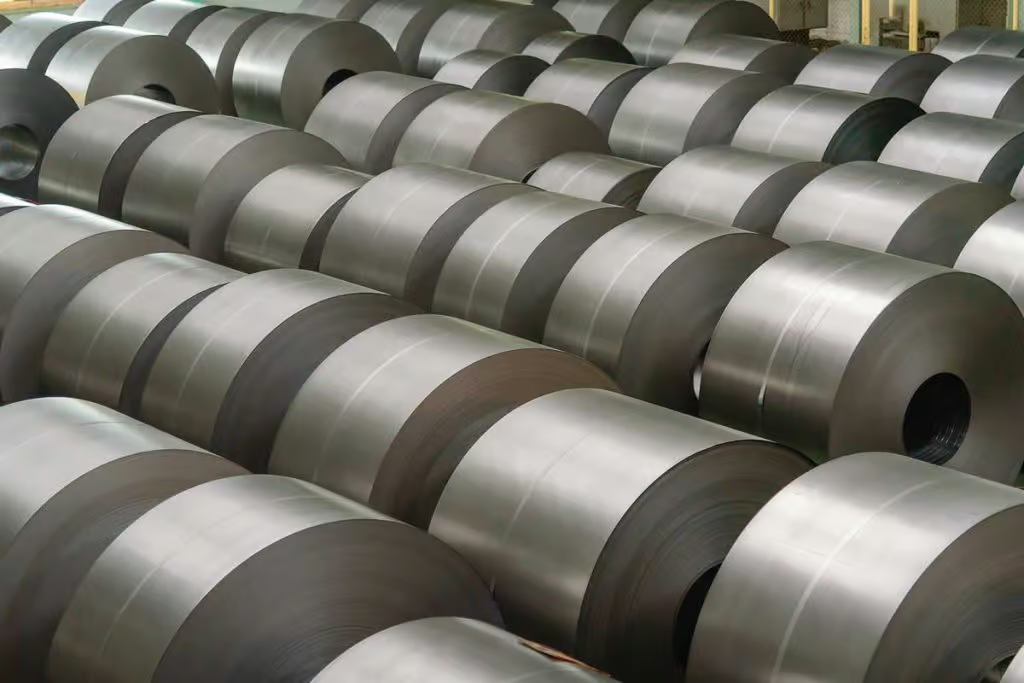
Steel prices have surged to historic highs, squeezing job shops’ margins and forcing fabricators to adjust pricing, rethink job selection, and maximize material efficiency. Until prices stabilize, shops can stay profitable by expanding into jobs that use cheaper materials, improving nesting and scrap recovery, and staying agile in how they schedule and quote work.
Steel prices have been on a steady climb from August of last year, going from an average price of $473 USD to the current $1,770 per ton of HR steel in North America. Given the last major high even remotely close to this in the past decade was $915 per ton in July 2018, fabricators have more than enough reason to be concerned that current prices will continue to rise.
The ultimate fear is that job shops won’t be able to make enough money to remain afloat, especially those who had recently invested in new technology. Without the ability to buy materials at a feasible price, those machines simply take up space. It may be necessary to adjust prices while materials are expensive—make sure to inform regular customers that an increase is due to the current market. The Fabricator is an excellent source for industry news and analysis should they ask for more information regarding material prices.
Even with price adjustments, know your limits when it comes to incoming quotes and orders; some might just not be practical to fill while still paying expenses. Don’t eat away at margins at the detriment of your own business.
The hope is that prices will finally peak in August at $1825, with a gradual drop over the next year to a more reasonable $1000 per ton.
In the meantime, what can small laser-cutting job shops do in order to make profit? Laser cutting itself is a very flexible part of manufacturing; there is a plethora of jobs out there that need reliable fabricators, and use materials far cheaper than steel currently is. The job shop needs to be as flexible as its tools—what kind of jobs are you capable of expanding into that you usually don’t take? Consider whether keeping within your business’ comfort zone is truly in your best interest in the current market, or if taking new business opportunities could be your greatest ally.
For job shops with ongoing demand for steel from their customers, waiting out the peak in prices simply isn’t an option. It’ll be necessary for those fabricators to maximize the amount of usage they can get out of the material. Here, automated nesting and grouping like orders from different customers are invaluable. Not only do these methods guarantee the greatest amount of parts cut from each sheet, saving material from the scrap bin, but you’ll also save time from planning, changeovers, and allow you to execute orders in tandem. These all work together to save you a bundle in this time of stress. Our sister company ipLaser provides quoting software with the capability to collate parts cut from like material, schedule the orders together, and fully nest them to maximize material usage.
Finally, it’s also a good idea at this time to analyze your scrap process, as resell value will be increasing at the same time as prices for raw material. In order to make the most of this source of income, have a clear plan and process for your job shop, with used scrap organized by material and by size. Read our previous article on selling scrap here.
While high expenses are stressful, remember that it’s not impossible to find ways around this problem. Keep an eye on current prices, predictions for the next 12 months, and keep yourself and your job shop informed on new opportunities and workarounds to get the edge on your competitors.
For more advice from experienced fabricators, like this article on the impact proper nesting can have on your profit margin, check out our Industry Insights and social media.
Gemma Randall
Marketing, Tempus Tools
Read blog
Guides
How much is nitrogen costing your job shop?
Nitrogen is one of the biggest ongoing costs in a laser job shop, and while alternatives like shop air exist, they often create cut-quality issues and extra processing time. To reduce long-term expense and improve supply stability, many fabricators are turning to on-site nitrogen generators or bulk liquid storage systems, which can significantly lower costs and reduce downtime compared to traditional cylinder deliveries.
Like all consumable materials, nitrogen is an ongoing cost that must be included in the budget of any laser cutter. It can account for as much as 60% of the total laser running costs. Several cylinders of gas can be used every hour that the machine runs, and depending on the size of the job shop and number of lasers running at once, the expense quickly builds. For the job shop attempting to minimize expenses, what can be done?
Some may find success using pressurized shop air (the air we breathe is roughly 80% nitrogen and 20% oxygen), but this presents its own complications. Firstly, one must have the machinery to pressurize the air and remove moisture in the first place—job shops in arid regions may have more difficulty with this. Secondly, for job shops that frequently cut stainless steel, cutting with mixed gases will have an effect on their product. While the oxidization caused by cutting stainless steel with a small percentage of oxygen isn’t severe, it will leave a ‘stain’ on the cut edge that some customers will not accept, and will require further processing to get rid of. Even if you avoid the up-front expense of the nitrogen, it’s quite likely that you lose more money through the extra time spent on these products.
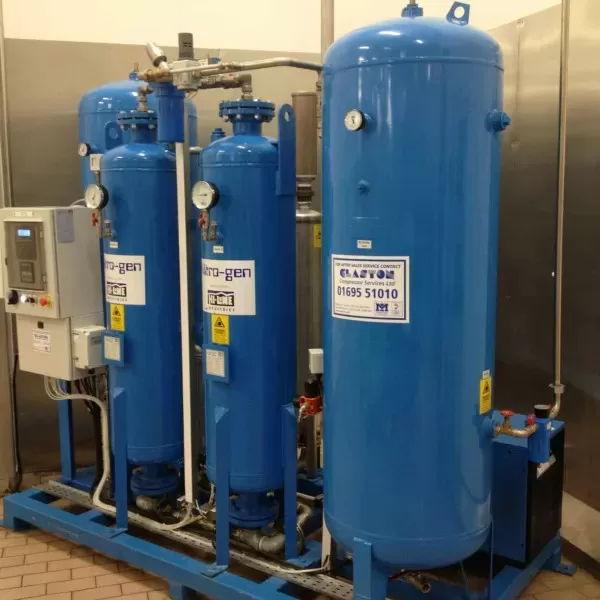
So while it’s expensive, it’s still necessary for many to have a steady supply of nitrogen. But that doesn’t mean it’s impossible to save without sacrificing quality. Nitrogen generators are becoming an increasingly attractive option for many reasons. Depending on the current price of nitrogen being sold to your competitors, you can be looking at long-term savings between 40-80%. Downtime also decreases—there’s no wait time on deliveries or danger of unexpected delays in the supply line, helping you be in control and self-sufficient. For environmentally-minded fabricators, there’s even ease of mind knowing that your carbon footprint has been reduced from fewer off-site deliveries.
The other option for fabricators with high production demands is to install large bulk storage tanks for liquid nitrogen. These can be refilled periodically, and over time are more economical than regular smaller deliveries of liquid nitrogen, and even more so than cylinders of gas nitrogen. On the other hand, bulk storage can be costly in rental and maintenance, is at the mercy of supply, and has the same issue of off-gassing as smaller containers of liquid. Liquid nitrogen will continually convert itself to gas and vent off, consuming upwards of 20% of your bought supply. Given a long enough delay between usage, your supply may run out entirely without being utilized. It’s therefore important to purchase amounts fairly close to what you’re reasonably going to be able to use in order to minimize this expense.
Every traditional purchase should be examined in order to streamline your business costs. When it comes to nitrogen tanks and cylinders, these purchases are contractual and look to the long-term, but their fluctuating prices, high wastage and unstable supply are to the fabricator’s detriment, creating future risk with your expenditure. Next time you look over your nitrogen expenses, consider whether a change in supply method now could benefit your business in the future with better pricing and a controlled supply.
Read blog

Guides
Forklift Theory: How to make the most of the fabricator’s best friend.
A forklift is only as useful as it is accessible, safe, and economically maintained — making clear parking zones, enforcing licensed operation, maintaining pedestrian safety, and keeping up with inspections are essential for efficiency and risk reduction. Since maintenance costs rise and productivity drops as forklifts age, job shops should track hours and repairs closely to determine when it becomes more cost-effective to replace the machine than keep it running.
Published via LinkedIn by Bruce Thomas, May 2021
Depending on the size of your workplace, you likely have one or more forklifts or other industrial trucks at your disposal in order to keep your profit centers running efficiently. Even if you only need the one, there are some rules that prove universal when it comes to making the most of your machine and its efficiency in your job shop, saving you time and money. Here’s tips we’ve gathered from the team at Tempus Tools and their decades of experience to find out how you can easily make your forklift even more efficient.
Your forklift is useful, but is it accessible?
Your forklift is far less useful to you if you struggle to access it within your workplace. Make sure that your forklift is always returned to the same designated area when you finish using it. You can mark this out with brightly colored floor tape. Make sure that this area, as well as the walkways the forklift regularly uses, is never blocked off by pallets or other equipment.
If fetching your forklift seems to take longer than it should, or if it’s in such high demand that you or others have to go into downtime, this is also an issue of accessibility. In this scenario, it might be wise to consider getting a second forklift and setting up an additional parking space on the opposite end of the floor. If the functions of the areas are different enough (e.g. one area is production-based while the other focuses on incoming and outgoing deliveries), segregate each forklift to its own operation zone so that each area can have sufficient access to a machine.
Are you using your forklift safely?
Although it is easy to get used to your forklift operating around you, as the only mobile heavy machine in the job shop it is easily the most dangerous, and should not be underestimated. On average, forklift accidents cause 85 deaths, 34,900 serious injuries, and 61,800 non-serious injuries in the US annually.
On the shop floor, it’s every employee’s job to keep themselves and others safe. This includes a safe environment, systems of work, well-maintained machinery, proper training and supervision, and complying with all safety rules and regulations. Here’s some of the ways that you can maximize safety around your forklift:
- Keep a log of employees that are licensed to use your forklift. Only licensed operators should be allowed to use the machine, and unlicensed trainees should be supervised at all times while operating. Inexperienced operators are far more likely to mishandle heavy loads, or to misjudge stopping distances and safe turning speeds.
- Establish a safe speed limit in your workplace. Reckless speeding shortens reaction time; even an experienced operator can get too comfortable. Place signs around operating areas, and ensure that operators stick to the speed limit.
- Keep the safety of pedestrians in mind at all times. Clearly mark out walkways for them to use with floor tape and/or safety barriers. Forklifts should be equipped with both audio (alarms and horns) and visual (flashing lights) warning signals to alert pedestrians to nearby forklifts. On their part, pedestrians working near forklifts should wear high-visibility clothing in order to stand out to drivers.
- Maintain your forklift, and make repairs through a reputable maintenance company. Due to the weight of the forklift and the loads it handles, a mechanical failure at the wrong moment can be catastrophic. Having your forklift properly repaired reduces the potential risk of accidents, and your insurance company may not cover you if you’re not adequately maintaining your equipment. Go through a safety inspection checklist at the beginning of each shift to make sure that the machine is in safe working condition.
Remember, be responsible. Training workers, understanding loads and the capacity of your forklift, and being careful does take time and money, but disregarding these practices could ultimately be more costly if an accident were to occur.
When do you need to replace your forklift?
At a certain point in a forklift’s life, it’s more expensive to keep using it than it is to replace it. Not only will maintenance costs continue to mount, but there is also the hidden cost of its decreasing productivity, resulting in a loss of income as time goes on.
Total cost of a forklift VS Age of forklift
A forklift’s economic lifespan mainly depends on the kind of use it’s seen – harsh environments, heavy use, and a lack of regular maintenance will wear a machine down over time.
Maintenance is fairly self-explanatory—only fixing problems as they arise will allow smaller problems to be ignored and escalate over time.
The average forklift’s economic lifespan tends to range between 12,000 and 14,000 operating hours, or 2,000 hours annually. A well-maintained machine that sees less than 2,000 a year will last roughly 7 years before it needs replacing. In excess of 2,000 gives you closer to 6 years.
A forklift that works in a harsh environment or with less than regular maintenance can lose as much as 2,000 operating hours of its maximum lifespan, leaving a sparingly used forklift with 6 years of use, and an heavily used one with only 5.
As the purpose of a forklift is, essentially, to maximize profit, one has to weigh its profits (hours of use) against the ownership and maintenance costs. If a forklift was to operate as new, with little to no maintenance costs, the profits would pay back the ownership costs easily over time. It’s only with the accumulation of maintenance costs over time that the forklift starts to operate at a loss. It’s up to you to calculate when your machine has reached the end of its economic lifespan, before its expenses outweigh its profits.
How has your job shop changed since you first got a forklift? What do you wish you’d known before getting one? What safety precautions do you have in place to prevent accidents?
Bruce Thomas,
Executive (Product), Tempus Tools
https://www.mccue.com/content/forklift-accident-statistics
https://rmh.com.pk/the-optimal-time-to-replace-your-forklift/
Read blog

Guides
Turning your scrap metal into an increasingly valuable profit center
Treat scrap as a true revenue stream by separating materials, grades, and sizes, keeping bins clean, and setting clear preparation standards that maximize payout from your dealer. With a consistent, colour-coded process and a designated person overseeing sorting, trading, and negotiations, job shops can turn what’s often overlooked waste into a reliable and meaningful source of profit.
Published via LinkedIn by Bruce Thomas, April 2021
Although a byproduct of the manufacturing process, scrap metal is most likely the only revenue generator a manufacturer has besides the products it makes.
Last year, we saw a laser cutting job shop and Tempus Tools customer gain $144k in revenue from selling their scrap metal. They were able to achieve this by treating their scrap as another valuable commodity to be sold, and monitoring and maximizing every aspect of their scrap program.
So how do you successfully run a profitable scrap program? The key is preparation and process.
Preparation
Preparing your scrap metal by organizing into material and grade will ensure you are getting the highest price for your scrap.
Grade 304 Stainless Steel and grade 316 stainless steel are the most popular and widely used types of stainless steel. Your scrap metal merchant will give you more for your 316 scrap, so it is important to keep these two types of steel in separate bins. If your 316 bin contains any amount of 304 steel, chances are you will end up receiving a payment for the bin’s value as 304 steel.
Different sizes of scrap will also fetch different prices, as they need to be processed differently:
Blanks: an uncut sheet of material.
Skeletons: a used sheet of material with parts cut out of it
Bushings: thin material under 300 by 300 millimetres/11.8 inches.
Insize: thick material under 300 by 300 millimetres/11.8 inches.
If kept separate and clean, bushings and insize will respectively fetch roughly 5% and 10% more than skeletons. Just like with materials, if it’s not clear what sizes a particular bin contains, you may receive a lower price than what you are selling is really worth.
It’s worth noting that not every scrap dealer has the same process – ask questions about their process and how best to handle outgoing scrap. Some scrap shops will pay more for skeletons that are cut down to smaller sizes. Adding remnant cuts in your nesting software keeps your scraps at a regular size, with the bonus of making it easier to manage around the shop.
For example, if you chop your skeleton 1 meter(3ft) by 1 meter, this will fit on a standard pallet. Strap the whole lot up and your good quality skeleton is looking more valuable to your scrap dealer.
Prepare your bins and ensure general waste bins are also available. Make sure your entire team is briefed on the location and use of each bin (you may want to consider sending monthly reminder emails). The last thing you want is for a valuable scrap bin to be polluted with cheap materials or general waste! to ensure you are all on the same page.
Process
Having a clear and consistent process for your scrap metal will enhance your overall operational efficiency. For example, when and how should the scrap bins be filled, and by whom? If the usual fork truck driver is sick, who will manage, transport, and sort scrap until he returns?
One method which is very effective to efficiently separate types of material is to colour-code your metal sheets. Keep a coloured spray can handy and as a pack comes in, spray the side to leave a coloured edge on the sheet, easy for you to later sort.

Once you’ve decided on a plan and a process for your scrap, it is strongly recommended to nominate someone in charge of overseeing the scrap process, trading, and negotiation. This eliminates any discrepancies and ensures consistency in operations and in revenue.
Bruce Thomas,
Executive (Product), Tempus Tools
Read blog


ROI Calculator
See how much time and money you’ll save
Use our ROI Calculator to measure potential labor savings, faster quoting, and increased consistency for your shop.

Resources
Success stories
Success stories
0
min read
US job shop Hammers home success with attitude-first hiring
Facing skilled labor shortages, Hammer MetalWerks shifted its hiring strategy to prioritize attitude over experience, using technology to quickly train new operators. With Tempus Tools streamlining quoting, work orders, and secondary processes, the team has improved accuracy, reduced errors, and empowered new staff to become productive faster.
A US-based metal fabrication job shop is taking a new approach to hiring staff, in response to skilled labor shortages, preferencing work ethic and attitude over existing skillset.
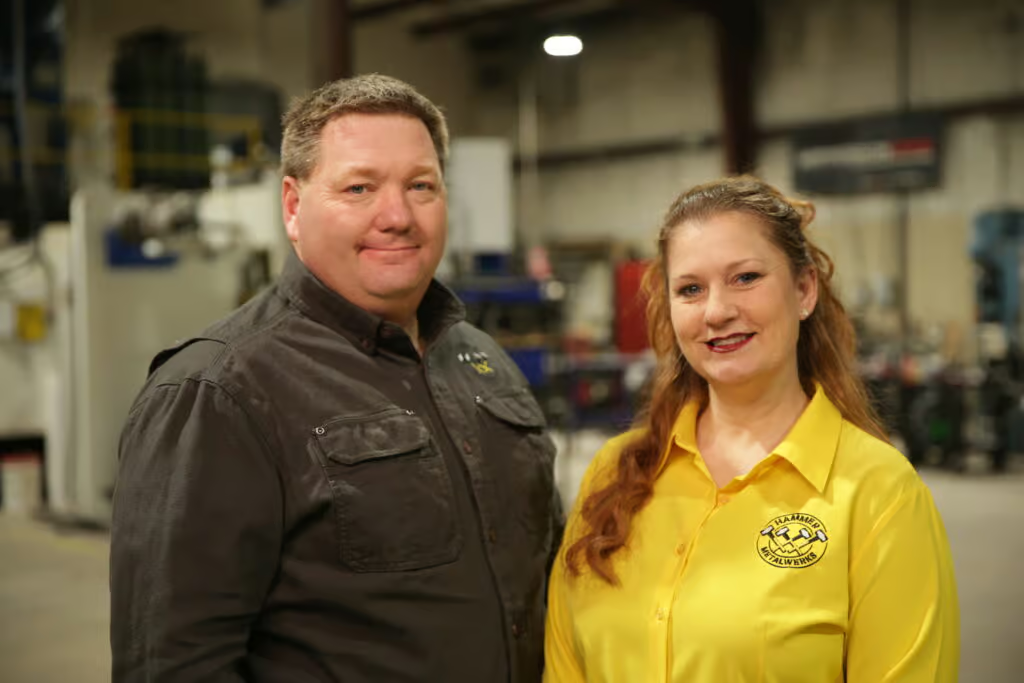
Derek Hammer, President of Hammer MetalWerks, and Erin Hammer, Vice President and Director of Human Resources have found that with the right technology, you can train and upskill an employee with a good attitude, which benefits them and the business.
“Our laser operator and brake press operator had both never used those machines in their life before working here. But they were intelligent, familiar with computer systems, and had a positive attitude to learning, so we hired them based on that,” said Derek.
Hammer MetalWerks provides small-to-medium production runs and parts for a huge range of industries, from construction, to healthcare, entertainment, attractions, military, and government.
“Rather than looking for highly skilled – and more expensive – operators, which are in short supply, we looked for technology that could make the operator’s job easier, and help them get up to speed faster,” says Derek.
Hammer chooses Tempus Tools
One technology the Hammers chose to help their new staff, and the overall efficiency of the job shop, was Tempus Tools. Tempus Tools is multi-functional laser cutting quoting software that is calculation-based and runs on a Software as a Service (SaaS) model. It can be set up with information on material price, cutting time, labour, and other relevant information, to generate quotes quickly and accurately.
“Tempus Tools has been highly valuable for us. It provides work orders to the shop floor with lots of details that the operators don’t have to find or calculate themselves. One example for us is that sheet sizes are all metric, and we use imperial gauges in the US – which can often lead to errors if not converted correctly,” explains Derek, whose business operates a 3kW fiber laser machine.
“Moreover, 11 gauge aluminium is not the same thickness as 11 gauge steel, and our laser machines are all metric, so having all the right measurements through Tempus Tools reduces the risk of any errors.”
“Additionally, Tempus Tools is very user-friendly, so staff that are used to working with computers in a broad range of contexts can pick up the program quickly and begin working with it.”
Tempus Tools CEO, Bart Jesman, says it’s rewarding to see the software benefitting forward-thinking job shops like Hammer MetalWerks. “We’ve designed Tempus Tools to provide benefits to job shops of all shapes and sizes. What Derek has done is take this a step further and used it to improve his hiring process, by making the operator’s job easier – it’s an intelligent approach.”
Secondary processes
In addition to metal fabrication and laser cutting, Hammer MetalWerks has a unique advantage over most job shops, with the broad range of additional services and secondary processes it provides, including design, bending, welding, powder coating, packaging, tapping, rivets, hardware, and more, all from the one place.
“With so many secondary processes, it’s so helpful that we can quote them all using Tempus Tools, and they can all be included in the work order that goes out to the shop floor,” says Derek.
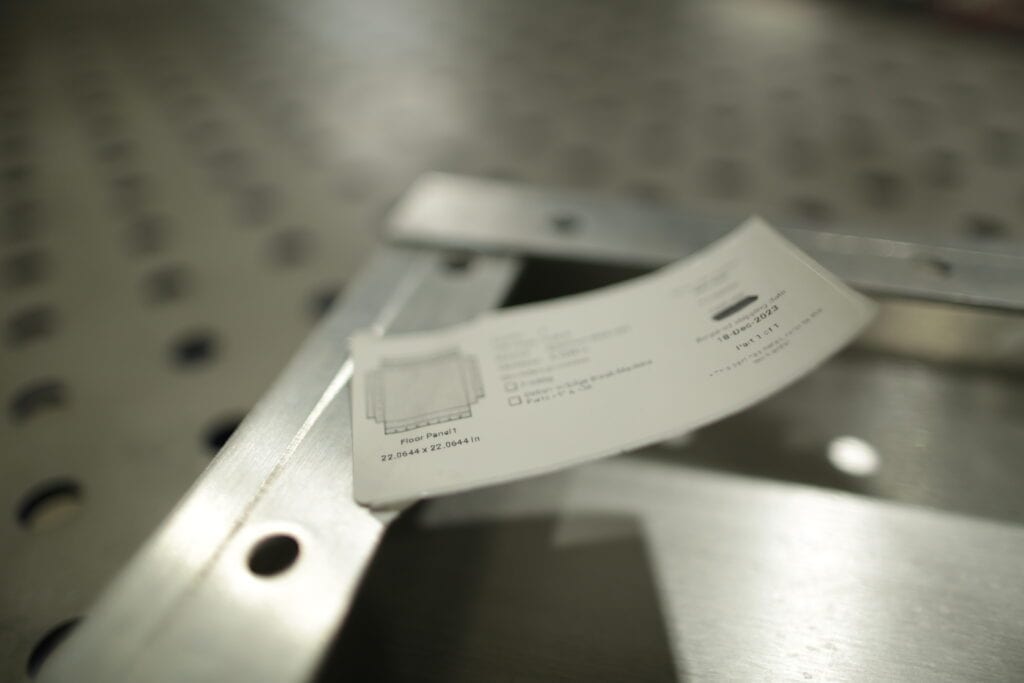
“Additionally, the work order can be sent to our label printer, including a thumbnail of each item, to provide a visual cue to our shop floor staff, to further enhance the accuracy and efficiency of their work. It really helps avoid mix-ups on the shop floor.”
Updates and support
Derek adds that the support from the Tempus Tools team has been outstanding, collaborative, and helpful.
“The Tempus Tools team is always open to feedback, and they use this to help develop new features that make Tempus Tools better for job shops like ours. But they’ll also help with general questions we have – and they have experienced staff to draw upon for industry knowledge,” he says.
“With the skilled labor shortages in the US – and common issues around the world – having the right technology is crucial. We now hire employees that fit well with our work culture and have a good attitude – and it’s working out well for our business,” concludes Derek.
To learn more about Tempus Tools, please click here.
Read blog
Success stories
0
min read
From quoting crunches to streamlined processes: Tempus Tools empowers growth of J&T Steel Sales
As J&T Steel Sales expanded into the fast-growing laser cutting market, outdated spreadsheet-based quoting quickly became a bottleneck for delivering fast, reliable service. By adopting Tempus Tools, the team streamlined quoting, order tracking, and invoicing—freeing up time, improving consistency, and supporting the company’s growth as they scale their laser cutting operations.
Expanding Australian metal fabrication specialist, J&T Steel Sales, has found that improved productivity and new equipment is only half the battle to boost customer service and sales – equally important is eliminating the outdated processes used to track and prepare quotes, delivery, and invoices.
J&T Steel Sales began as a small plate processing business in Victoria with a CNC Plasma machine, where staff used spreadsheets to develop quotes for customers, but the company has now made the move into the high demand laser cutting market.
Part of the motivation for the expansion was a need in the market for better lead times on laser cut metal products, including aluminium, stainless steel, and carbon steel.
“We had customers come and beg us to purchase a laser machine, because they were fed up with the long lead times that were becoming increasingly common for laser cut products,” explains Luke Patterson, Operations Manager, J&T Steel Sales.
“So we invested in a laser cutting machine, and prepared to grow our business to the next level. But with this change, we needed a quick and efficient software solution to export a presentable quote that we can forward directly to customers in a timely fashion. Spreadsheets just weren’t going to work anymore, so we did some research and found Tempus Tools,” he said.
Laser cutting quoting software streamlines operationsTempus Tools, is a multi-functional laser cutting quoting software that is provided using a SaaS (Software as a Service) model. Tempus Tools was developed specifically for the laser cutting industry, and is designed to save job shops time, and make quoting more efficient, accurate, and consistent.
“Tempus Tools has allowed us to streamline not only the quoting aspect, but also the tracking of active orders as well as invoicing,” says Luke.
“It has been able to take most of the heavy lifting in cutting back on excess paper waste in our offices, whilst also creating a digital paper trail to be able to track material usage and stock.”
Since purchasing the laser cutting machine, J&T Steel Sales has committed to getting customers their parts when they need them, calling it “the J&T Guarantee”.
“Tempus Tools has helped us immensely in delivering this guarantee to our customers. It has taken the stresses and late night quoting crunches and completely streamlined the process, freeing up more time for us to be able to focus on growing the business,” says Luke.
“In the past, expanding our customer base meant we would fall increasingly behind when it came to invoicing and quoting. Now, with Tempus Tools, we really feel we have found a software that not only services us now, but also allows us room to grow in the future.”
Service is key
Luke explains that in his business, customer service is the key to success. Customers have good memories, and they value pricing consistency, accuracy, and reliability.
“Being a service-focused business, it’s something I look for in our suppliers too. In my opinion, the Tempus Tools team has been exceptional when it comes to responsiveness and availability to work through any challenges I’m experiencing,” he says.
“Coming from a small business ourselves it was an incredibly refreshing experience to have team members visit our workshop, and to also feel listened to when it came to our concerns or feedback for the future development of Tempus Tools.”
“I met Mark Washington (Sales & Support) and Felipe Lechuga (Director) from Tempus Tools at a local manufacturing expo earlier this year, and they took the time to visit our job shop and discuss the functionality of Tempus Tools, and what more it could be doing for us. I was very impressed, and I’m grateful for all the support.”
A bright future
J&T Steel Sales has seen steady growth since moving into the laser cutting business, and Luke has plans to continue this trend.
“Our future plans are not only to focus on bringing in new customers – ideally ones that require repeat work – but also to let all our customers know about our bending and fabrication facility, so they know we can provide an end-to-end manufacturing solution,” he says.
“Tempus Tools has a huge range of useful features, and the development team is always working on new functionality that can benefit job shops like ours, so it is a key component of our growth plans.”
To learn more about Tempus Tools, please click here.
Read blog

Success stories
0
min read
MSG Industries provides laser cutting quotes eight times faster with game-changing software
After struggling with an in-house quoting system that was costly and inefficient, MSG Industries adopted Tempus Tools and immediately cut quoting time while improving accuracy and pricing consistency. The team now relies on Tempus Tools powerful features—like PDF part extraction and upcoming pipe-cutting support—to streamline operations and better serve their growing customer base.
A Canadian metalworking, fabrication, welding, and laser cutting enterprise, MSG Industries, has implemented a “game-changing software” to deliver faster and more accurate laser cutting quotes to its customers.
MSG Industries Vice-President, Olivier Samson, had been working with his team on developing their own quoting tool software, but it was not a cost-effective solution to the accuracy and time pressures the growing business was facing.
“We probably spent about $15,000 (Canadian dollars) and a large investment of hours developing a home-made system, but it just wasn’t performing to the level we needed to deliver better service to our customers,” said Samson.
“We did some research and discovered Tempus Tools, and it’s a game-changing software for us. Right now, I can’t imagine how we could get through the week without it,” he added.
MSG Industries, which prides itself on innovation, integrity, and professionalism, has been growing steadily since its inception three years ago, and to cope with additional requests for quotes, the company took on two full-time employees dedicated to quoting.
Tempus Tools, is an all-in-one laser cutting quoting software that is provided using a SaaS (Software as a Service) model.
“Since implementing Tempus Tools, we’ve found it is much more accurate, reliable, and fast. Instead of two people quoting full time, we can now have one person do a better job in a quarter of the time, freeing up staff to work on other tasks that can further grow our business,” says Samson.
“As we take on more customers, and send out more quotes, Tempus Tools also gives us total pricing consistency, which means we build the trust of our customers. No one likes receiving two different prices for the same work, but if two different estimators manually prepare the quote, it can happen,” he says.
“Additionally, the service has been outstanding, which is rare these days. Every time I’ve needed assistance, the Tempus Tools team has been quick to respond and highly professional.”
New updates: pipe cutting
MSG Industries provides services to a broad range of industry, and is constantly looking at ways to innovate and expand its offering.
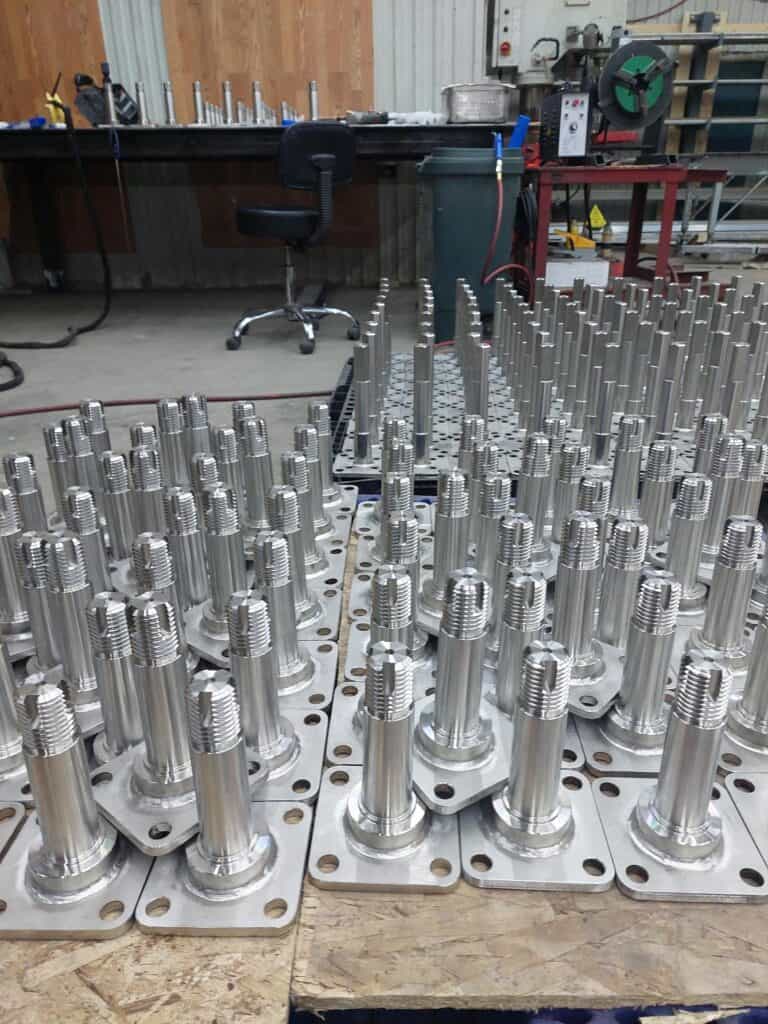
“Our strength has always been our versatility. We have a department dedicated to heavy structural fabrication, such as schools or hospital building pieces, another department for food factory equipment, one for hydropower products, and then we have pipe cutting and laser cutting services,” explains Samson.
“Since we have so many different departments, we need very reliable tools to help us quote, and Tempus Tools has been highly valuable to us.”
“Our major focus right now is working on our pipe cutting laser service, and Tempus Tools is already working on adding this functionality into Tempus Tools so that we can quote for this service too – it’s very exciting.”
Turning customer PDFs into quote-ready CAD files
Tempus Tools Director Felipe Lechuga says that the discovery of Tempus Tools PDF part extractor feature was a further benefit to MSG Industries.
“MSG had just been using Tempus Tools for creating new quotes, but when they discovered they could use the PDF part extractor to turn a customer’s vector PDF into a CAD file straight away with no tracing required – they were delighted with the results,” said Lechuga.
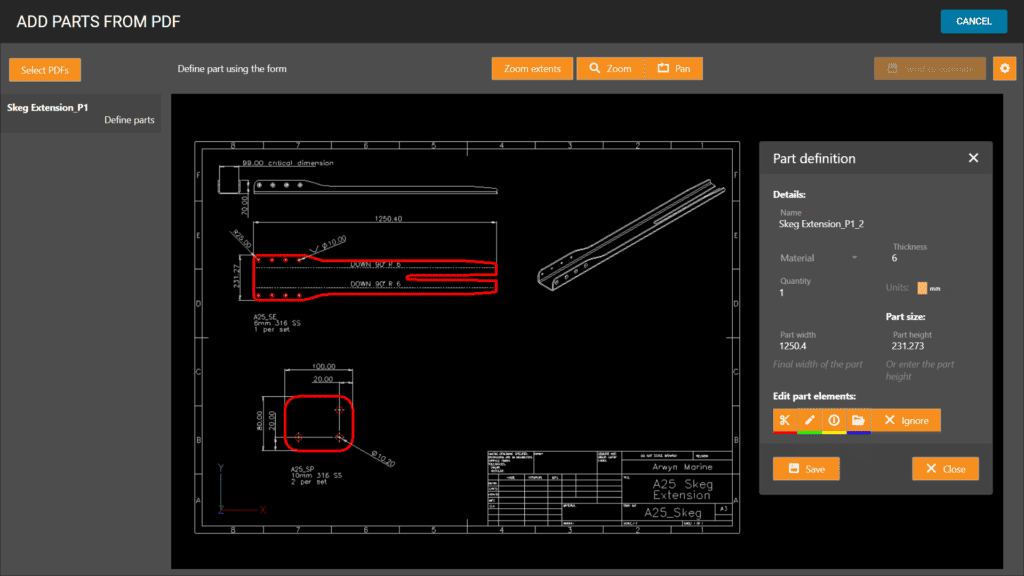
“The PDF part extractor doesn’t need any CAD package or skills to use, meaning anyone can simply click on a part and extract it into a quote. You can scale the part, plus specify details like folding and etching too.”
Olivier Samson says he can’t believe he didn’t try the PDF part extractor right away. “This is even more than we hoped for. Such a useful tool! I wish we’d tried out these features from the beginning.”
“I’ve found that Tempus Tools is reliable and fast, and Tempus Tools is actively working on updates, so we really couldn’t ask for more!” he concluded.
Read blog
Resources
Product updates
Product updates
0
min read
New integration: Tempus Tools + ECI M1 – from quote to order to ERP, seamlessly
At Tempus Tools, we know that speed and accuracy are everything in a laser cutting job shop, and today we’re announcing a new integration that makes both even easier.
We’re now fully integrated with ECI Software’s M1 ERP system.

What does that mean for your job shop?
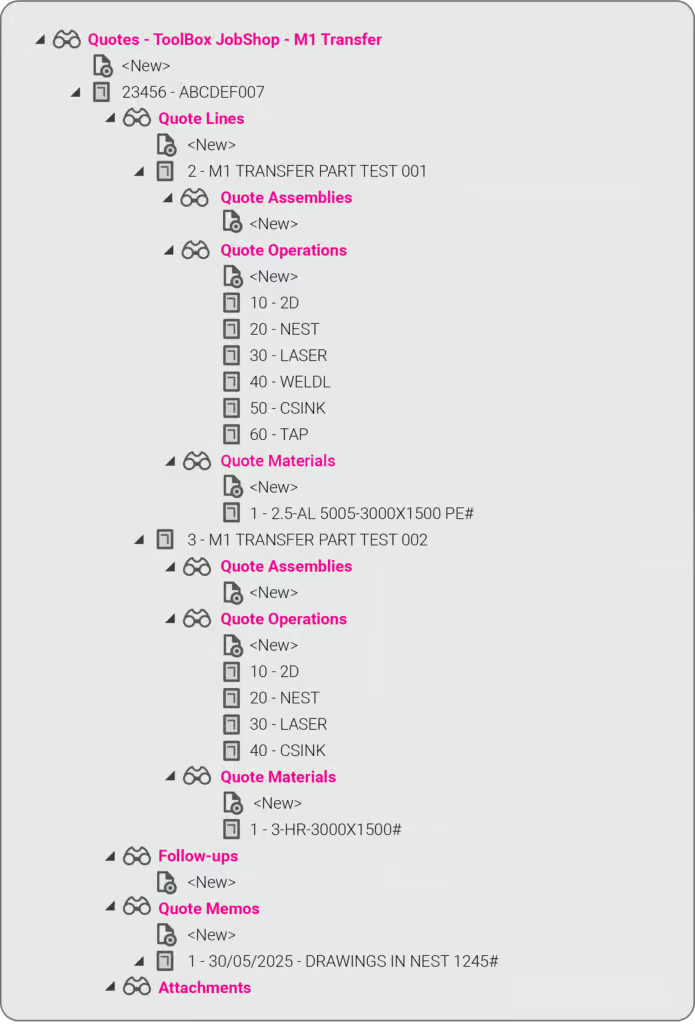
It means you can now send quotes, order details, and production-ready drawings directly from Tempus Tools into your M1 ERP — no more double handling, no more data entry errors, no more jumping between systems.
This integration eliminates any “dead zone” between quoting and production. You get the specialist laser quoting power of Tempus Tools (like lightning-fast nesting, material cost accuracy, and margin control) combined with the operational backbone of M1.
It’s quoting that talks to your shop floor.
We’ve talked about how integrations like Google Drive can supercharge job shop workflows, and this M1 integration is another great example.
Want to learn more or set it up? If you want to avoid the limitations in the generic quoting functions in ERP/MRP software, but still use the rich planning and production features in ERP/MRP software, then get in touch today.
Book a demo or email us at support@tempustools.com and we’ll help you get connected.
Tempus Tools + M1 = quoting to production, finally in sync.
Read blog
Product updates
0
min read
Tempus Tools’ Google Drive integration: 6 ways to supercharge your job shop efficiency
Tempus Tools’ new Google Drive integration automatically saves your quote data and part files to Drive, opening the door to faster, smarter workflows. In this post, we highlight six clever ways job shops are already using it to boost efficiency.
Last month Tempus Tools released a powerful new feature: seamless integration with Google Drive.
Since then, we’ve heard from lots of customers about the innovative ways they have implemented this integration in their job shops, and we wanted to share the best six with you to inspire you to use the feature in your shop.
First, a quick recap: with the Google Drive integration, all your quote data (in CSV format) and production-ready part files can be automatically saved to your chosen Google Drive folder. From here, they can be exported to any number of programs or that data can be manipulated for many use cases, opening up a world of automation, reporting and connectivity for your job shop. We’ve also put together a quick video to show the integration in action.
1. Automate quote data collection for reporting
With every quote automatically saved, you can easily compile and analyse your quote performance over time. Use Google Sheets or your favourite analytics tool to track:
- win/loss rates
- performance across material types
- average order size
- breakdown of secondary processes contributions
This data-driven approach helps you identify trends, optimise pricing and improve customer response times.
2. Connect with ERP/MRP and other business systems
Some apps have native integration with Google Drive, which makes taking in quote data and parts easy, but many need a formal API. Luckily, Google Drive comes with its own API.
Some users have used the Google Drive API to build automations that push quote data directly into ERP, MRP or order management systems. This can streamline order processing, reduce manual data entry and ensure your production schedule is always up to date.
3. Organise your orders by material type
Use the exported quote data to create a parts planner that groups jobs by common material type. This enables you to:
- batch similar jobs for more efficient material usage
- reduce changeover times on machines
- optimise purchasing and inventory management
A simple Google Sheets script or integration with a dashboard tool can make this process nearly automatic.
4. Integrate with project management tools
Connect your quote data with popular tools like ClickUp, Monday.com or Airtable. Build custom dashboards and planners for your factory, visualise job statuses and assign tasks to your team-all based on real-time quoting data. These tools don’t require coding or a developer and anyone can work wonders. These types of projects boost collaboration on the shop floor and keep everyone aligned on priorities.
5. Create a scheduling calendar from time calculations
Use the time estimates in your quote data to automatically populate a production calendar. With a Google Calendar integration, you can:
- visualise machine and operator workloads
- identify bottlenecks before they happen
- easily adjust schedules as new jobs come in
This proactive scheduling helps you deliver on time, every time.
6. Enable automated notifications and workflows
Set up Google Drive triggers (using tools like Zapier or Google Apps Script) to notify your team when new quotes are confirmed as orders, or to kick off downstream processes-like updating CRM records or ordering materials.
Getting started is easy
- Go to Settings > Organisation settings > Integrations in your Tempus Tools Tempus Tools account
- Connect your Google Drive and select your preferred folder
- Choose the quote statuses that will trigger automatic file saving
- Start building automations and workflows that fit your shop’s needs
This integration is designed to be flexible-whether you want to automate reporting, connect with business systems, or simply keep your files organised, Tempus Tools and Google Drive make it possible.
Ready to enhance your job shop efficiency? Try the new Google Drive integration today.
Read blog
Product updates
0
min read
Tempus Tool’s new laser cutting quoting experience
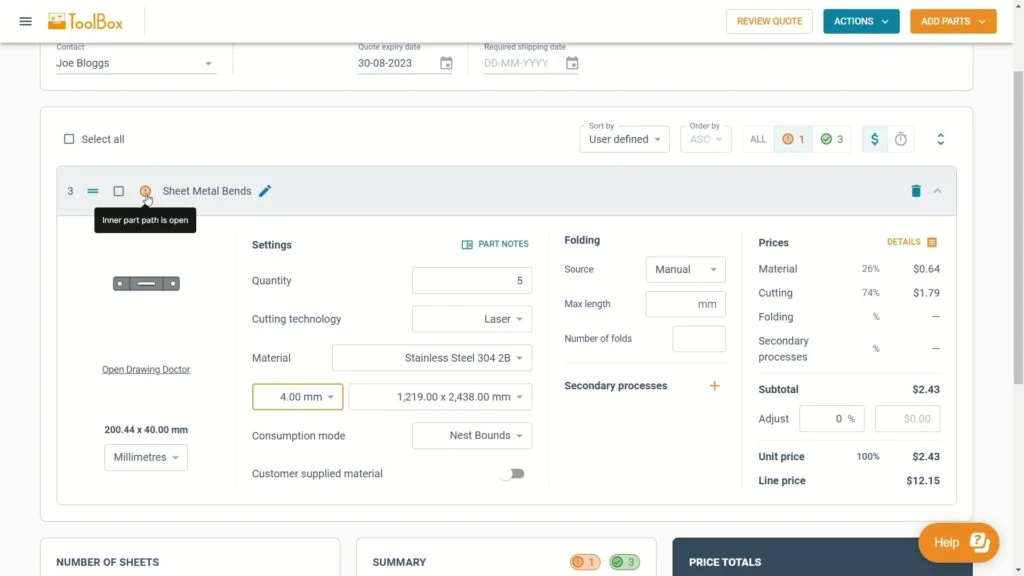
Tempus Tool's new quoting interface delivers faster calculations, cleaner navigation, and powerful new features—all in one unified, intuitive screen. From smarter sorting to automatic updates and richer quote details, the upgraded experience makes quoting simpler, quicker, and more efficient than ever.
After months of rigorous development and innovation, we’re thrilled to unveil the newest evolution of our quoting interface in Tempus Tools. We remain committed to enhancing your laser cutting quoting process. This fresh approach promises enhanced navigation, lightning-fast calculations, and a host of exciting new features.
We have collected your feedback and listened to your concerns and requests over the past couple of years, and our design team has used their magic to put together a quoting interface that takes Tempus Tools to the next level!
Watch our new Tempus Tools Overview video to see all changes in detail:
Read on to learn more about some of the enhancements.
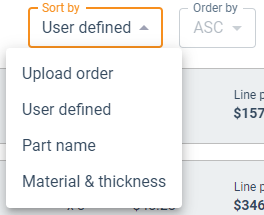
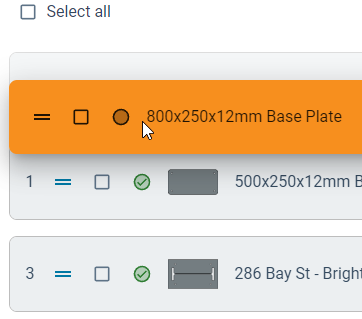
Tailored sorting
You’re in complete control. Choose between the smart auto-sort feature or manually arrange parts using drag-and-drop for a seamless organisation that aligns with your preferences.
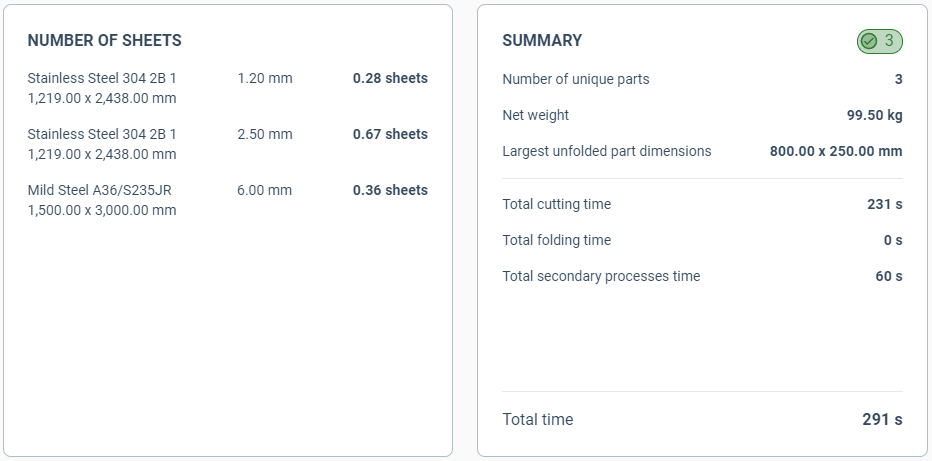
Material requirements and order summary
At a glance, get an indication of how many sheets you need of each material to fulfil the order. Additionally, the order summary details information such as the total order weight, processing time and part count.
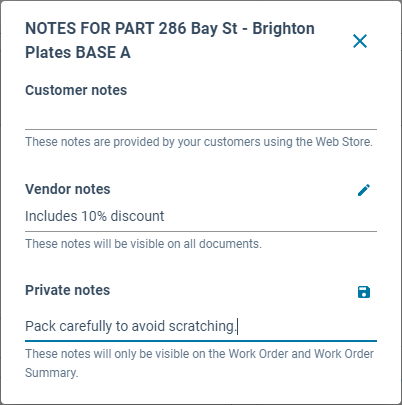
Part notes for everyone
A dedicated section for notes, whether they come from your customers, your team, or personal reminders for a job.
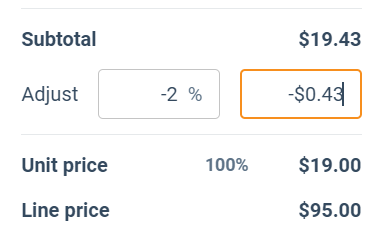
Streamlined price adjustments
With our revamped interface, tweaking the prices of parts becomes an intuitive and quick task.
Extra quote details
From setting an RFQ number to determining invoice due dates, shipping options, and beyond – we’ve got it all.

Unified quoting screen
No more toggling between tabs. Every bit of information you need, all consolidated on a single, intuitive page.
Automatic calculations
Forget the constant back and forth with the Calculate and Edit buttons. Our system now recalculates on-the-fly, keeping up with your pace.
Sleeker interface
With a cleaner, fresher look, onboard new team members with ease and navigate your daily tasks faster.
Customer emailing enhancements
An integrated system to keep your customers in the loop for every quote status.
In short, quoting in Tempus Tools is now even simpler and smarter. We’ve made sure it’s user-friendly while still being packed with all the features you need. Dive in and check out all the new improvements!
Accessing the new quoting experience
If you’re new to Tempus Tools, you will get the new experience by default. Just create a Tempus Tools account to get started.
For existing users, you have a temporary period to switch back and forth between the old and new experiences using the toggle at the top of the quote page.
We believe the new quoting experience will significantly enhance your quoting efficiency, and we can’t wait for your feedback.
Read blog
Ready to take a closer look at Tempus Tools?
Find out if Tempus Tools is a good fit for your shop in just 30 minutes.
Upload your own parts for a live demo
Get answers to pricing and setup questions
No-pressure call focused on your workflow