Resources
Industry insights, product updates & customer wins
Stay up to date with industry insights, customer stories, and product improvements—everything to help you quote faster and run smoother.
Success stories
0
min read
From quoting crunches to streamlined processes: Tempus Tools empowers growth of J&T Steel Sales
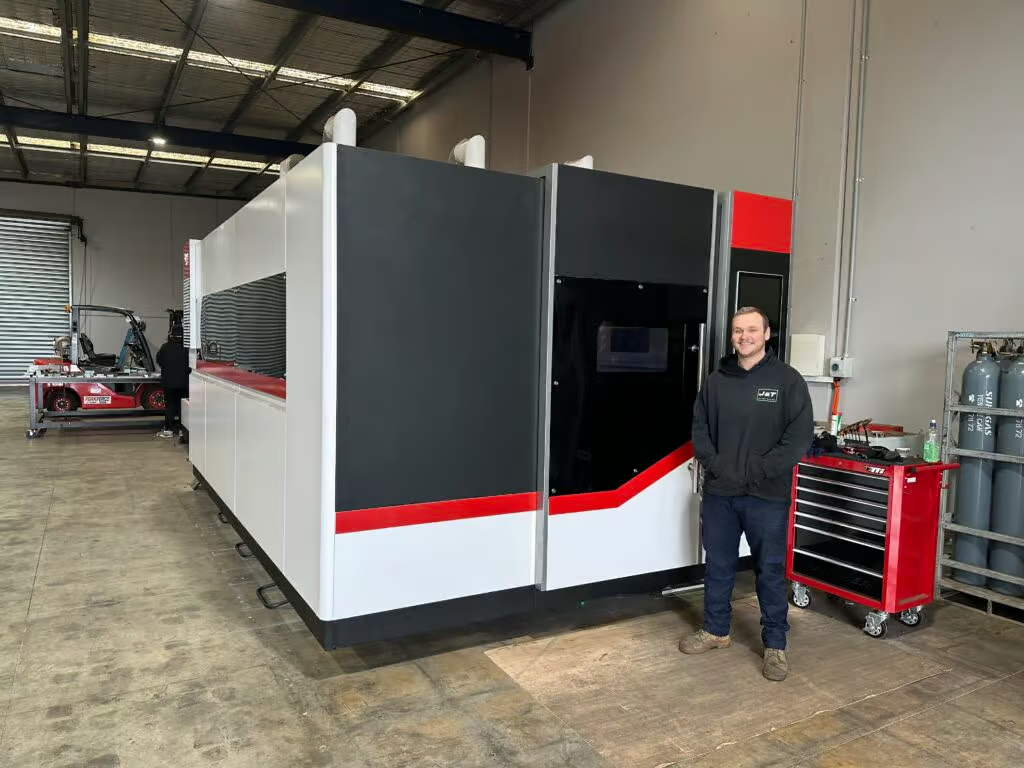
As J&T Steel Sales expanded into the fast-growing laser cutting market, outdated spreadsheet-based quoting quickly became a bottleneck for delivering fast, reliable service. By adopting Tempus Tools, the team streamlined quoting, order tracking, and invoicing—freeing up time, improving consistency, and supporting the company’s growth as they scale their laser cutting operations.
Expanding Australian metal fabrication specialist, J&T Steel Sales, has found that improved productivity and new equipment is only half the battle to boost customer service and sales – equally important is eliminating the outdated processes used to track and prepare quotes, delivery, and invoices.
J&T Steel Sales began as a small plate processing business in Victoria with a CNC Plasma machine, where staff used spreadsheets to develop quotes for customers, but the company has now made the move into the high demand laser cutting market.
Part of the motivation for the expansion was a need in the market for better lead times on laser cut metal products, including aluminium, stainless steel, and carbon steel.
“We had customers come and beg us to purchase a laser machine, because they were fed up with the long lead times that were becoming increasingly common for laser cut products,” explains Luke Patterson, Operations Manager, J&T Steel Sales.
“So we invested in a laser cutting machine, and prepared to grow our business to the next level. But with this change, we needed a quick and efficient software solution to export a presentable quote that we can forward directly to customers in a timely fashion. Spreadsheets just weren’t going to work anymore, so we did some research and found Tempus Tools,” he said.
Laser cutting quoting software streamlines operationsTempus Tools, is a multi-functional laser cutting quoting software that is provided using a SaaS (Software as a Service) model. Tempus Tools was developed specifically for the laser cutting industry, and is designed to save job shops time, and make quoting more efficient, accurate, and consistent.
“Tempus Tools has allowed us to streamline not only the quoting aspect, but also the tracking of active orders as well as invoicing,” says Luke.
“It has been able to take most of the heavy lifting in cutting back on excess paper waste in our offices, whilst also creating a digital paper trail to be able to track material usage and stock.”
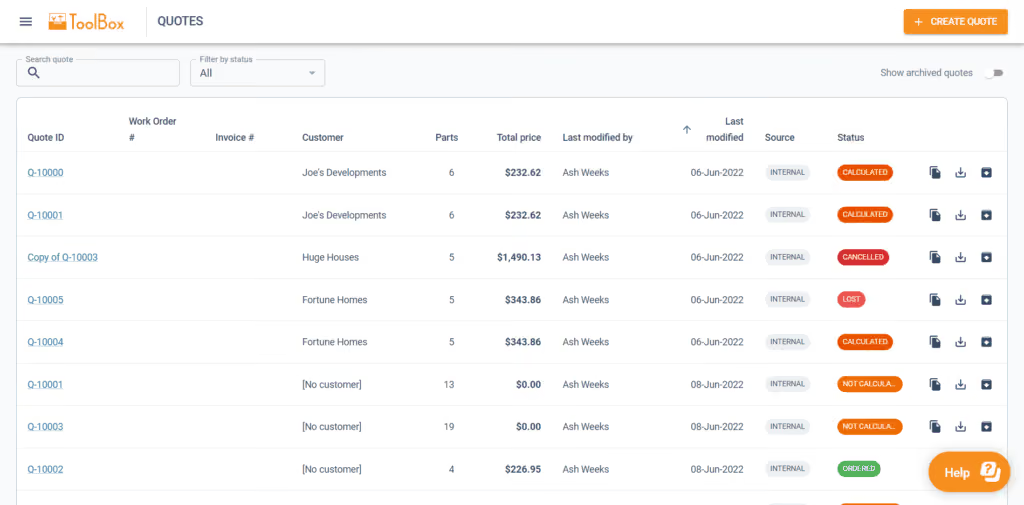
Since purchasing the laser cutting machine, J&T Steel Sales has committed to getting customers their parts when they need them, calling it “the J&T Guarantee”.
“Tempus Tools has helped us immensely in delivering this guarantee to our customers. It has taken the stresses and late night quoting crunches and completely streamlined the process, freeing up more time for us to be able to focus on growing the business,” says Luke.
“In the past, expanding our customer base meant we would fall increasingly behind when it came to invoicing and quoting. Now, with Tempus Tools, we really feel we have found a software that not only services us now, but also allows us room to grow in the future.”
Service is key
Luke explains that in his business, customer service is the key to success. Customers have good memories, and they value pricing consistency, accuracy, and reliability.
“Being a service-focused business, it’s something I look for in our suppliers too. In my opinion, the Tempus Tools team has been exceptional when it comes to responsiveness and availability to work through any challenges I’m experiencing,” he says.
“Coming from a small business ourselves it was an incredibly refreshing experience to have team members visit our workshop, and to also feel listened to when it came to our concerns or feedback for the future development of Tempus Tools.”
“I met Mark Washington (Sales & Support) and Felipe Lechuga (Director) from Tempus Tools at a local manufacturing expo earlier this year, and they took the time to visit our job shop and discuss the functionality of Tempus Tools, and what more it could be doing for us. I was very impressed, and I’m grateful for all the support.”
A bright future
J&T Steel Sales has seen steady growth since moving into the laser cutting business, and Luke has plans to continue this trend.
“Our future plans are not only to focus on bringing in new customers – ideally ones that require repeat work – but also to let all our customers know about our bending and fabrication facility, so they know we can provide an end-to-end manufacturing solution,” he says.
“Tempus Tools has a huge range of useful features, and the development team is always working on new functionality that can benefit job shops like ours, so it is a key component of our growth plans.”
To learn more about Tempus Tools, please click here.
Read blog
Product updates
0
min read
Tempus Tools’ Google Drive integration: 6 ways to supercharge your job shop efficiency
Last month Tempus Tools released a powerful new feature: seamless integration with Google Drive.
Since then, we’ve heard from lots of customers about the innovative ways they have implemented this integration in their job shops, and we wanted to share the best six with you to inspire you to use the feature in your shop.
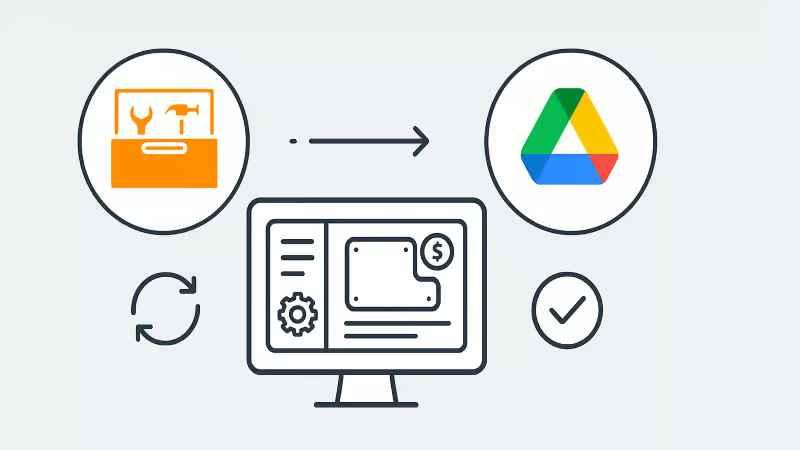
First, a quick recap: with the Google Drive integration, all your quote data (in CSV format) and production-ready part files can be automatically saved to your chosen Google Drive folder. From here, they can be exported to any number of programs or that data can be manipulated for many use cases, opening up a world of automation, reporting and connectivity for your job shop. We’ve also put together a quick video to show the integration in action.
1. Automate quote data collection for reporting
With every quote automatically saved, you can easily compile and analyse your quote performance over time. Use Google Sheets or your favourite analytics tool to track:
- win/loss rates
- performance across material types
- average order size
- breakdown of secondary processes contributions
This data-driven approach helps you identify trends, optimise pricing and improve customer response times.
2. Connect with ERP/MRP and other business systems
Some apps have native integration with Google Drive, which makes taking in quote data and parts easy, but many need a formal API. Luckily, Google Drive comes with its own API.
Some users have used the Google Drive API to build automations that push quote data directly into ERP, MRP or order management systems. This can streamline order processing, reduce manual data entry and ensure your production schedule is always up to date.
3. Organise your orders by material type
Use the exported quote data to create a parts planner that groups jobs by common material type. This enables you to:
- batch similar jobs for more efficient material usage
- reduce changeover times on machines
- optimise purchasing and inventory management
A simple Google Sheets script or integration with a dashboard tool can make this process nearly automatic.
4. Integrate with project management tools
Connect your quote data with popular tools like ClickUp, Monday.com or Airtable. Build custom dashboards and planners for your factory, visualise job statuses and assign tasks to your team-all based on real-time quoting data. These tools don’t require coding or a developer and anyone can work wonders. These types of projects boost collaboration on the shop floor and keep everyone aligned on priorities.
5. Create a scheduling calendar from time calculations
Use the time estimates in your quote data to automatically populate a production calendar. With a Google Calendar integration, you can:
- visualise machine and operator workloads
- identify bottlenecks before they happen
- easily adjust schedules as new jobs come in
This proactive scheduling helps you deliver on time, every time.
6. Enable automated notifications and workflows
Set up Google Drive triggers (using tools like Zapier or Google Apps Script) to notify your team when new quotes are confirmed as orders, or to kick off downstream processes-like updating CRM records or ordering materials.
Getting started is easy
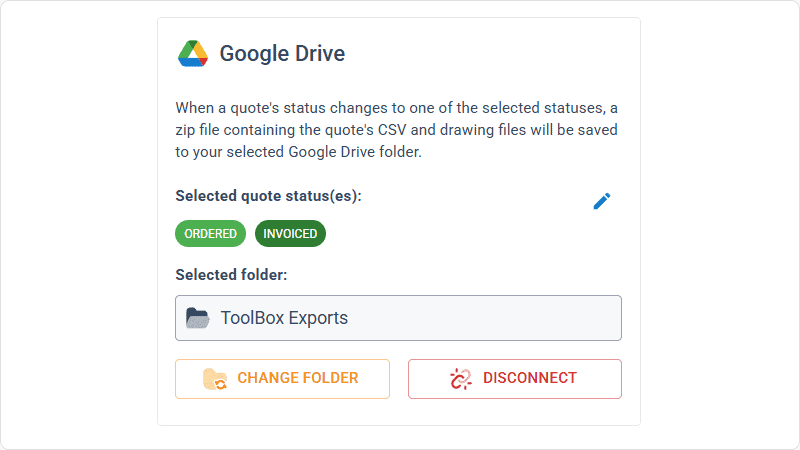
- Go to Settings > Organisation settings > Integrations in your Tempus Tools Tempus Tools account
- Connect your Google Drive and select your preferred folder
- Choose the quote statuses that will trigger automatic file saving
- Start building automations and workflows that fit your shop’s needs
This integration is designed to be flexible-whether you want to automate reporting, connect with business systems, or simply keep your files organised, Tempus Tools and Google Drive make it possible.
Ready to enhance your job shop efficiency? Try the new Google Drive integration today.
Read blog

Articles
0
min read
Is expensive, non-dedicated software holding you back from effortless laser cutting quoting?
Laser cutting is a precise task, requiring machinery tailored to specific requirements. Profitability is significantly boosted by the ability to be able to respond quickly to customer requests for quotes (RFQs), and efficiently deliver the product.
“With the time and energy often spent on selecting the right laser cutting machine, it’s amazing how often software is overlooked as a driver of productivity,” says Tempus Tools Head of Global Sales, Mark Washington.

“Sometimes laser cutting companies are stuck using software that wasn’t specifically designed for job shops, but it’s all that their team is used to using. Other times, expensive software is implemented, but only a small fraction of the features are actually used,” he says.
“And in many cases, it becomes so complex that a specialist is hired to manage quoting via the software – but what happens if they leave the company?”
Tempus Tools is the creator of dedicated quoting software, Tempus Tools, which can provide fast, accurate, and consistent laser cutting quotes that are professionally presented, ready to send back to the customer.
“Using software that isn’t specifically designed for laser cutting is like using a cricket bat to play tennis. It might get the job done, but it would be far more efficient and accurate with the tools designed for the job!” says Mark (pictured, right).
“In addition to providing quotes in minutes, Tempus Tools can also produce production documents with the click of a button, to add further efficiency to running a job shop floor,” he adds.
A shift in the industry
With customers demanding faster service, the industry is shifting to tailored laser cutting quoting solutions, to enhance their RFQ response times, and Mark sees this as part of a larger global trend.
“It’s evident across a number of industries – smarter players want to utilise technologies specifically targeted to their industry to out-pace competitors. And laser cutting job shops are enthusiastically getting on board with this trend,” he says.
“Tempus Tools has been specifically designed for laser cutting job shops. It’s quick to set up, intuitive, and user-friendly, so the entire team can use it with minimal training, instead of relying on one specialist.”
Tempus Tools cloud-based laser cutting quoting software can be set up with information on material price, cutting time, labour, and other relevant information, to generate quotes quickly and accurately, with repeatability.
“The Tempus Tools team has decades of experience in the laser cutting industry, from the shop floor, through to management, and running their own laser cutting enterprises, so we know the industry inside out – and we can support through setup and every step of the journey, for no additional charges,” adds Mark.
“A major inhibitor of laser cutting quoting software has often been cost, with powerful software that can do it all costing thousands per month. But if you only need dedicated laser cutting quoting software, our plans start from US$100 per month, and are packed full of features you will actually use,” he says.
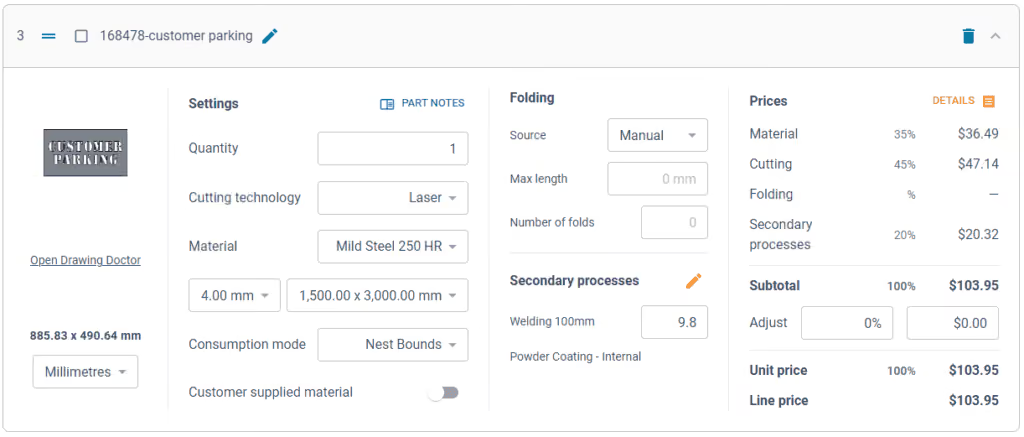
Switching software – overcoming challenges
Even with the knowledge of the benefits of dedicated laser cutting quoting software, job shops can be hesitant about the time involved in switching, says Mark. He notes some of the main concerns:
- Time – often job shops have tried other software implementations and it’s taken months, and they just cannot afford to spend that time again. But Tempus Tools isn’t like other software. For a job shop with one laser, press brake, and standard secondary processes, set up takes less than 90 minutes.
- Staff training – job shops often believe their staff don’t have the time or capacity to learn a whole new software. But again, Tempus Tools is different. It’s designed to be user-friendly, easy to learn, and staff end up doing their jobs more efficiently, and enjoying the features right away.
- Hidden costs – this is a big factor for any software, and job shops are highly alert to cheap upfront costs, followed by lots of add-ons. No one likes to be “nickel and dimed”. For Tempus Tools, it’s a monthly or yearly subscription, and that’s all. No extra charges for support, upgrades, or training. Features all have a set pricing that’s clear from the outset.
- Too many programs – some job shops have two, three, or more different software programs – why add more, especially if they don’t talk to each other? That’s a totally valid concern. Tempus Tools outputs a CSV as standard with all the quote data, making integration seamless and easy.
“The Tempus Tools leadership team has decades of experience working from the shop floor to the top floor, so they understand the pain of changing software, and have designed Tempus Tools to be effortless and simple,” says Mark.
Tempus Tools features
Tempus Tools features that have been specifically designed for laser cutting job shops include:
- 3D model extractor. Identify, extract and unfold sheet-metal parts directly from 3D assemblies without a 3D software package.
- PDF to CAD convertor. Convert a vector PDF into a CAD file instantly. No tracing, no CAD package, just click on a part and extract it into your quote.
- Tube quoting. Easily drag and drop rectangular, square or round hollow sections into the tube module. It quickly calculates highly accurate cutting time and material consumption for pricing.
- Web Store. Let your customers get instant pricing and place orders from your website 24/7 with an online quoting portal.
- Secondary processes. Get accurate and consistent folding prices quickly using the built-in folding algorithm developed by specialists with decades of experience using brake presses.
- Drawing Doctor®. Upon upload of a 2D DXF or DWG file, Drawing Doctor® automatically corrects for double lines, dimensions, and small end points that are hidden in some drawings.
- Part Library. Part Library allows you to save parts that you’ve produced for a customer for re-use. Saves time on repeat orders and quotes, by dropping an existing part straight into the quote, ready to calculate, based on the latest pricing.
“These are just a few of our most popular features, but there are lots more within Tempus Tools, and our development team is constantly listening for customer feedback to determine what new features can be added,” says Mark.
“So for effortless laser cutting quoting, don’t let software hold you back, let it be the catalyst that drives business growth. We offer an obligation-free trial of Tempus Tools so that laser cutting job shops can see the difference for themselves.”
Read blog
Guides
0
min read
How to set laser cutting prices that are both competitive and profitable
Metal fabrication and laser cutting job shop owners have all asked themselves at one point, “how should I set my prices?”.
It’s a delicate balance. Set your prices too high and customers may walk away to the competition, but set your prices too low, and you may be working too hard for little or no profitable return.
Setting a baseline
“The first thing to do is understand all of the costs that are associated with running your laser machine. Once you have a complete overview, best practice is to apply a full absorption costing method to your business,” advises Bruce Thomas, Product Executive at Tempus Tools. Bruce has decades of experience in the laser cutting industry. His experience is complemented by the Tempus Tools team, which are highly knowledgeable in the laser cutting industry, with practical, hands-on experience on the shop floor, through to management.
“Full absorption costing means that you’re absorbing overhead costs into the hourly rate. In laser cutting job shops, this could be direct costs, like labour, as well as indirect costs like rent, insurance, power, and maintenance. But each case is different, so we can provide guidance on how to perform this type of calculation,” he says.
Bruce explains that once you have calculated all the costs within a job shop and created an annual figure, you can set an accurate yearly revenue target, which can be broken down into monthly and daily objectives. This breakdown is an effective way to focus on revenue goals for the job shop.
“This data should give you an idea of what prices need to be set in order to be profitable, but you won’t know if they are exactly right until you get market feedback, so be prepared to adjust these initial prices,” says Bruce.
A word on assumptions
Full absorption costing is a great starting point, but Bruce points out that this calculation does require some assumptions, such as the number of hours the shop will be operational for, and the percentage of those hours the machine will be cutting (known as the utilisation rate).
“Varying the utilisation rate can have a big impact on how costs are distributed. If your machine isn’t running for as many hours per day as you predicted (actual cutting time), then you find yourself in a situation where you’ve priced your cutting service too low,” he says.
“In other situations, you might increase the number of shifts per day, or add shifts on weekends, which can increase efficiency without changing fixed overheads, resulting in a more competitive hourly rate.
Getting ahead and staying competitive
“Of course, once you’ve come up with a price, it’s crucial to see if it’s competitive with the market, and one of the best ways to do this is to use software to monitor your win/loss ratio,” he says.
“A typical win/loss ratio is about 30-40%. This means, for every 100 jobs you quote for, you win 30-40 of them. Lower than 30 means the pricing is too expensive and you’re losing work to competitors, and above 40 means the pricing is too cheap, meaning you are doing a lot of work for a lower profit margin.”
“It’s important to monitor pricing over time, and see how it changes in reaction to trends, too. For example, material price fluctuations or changes in demand from different industries will have an impact on pricing.”
“Similarly, technology changes will have an impact. Cheaper and more powerful machines, and more automation will allow more advanced laser cutting tasks to be done with lower costs.”
“It’s important to know your customer, but it’s equally important to know your competitor and what they are offering, and for how much.”
Hourly rates only go so far
Much of the metal fabrication and laser cutting industry uses hourly rates to calculate a price, which is then quoted to customers, but this only works up to a point, says Bruce.
“To remain competitive, you need to keep monitoring prices. Each quote – regardless of who prepares it – needs to be consistent and accurate. One of the best ways to do this is to use laser cutting quoting software, so that any changes are implemented within the software, rather than on a per-quote basis,” he explains.
There are a range of factors that can affect a quote, and it can often mean one job shop will quote at a different rate to another. Bruce explains that this can be for reasons such as:
- The speed and size of the machine. A 6kW laser cutting machine can vary from approximately $180,000 to $1,200,000, which is a huge difference. Each machine will perform at different speeds, and allow different levels of sophistication.
- Whether the machine is paid off or not. If it’s still not paid off, this might have to be factored into the hourly rates.
- Cutting thickness, with thicker cuts demanding higher costs.
- Cut quality – all machines will be able to produce an acceptable quality, but some customers may demand an additional level of precision and finish, and if this takes additional time, it will need to be considered in the costs.
“With all that being said, your customer is buying on a per-part basis. They are comparing your part priced at $10 with the competitor’s part priced at $8. So, you need to adjust for this difference using software and data, rather than relying solely on a ‘gut feeling’. Knowing your bottom line gives you the confidence to accept or reject the work,” he says.
Added value wins more jobs
Once you’ve figured out a price, to really stand out from the competition, it’s all about the added value you can deliver, says Bruce.
“Consider your delivery times, customer service, expectations management, and understanding a customer’s unique needs. Do they need all their parts individually packed and labelled, for example? If you can meet their needs, you’re more likely to win the job,” he says.
“Adding value is always better than discounting price. In a race to the bottom on price, nobody wins.”
Tempus Tools helps win more jobs
To help deliver added value, monitor win/loss ratios, and provide faster, more accurate, and more consistent quotes, Tempus Tools created Tempus Tools. Tempus Tools is multi-functional laser cutting quoting software that is calculation-based and runs on a Software as a Service (SaaS) model. It can be set up with information on material price, cutting time, labour, and other relevant information, to generate quotes quickly and accurately.
“Tempus Tools can give job shop owners more accurate estimates of time, which leads to greater consistency,” says Bruce.
“Additionally, Tempus Tools can generate printable part labels, and produce work orders with times listed on each task. Tempus Tools provides consistent and accurate data on folding, cutting, and secondary processes, so that quotes to customers are exactly right.”
“We’ve helped a huge variety of different job shops with full absorption costing, win/loss ratios, setting up pricing, and then generating fast and accurate quotes – so if you’re looking to optimise your job shop’s operations, we’re here to help,” he concludes.
Read blog
Product updates
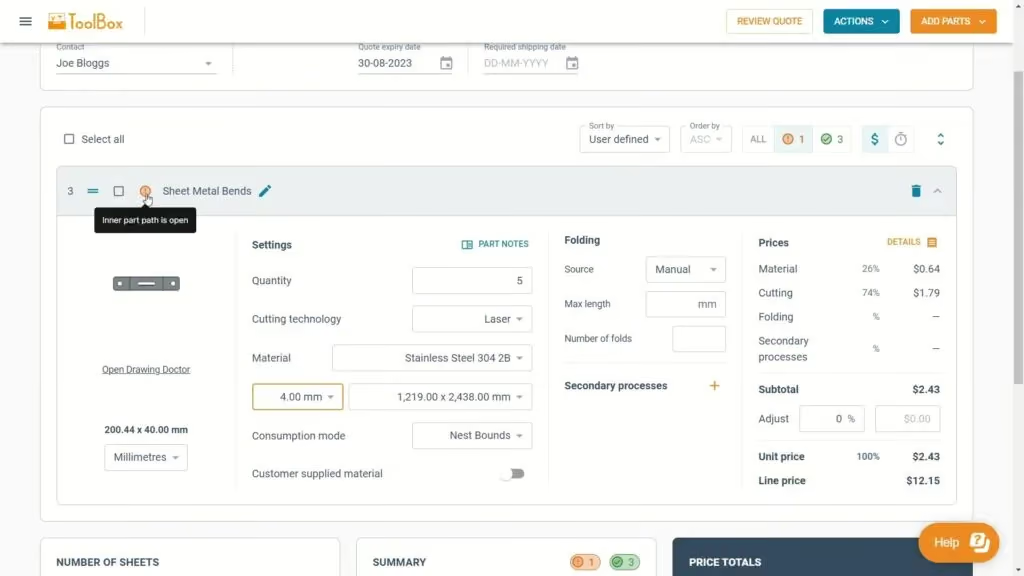
Tempus Tool’s new laser cutting quoting experience
Tempus Tool's new quoting interface delivers faster calculations, cleaner navigation, and powerful new features—all in one unified, intuitive screen. From smarter sorting to automatic updates and richer quote details, the upgraded experience makes quoting simpler, quicker, and more efficient than ever.
After months of rigorous development and innovation, we’re thrilled to unveil the newest evolution of our quoting interface in Tempus Tools. We remain committed to enhancing your laser cutting quoting process. This fresh approach promises enhanced navigation, lightning-fast calculations, and a host of exciting new features.
We have collected your feedback and listened to your concerns and requests over the past couple of years, and our design team has used their magic to put together a quoting interface that takes Tempus Tools to the next level!
Watch our new Tempus Tools Overview video to see all changes in detail:
Read on to learn more about some of the enhancements.
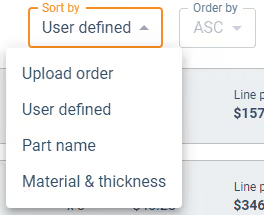
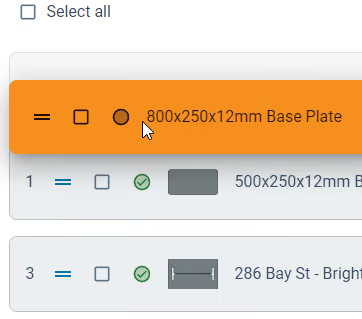
Tailored sorting
You’re in complete control. Choose between the smart auto-sort feature or manually arrange parts using drag-and-drop for a seamless organisation that aligns with your preferences.
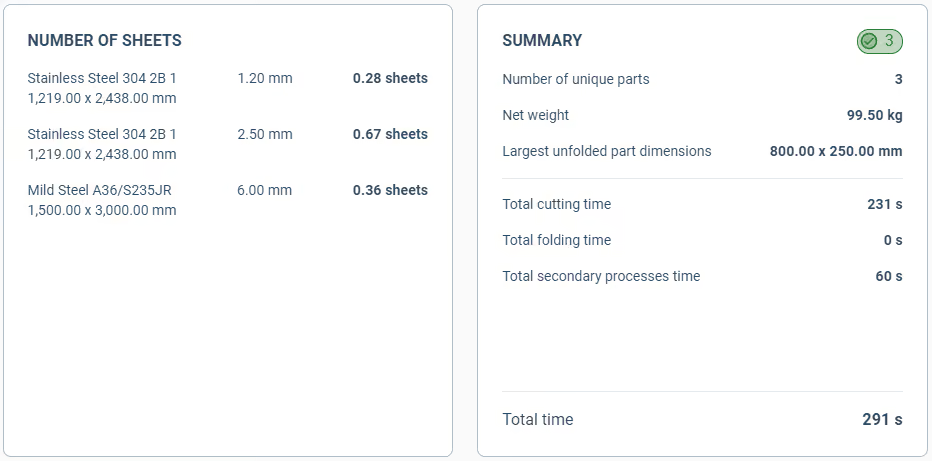
Material requirements and order summary
At a glance, get an indication of how many sheets you need of each material to fulfil the order. Additionally, the order summary details information such as the total order weight, processing time and part count.
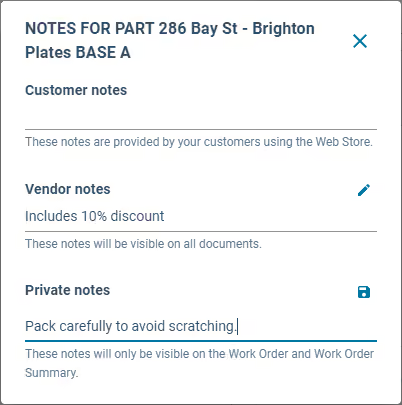
Part notes for everyone
A dedicated section for notes, whether they come from your customers, your team, or personal reminders for a job.
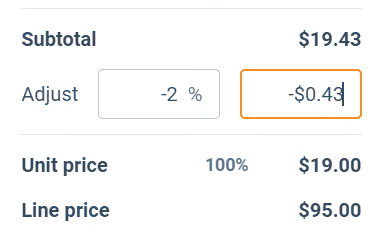
Streamlined price adjustments
With our revamped interface, tweaking the prices of parts becomes an intuitive and quick task.
Extra quote details
From setting an RFQ number to determining invoice due dates, shipping options, and beyond – we’ve got it all.

Unified quoting screen
No more toggling between tabs. Every bit of information you need, all consolidated on a single, intuitive page.
Automatic calculations
Forget the constant back and forth with the Calculate and Edit buttons. Our system now recalculates on-the-fly, keeping up with your pace.
Sleeker interface
With a cleaner, fresher look, onboard new team members with ease and navigate your daily tasks faster.
Customer emailing enhancements
An integrated system to keep your customers in the loop for every quote status.
In short, quoting in Tempus Tools is now even simpler and smarter. We’ve made sure it’s user-friendly while still being packed with all the features you need. Dive in and check out all the new improvements!
Accessing the new quoting experience
If you’re new to Tempus Tools, you will get the new experience by default. Just create a Tempus Tools account to get started.
For existing users, you have a temporary period to switch back and forth between the old and new experiences using the toggle at the top of the quote page.
We believe the new quoting experience will significantly enhance your quoting efficiency, and we can’t wait for your feedback.
Read blog
Success stories
Simple laser cutting quoting helps Rolleston Sheetmetal Engineering with tricky and unique jobs
When Rolleston Sheetmetal Engineering brought laser cutting in-house, owner Frank Maat needed a simple, accurate way to quote jobs—leading him to adopt Tempus Tools. The software’s ease of use, reliable calculations, and strong support have helped him quote confidently, reduce errors, and grow his business at his own pace.
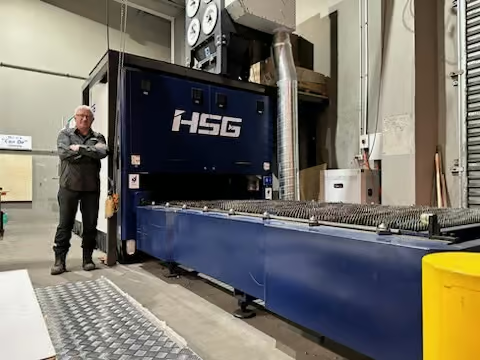
Quiet achiever Frank Maat specialises in bespoke and unique metal fabrication jobs, through his business Rolleston Sheetmetal Engineering.
Based in Rolleston, New Zealand (about 25km South-West of Christchurch), Frank’s company predominantly serves the agricultural community, including its suppliers and contractors, who request anything from large silos to storage boxes, to safety handrails, and everything in between.
Frank soon realised that he was spending too much money, and waiting too long, by getting laser cutting done by a third party, so he invested in his own laser cutting machine.
“I wanted to be in control of timelines and deadlines, so I could deliver more reliably to my customers, so I purchased a brand new laser machine. But then I had a new challenge – how do I accurately quote jobs?” said Frank.
After speaking with connections in the industry, Frank received a recommendation for Tempus Tools, by Tempus Tools, an all-in-one laser cutting quoting software that is provided using a SaaS (Software as a Service) model.
“I’m not a technology person, so at first I was apprehensive about using a software, which I worried would be too complex. But Tempus Tools was very intuitive and user-friendly, and I’ve been really enjoying its features,” he said.
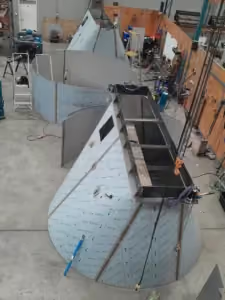
“I like that my laser machine operator and I can get an accurate idea of material usage, time, labour, and other relevant data for each job – and it greatly reduces the risk of human error, because Tempus Tools is a rules-based program.”
“Additionally, the Tempus Tools software is easily adjustable, which allows me to tread that fine line between being competitive and being profitable,” added Frank.
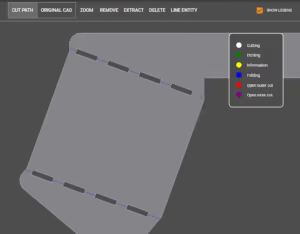
Rolleston Sheetmetal Engineering also uses secondary processes such as folding, powder coating, tapping, and galvanising, and Tempus Tools can include these in quotation calculations.
Tempus Tools Director, Felipe Lechuga, says it’s rewarding to help a small business like Rolleston Sheetmetal Engineering, which is focused on delivering the best customer service in the most efficient way.
“Businesses like this give us the opportunity to not only provide software that benefits the owner, but to also impart our knowledge from our own experience in laser cutting, so that they don’t have to make the same mistakes we once did,” added Felipe, who, in addition to his role at Tempus Tools, runs his own laser cutting business, Lemaco SpA, in Chile.
Outstanding support
In addition to a range of useful features, Frank has been impressed with the support offered by the Tempus Tools team.
“The support has been truly fantastic. Tempus Tools staff have helped me with calculations on my hourly rate, and every time I have a question, they are available promptly to assist me,” he said.
“It gave me confidence that the Tempus Tools leadership team all have decades of practical experience in laser cutting, both on the job shop floor, and at management level, so they know the sorts of challenges and opportunities I face with my business.”
Frank is optimistic about the future, but has humble plans for future expansion. “I’m not going to rush into growth, but I know the possibility is there, and I plan to go about it quietly. I know Tempus Tools will be able to grow with me, when I need it, because the same program can run more quotes and add different secondary processes as required.”
To learn more about Tempus Tools, please click here.
Rolleston Sheetmetal Engineering can be contacted on:
Ph: +64 (0) 29 771 7050
Email: office@rollestonsheetmetal.nz
Read blog
Success stories
Bespoke metal fabrication specialist forges ahead with elegant laser cutting quoting solution
Hurstbourne Forge turned to Tempus Tools to streamline quoting for its bespoke, small-batch metal fabrication work, finding it far simpler and more powerful than other complex or costly solutions. With automated handling of folding, secondary processes, 3D STEP files, and a Web Store for self-service quotes, Tempus Tools has significantly improved efficiency and supports the company’s fast-turnaround, highly specialised jobs.
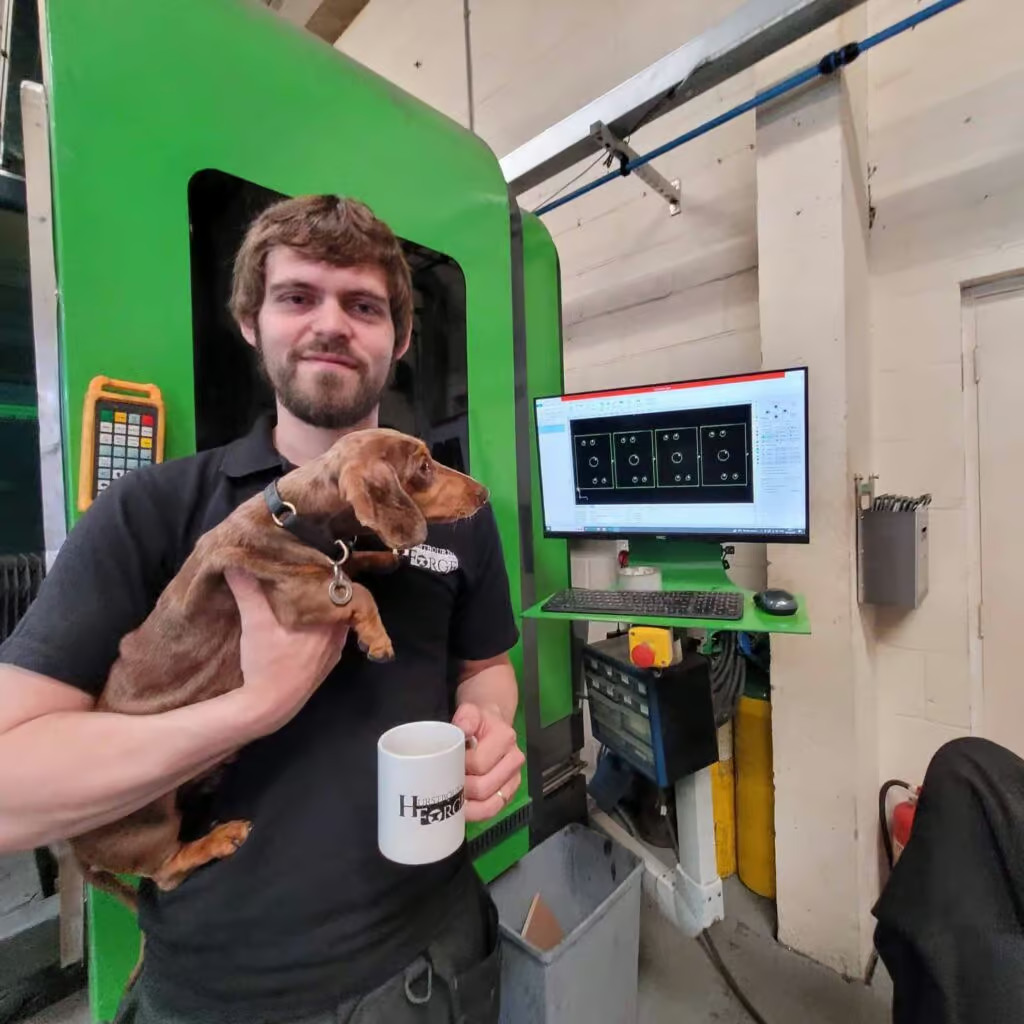
Bespoke metal fabrication specialist, Hurstbourne Forge, has found an elegant and efficient solution to its varied laser cutting quoting needs for its job shop in Andover, Hampshire, in the UK.
The family-owned business, run by Jack and Lydia Swanborough produces “pretty much anything in metal – with precision and care” and specialises particularly in small-to-medium volume bespoke and batch work.
“Quoting customers for these highly specialised jobs was taking time and effort, and we knew there had to be a more efficient way. We discovered Tempus Tools, and it ticked all the boxes for us. It was such an elegant solution,” said Jack, who has been in the current premises in Andover for the last 2.5 years.
“Tempus Tools gave us an automatic quoting system with a simple interface and a good front-end solution for self-service customers. Other solutions I looked into were needlessly complex, expensive, or both,” he said.
Hurstbourne Forge operates with a fibre laser, press brake, and a broad range of secondary processes, including welding, bending, forming, folding and ring rolling, powder coating, shotblasting, and refinishing.
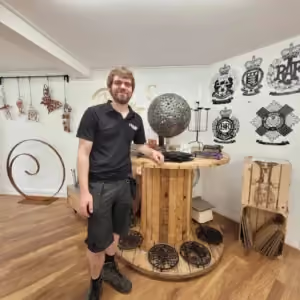
“Tempus Toolsl is much better than anything we’ve used before, especially for larger and more complex quotes – and I like that it handles all the folding and secondary processes automatically. It’s ideal, because we just installed a new press brake to keep up with growing demand,” said Jack.
“We have a fairly small laser and press setup by global standards, but run a full drawing to final part service for fabrication in any material in-house, specialising in fast turnaround, one-off and weird and wonderful bespoke jobs. We have very attractive pricing for short run laser jobs that are often expensive to get done elsewhere, and Tempus Tools is helping streamline our quoting efficiency to further reduce our costs,” he said.
STEP-ping up with new features
Tempus Tools seeks feedback from customers and uses this to add new features and make improvements to Tempus Tools. The leadership team has more than 100 years of combined experience in the laser cutting industry, from hands-on, practical shop floor work, through to company management.
“One of the features we really enjoy is that we can get quick PDF quotes straight out to customers. The ability to directly translate 3D STEP files into a PDF quote is a game changer for the efficiency of our business,” said Jack.
With Tempus Tools, users can identify, extract, and unfold sheet-metal parts directly from 3D assemblies without a 3D software package. The flattened 2D drawings can be exported as DXF and DWG files with cut and fold lines for use in production or other systems.

Tempus Tools Director, Felipe Lechuga, says that the automatic 3D unfolding feature removes a number of previous obstacles for job shops. “3D software packages are expensive, trained operators are expensive, and finding the time to train people (if they have no prior experience) is hard too. We have designed Tempus Tools so job shops of any size can handle 3D files with ease, with no need for software or specialised skillsets.”
Hurstbourne Forge also utilises the Tempus Tools Web Store feature, so that customers can get a quick quote automatically through their own website.
“The Web Store interface is great for our small-to-medium volume batch work. It means customers can use our website as a self-service e-shop for our products, saving them time, and increasing business for us,” said Jack.
“And what further sets the Tempus Tools team apart is they are highly responsive to any questions or requests for support. I can reach out and discuss new features directly with the development team – and see them implemented – which is fantastic,” he adds.
“We’ve just added Xero integration – another highly useful feature – and our business is running at its highest level of efficiency. Tempus Tools has greatly contributed to this increased productivity, and I’m excited to see new features and improvements continue to be rolled out.”
To learn more about Tempus Tools, please click here.
Hurstbourne Forge can be contacted on:
www.hurstbourneforge.co.uk
Ph: +44 01264 527 017
Email: info@hurstbourneforge.co.uk
Read blog

Guides
How do you match pricing when implementing new quoting software?
Switching to quoting software can feel intimidating, but for most job shops, existing pricing is already inconsistent—making implementation the perfect moment to reset and create a clear, competitive pricing policy. With faster quotes, fewer errors, and consistent pricing, software like Tempus Tools helps shops win better jobs and operate more efficiently.
Laser cutting job shops know that providing accurate and timely quotes to customers is crucial for business growth.
Trying to do this manually can be tricky – and can often lead to pricing inconsistencies or errors. This is where implementing software for calculating, preparing, and sending quotes can really benefit your job shop.
But how do I match my existing prices with a whole new system?
This is a very common question, and it’s a fear that can mean job shops put off upgrades that could be saving them time and earning them more money.
In most cases, if you aren’t using quoting software, the pricing policy is not clear or consistent to begin with, especially with different estimators using different criteria in their calculations. This can lead to confusion and inconsistencies in pricing, which can negatively impact your business.
But this is actually an opportunity to re-think your pricing strategy and generate a consistent and logical pricing policy for the future. The pricing policy must be aligned with the strengths and weaknesses of the shop, facilitating winning attractive jobs and avoiding low-profit or jobs outside the strengths of the company.
Rethinking your pricing policy
The best time to re-think your pricing policy is when implementing a new quoting software. The software can help you analyze your pricing history and identify areas where you can improve your pricing strategy. By taking advantage of this opportunity, you can create a more effective pricing policy that will benefit your business in the long run.
You can also make sure you’re providing fair and competitive prices to your customers – because they tend to be discerning enough to know when they are getting an unfairly high price. I’ve even seen customers use a quoting software to see if their laser vendor was overcharging them!
In addition to helping you create a pricing policy that focuses on the best jobs for your business, a quoting software will bring a broad range of benefits, too, including:
- Speed – with just a few clicks, you can generate a quote and send it to a customer
- Reduced costs – with fewer errors, and lower hours invested in preparing quotes
- Consistency – with the same job always being quoted at the same price – no matter who is creating the quote
With all these advantages, implementing a quoting system can be a highly cost-effective way to grow your job shop and stay ahead of the competition.
Don’t let the fear of change hold you back from taking advantage of these benefits and improving your business.
To see all the latest features of Tempus Tools, the leading quoting software designed specifically for laser cutting job shops, visit our Latest Features page.
Author: Felipe Lechuga, Director, Tempus Tools (pictured)

Read blog
Product updates
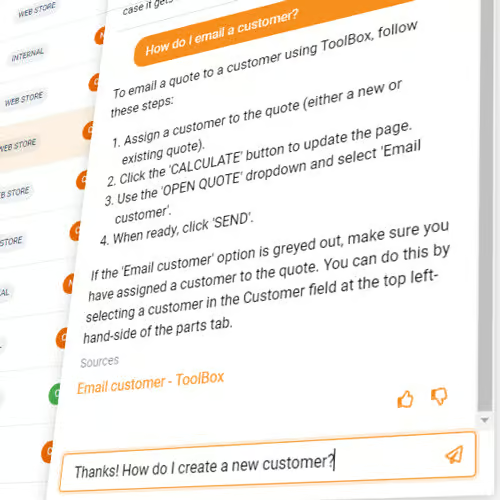
Introducing the Tempus Tools AI assistant – a truly helpful chatbot for instant support within Tempus Tools!
Tempus Tools now includes a powerful AI Chat Assistant, built on GPT-4, to deliver instant, 24/7 support and laser-cutting knowledge right inside the app. It pulls directly from support articles, improves with feedback, and makes getting help faster and easier than ever.
We’re excited to announce the launch of our innovative AI Chat Assistant, designed to transform customer support within Tempus Tools, our leading laser cutting quoting software.
Thanks to recent advancements in Large Language Models (LLMs) like OpenAI’s GPT-4, we’re able to provide a chatbot experience unlike anything before. Previous chatbots often lacked context and struggled with understanding questions. With GPT-4, our Tempus Tools AI assistant overcomes these challenges, bringing you on-demand support answers and general knowledge information within the context of laser cutting.
Key features of the Tempus Tools AI Assistant
- Real-time access to support articles: The AI chat assistant quickly provides accurate information from our support articles.
- User-friendly interface: Type your query in the chat window within Tempus Tools for instant support.
- Constantly evolving: Our AI Chat Assistant learns and improves over time, offering increasingly efficient support. Give it a thumb up or a thumbs down if the answer isn’t what you were expecting, and that information will be used to improve future conversation.
- Available 24/7: The AI Chat Assistant is always available, ensuring help when you need it.
- Context of laser cutting in general: the Tempus Tools AI can answer questions with a general understanding of laser cutting.
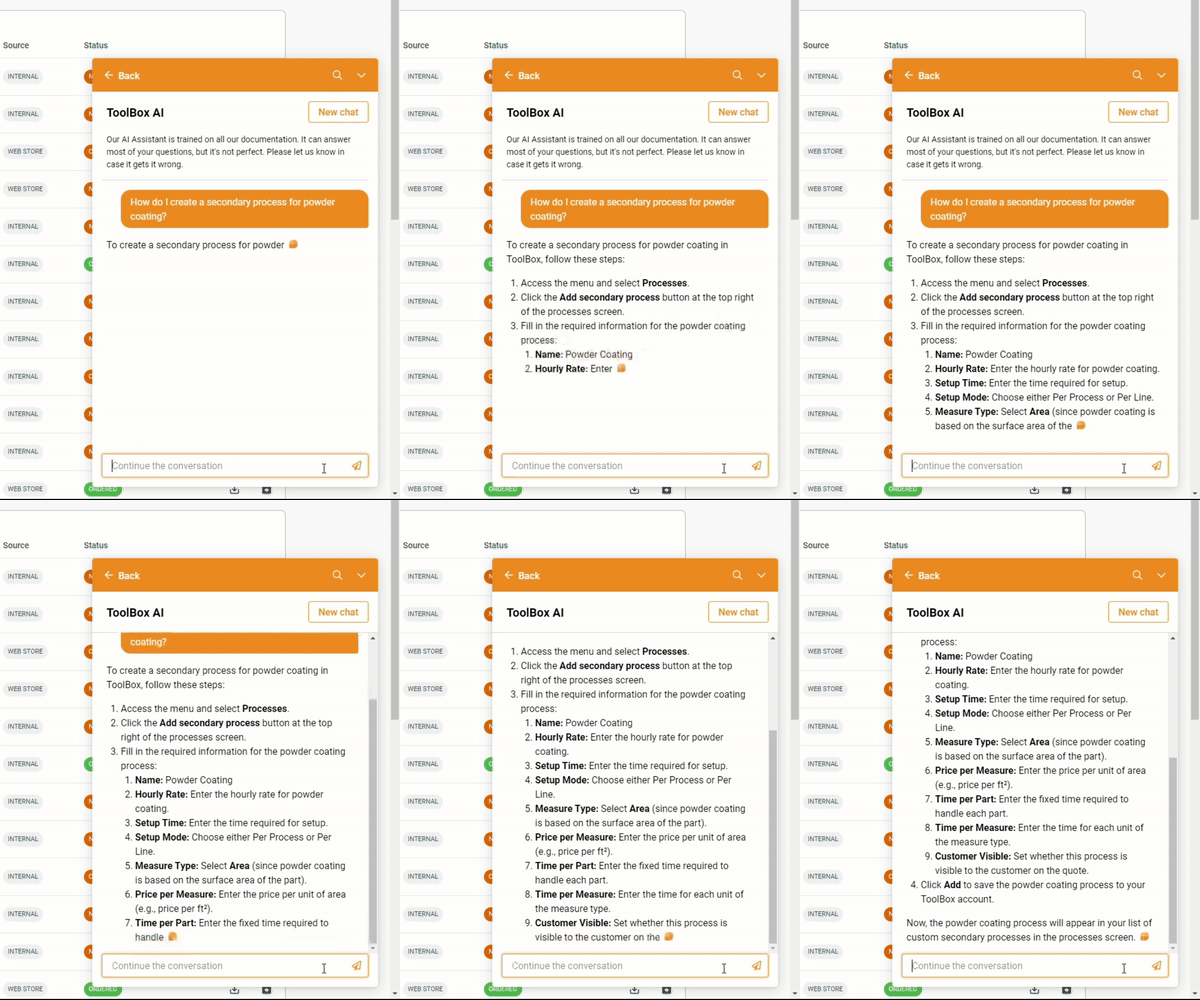
Accessing the Tempus Tools AI Assistant
Log in or create a Tempus Tools account, find the help button in the lower right-hand corner, and click to open the chat window. Enter your question for instant assistance.
We believe our AI Chat Assistant will significantly enhance your Tempus Tools experience, and we can’t wait for your feedback. For any questions, reach out to our support team at support@tempustools.com.
Read blog

Success stories
Tempus Tools laser cutting quoting software helps Red Horizon Engineering cut through the competition
Red Horizon Engineering owner Steve Geroski used automation and Tempus Tools to compete with larger shops, eliminating manual quoting and enabling fast, accurate estimates even as demand surged. With intuitive workflows, tube cutting support, and plans for a 24/7 Web Store, Tempus Tools has become a key driver of the company’s growth and efficiency.
Automation is often presented as “taking jobs” away from real workers, but Red Horizon Engineering owner, Steve Geroski, sees it as a company builder for smaller businesses.
“When I established my own job shop for engineering, maintenance, equipment design, and laser cutting, it was software and automation programs that allowed me to maintain efficiency and quality to match the larger players – it’s what gave me a chance to be competitive,” he said.
After 17 years as a senior operations manager for a major tire and rubber company, Steve decided to “bet the house” and establish his own engineering company, with a 6000W CNC fiber laser.
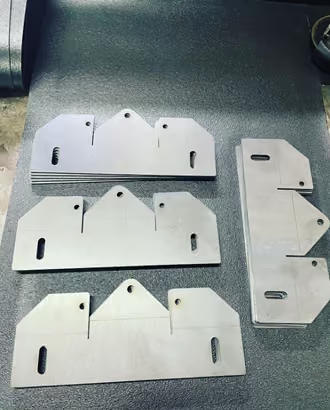
“There is a huge demand for laser cut materials here in Ohio and surrounding areas, especially from heavy industry. But I just don’t have time to manually quote all the orders while establishing and managing all areas of my business,” he said.
Red Horizon Engineering’s laser cutting machine is capable of cutting 1” mild steel, 1/2” Stainless Steel, 3/8” aluminium, and 1/4” brass, with titanium and other metals available too.
Steve wanted to avoid the headaches of using spreadsheets or clunky interfaces within Excel estimating software programs to quote jobs, so he did some research, and found Tempus Tools, a rules-based laser cutting quoting software specifically designed for laser cutting job shops.
“Tempus Tools has been one of the smoothest and most intuitive programs I’ve ever used. This meant I could implement it straight away and start quoting for orders while continuing to set up other parts of the job shop,” he said.
“I could easily train my business partner Joe to use the software when I’m not here, and as we expand in the future, training new staff won’t be a time-consuming exercise. The job shop estimating software is well laid out, it has point-to-click functionality, and it’s clear it has been designed by professionals who know this industry inside out.”
“And the support has been outstanding. I get quick responses, there’s a group for asking questions and providing feedback. It’s so rare to find a company so receptive to customer feedback, but Tempus Tools takes customer comments and uses them to create new features or enhance existing ones.”
Red Horizon Engineering’s laser cutting quotes are mostly going to heavy industry, which typically demands pre-welded parts on 1/4” plate or larger, and are often used for materials handling equipment, such as conveyors. But they also get jobs for signage, personal projects, and even commercial art.
“Heavy industry is where we see growth, but the other projects are a lot of fun. And with Tempus Tools, it’s so easy to adjust pricing on the fly. I haven’t had to turn down any work since we opened, because I’m not wasting time manually preparing quotes,” said Steve.
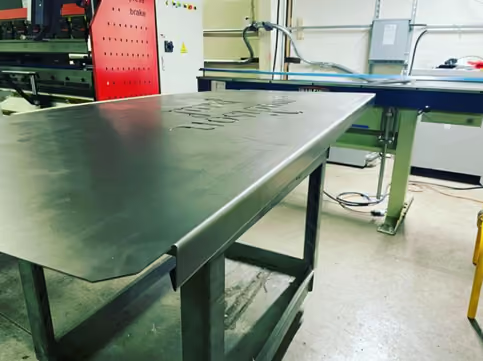
Investing in Tube Capabilities
Steve decided to further differentiate himself from the competition by adding a rotary attachment to his laser cutting machine to allow tube cutting.
“Not many fabrication shops have this capability – it’s usually bigger steel suppliers – and there was interest in it straight away. But tube is almost impossible to quote manually. With Tempus Tools, I can easily input the information and get an accurate quote every time,” he said.
The Tube feature allows the user to easily drag and drop rectangular, square, or round hollow sections into Tempus Tools. It flattens the part and calculates runtime in the quoting module.
Looking To The Future
As Steve continues to establish and grow his job shop, the next Tempus Tools feature he plans to implement is Web Store, which provides a 24/7 online store for laser cutting, which he can embed into his own website.
“With Web Store, customers can get quotes and place orders via my website, which multiplies the number of orders I’m able to receive. I plan on setting up a member’s login area where my valued customers can access this service 24/7,” he said.
“Tempus Tools has built some fantastic features into their Tempus Tools software, and I’ve been impressed with the responsiveness of their support team. Their price-point is also highly competitive, so it was the best decision for my business.”
To learn more about Tempus Tools, please click here.
Red Horizon Engineering can be contacted on:
redhorizonengineering.com
Ph: +1 (419) 619-2894
Email: SteveGeroski@RedHorizonEngineering.com
Read blog


ROI Calculator
See how much time and money you’ll save
Use our ROI Calculator to measure potential labor savings, faster quoting, and increased consistency for your shop.

Resources
Success stories

Success stories
0
min read
US job shop Hammers home success with attitude-first hiring
Facing skilled labor shortages, Hammer MetalWerks shifted its hiring strategy to prioritize attitude over experience, using technology to quickly train new operators. With Tempus Tools streamlining quoting, work orders, and secondary processes, the team has improved accuracy, reduced errors, and empowered new staff to become productive faster.
A US-based metal fabrication job shop is taking a new approach to hiring staff, in response to skilled labor shortages, preferencing work ethic and attitude over existing skillset.
Derek Hammer, President of Hammer MetalWerks, and Erin Hammer, Vice President and Director of Human Resources have found that with the right technology, you can train and upskill an employee with a good attitude, which benefits them and the business.
“Our laser operator and brake press operator had both never used those machines in their life before working here. But they were intelligent, familiar with computer systems, and had a positive attitude to learning, so we hired them based on that,” said Derek.
Hammer MetalWerks provides small-to-medium production runs and parts for a huge range of industries, from construction, to healthcare, entertainment, attractions, military, and government.
“Rather than looking for highly skilled – and more expensive – operators, which are in short supply, we looked for technology that could make the operator’s job easier, and help them get up to speed faster,” says Derek.
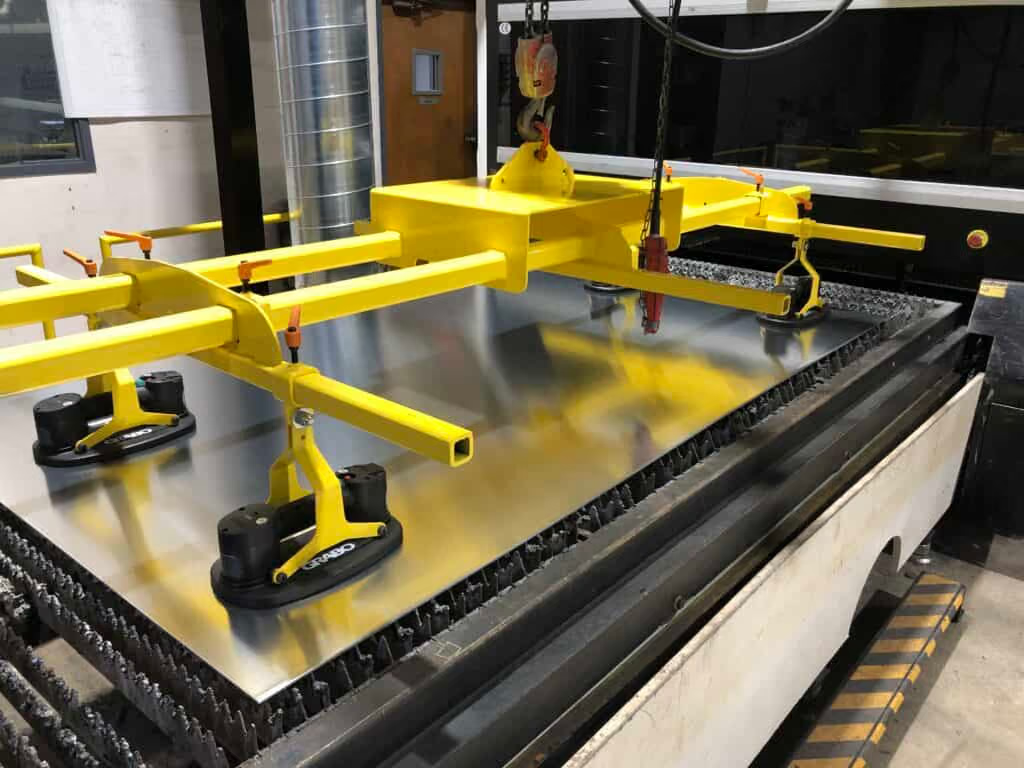
Hammer chooses Tempus Tools
One technology the Hammers chose to help their new staff, and the overall efficiency of the job shop, was Tempus Tools. Tempus Tools is multi-functional laser cutting quoting software that is calculation-based and runs on a Software as a Service (SaaS) model. It can be set up with information on material price, cutting time, labour, and other relevant information, to generate quotes quickly and accurately.
“Tempus Tools has been highly valuable for us. It provides work orders to the shop floor with lots of details that the operators don’t have to find or calculate themselves. One example for us is that sheet sizes are all metric, and we use imperial gauges in the US – which can often lead to errors if not converted correctly,” explains Derek, whose business operates a 3kW fiber laser machine.
“Moreover, 11 gauge aluminium is not the same thickness as 11 gauge steel, and our laser machines are all metric, so having all the right measurements through Tempus Tools reduces the risk of any errors.”
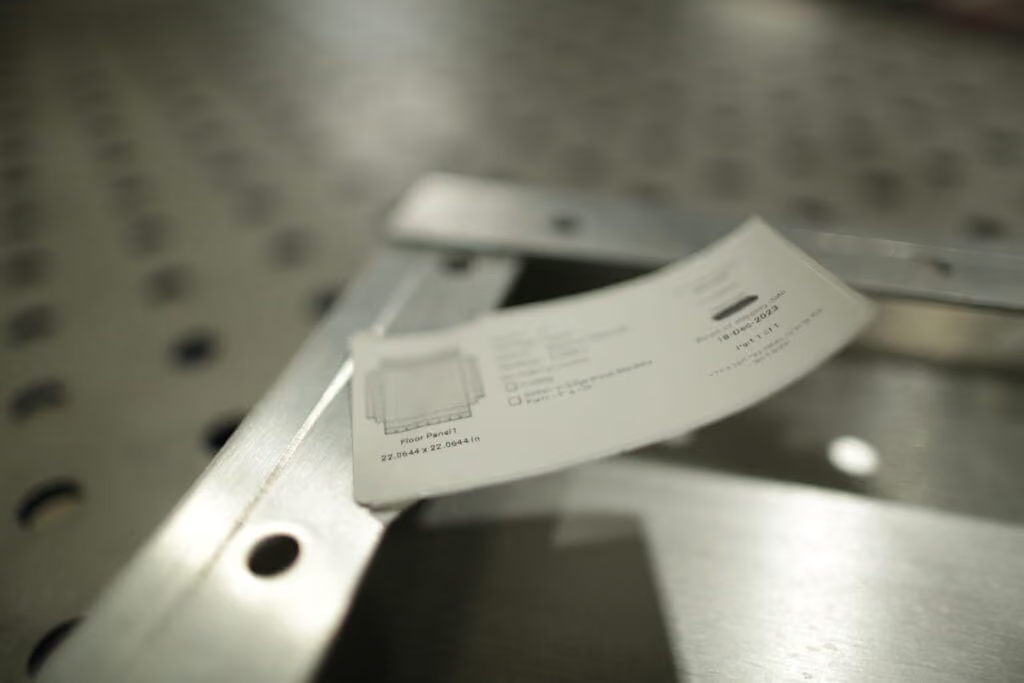
“Additionally, Tempus Tools is very user-friendly, so staff that are used to working with computers in a broad range of contexts can pick up the program quickly and begin working with it.”
Tempus Tools CEO, Bart Jesman, says it’s rewarding to see the software benefitting forward-thinking job shops like Hammer MetalWerks. “We’ve designed Tempus Tools to provide benefits to job shops of all shapes and sizes. What Derek has done is take this a step further and used it to improve his hiring process, by making the operator’s job easier – it’s an intelligent approach.”
Secondary processes
In addition to metal fabrication and laser cutting, Hammer MetalWerks has a unique advantage over most job shops, with the broad range of additional services and secondary processes it provides, including design, bending, welding, powder coating, packaging, tapping, rivets, hardware, and more, all from the one place.
“With so many secondary processes, it’s so helpful that we can quote them all using Tempus Tools, and they can all be included in the work order that goes out to the shop floor,” says Derek.
“Additionally, the work order can be sent to our label printer, including a thumbnail of each item, to provide a visual cue to our shop floor staff, to further enhance the accuracy and efficiency of their work. It really helps avoid mix-ups on the shop floor.”
Updates and support
Derek adds that the support from the Tempus Tools team has been outstanding, collaborative, and helpful.
“The Tempus Tools team is always open to feedback, and they use this to help develop new features that make Tempus Tools better for job shops like ours. But they’ll also help with general questions we have – and they have experienced staff to draw upon for industry knowledge,” he says.
“With the skilled labor shortages in the US – and common issues around the world – having the right technology is crucial. We now hire employees that fit well with our work culture and have a good attitude – and it’s working out well for our business,” concludes Derek.
To learn more about Tempus Tools, please click here.
Read blog
Success stories
0
min read
From quoting crunches to streamlined processes: Tempus Tools empowers growth of J&T Steel Sales
As J&T Steel Sales expanded into the fast-growing laser cutting market, outdated spreadsheet-based quoting quickly became a bottleneck for delivering fast, reliable service. By adopting Tempus Tools, the team streamlined quoting, order tracking, and invoicing—freeing up time, improving consistency, and supporting the company’s growth as they scale their laser cutting operations.
Expanding Australian metal fabrication specialist, J&T Steel Sales, has found that improved productivity and new equipment is only half the battle to boost customer service and sales – equally important is eliminating the outdated processes used to track and prepare quotes, delivery, and invoices.
J&T Steel Sales began as a small plate processing business in Victoria with a CNC Plasma machine, where staff used spreadsheets to develop quotes for customers, but the company has now made the move into the high demand laser cutting market.
Part of the motivation for the expansion was a need in the market for better lead times on laser cut metal products, including aluminium, stainless steel, and carbon steel.
“We had customers come and beg us to purchase a laser machine, because they were fed up with the long lead times that were becoming increasingly common for laser cut products,” explains Luke Patterson, Operations Manager, J&T Steel Sales.
“So we invested in a laser cutting machine, and prepared to grow our business to the next level. But with this change, we needed a quick and efficient software solution to export a presentable quote that we can forward directly to customers in a timely fashion. Spreadsheets just weren’t going to work anymore, so we did some research and found Tempus Tools,” he said.
Laser cutting quoting software streamlines operationsTempus Tools, is a multi-functional laser cutting quoting software that is provided using a SaaS (Software as a Service) model. Tempus Tools was developed specifically for the laser cutting industry, and is designed to save job shops time, and make quoting more efficient, accurate, and consistent.
“Tempus Tools has allowed us to streamline not only the quoting aspect, but also the tracking of active orders as well as invoicing,” says Luke.
“It has been able to take most of the heavy lifting in cutting back on excess paper waste in our offices, whilst also creating a digital paper trail to be able to track material usage and stock.”
Since purchasing the laser cutting machine, J&T Steel Sales has committed to getting customers their parts when they need them, calling it “the J&T Guarantee”.
“Tempus Tools has helped us immensely in delivering this guarantee to our customers. It has taken the stresses and late night quoting crunches and completely streamlined the process, freeing up more time for us to be able to focus on growing the business,” says Luke.
“In the past, expanding our customer base meant we would fall increasingly behind when it came to invoicing and quoting. Now, with Tempus Tools, we really feel we have found a software that not only services us now, but also allows us room to grow in the future.”
Service is key
Luke explains that in his business, customer service is the key to success. Customers have good memories, and they value pricing consistency, accuracy, and reliability.
“Being a service-focused business, it’s something I look for in our suppliers too. In my opinion, the Tempus Tools team has been exceptional when it comes to responsiveness and availability to work through any challenges I’m experiencing,” he says.
“Coming from a small business ourselves it was an incredibly refreshing experience to have team members visit our workshop, and to also feel listened to when it came to our concerns or feedback for the future development of Tempus Tools.”
“I met Mark Washington (Sales & Support) and Felipe Lechuga (Director) from Tempus Tools at a local manufacturing expo earlier this year, and they took the time to visit our job shop and discuss the functionality of Tempus Tools, and what more it could be doing for us. I was very impressed, and I’m grateful for all the support.”
A bright future
J&T Steel Sales has seen steady growth since moving into the laser cutting business, and Luke has plans to continue this trend.
“Our future plans are not only to focus on bringing in new customers – ideally ones that require repeat work – but also to let all our customers know about our bending and fabrication facility, so they know we can provide an end-to-end manufacturing solution,” he says.
“Tempus Tools has a huge range of useful features, and the development team is always working on new functionality that can benefit job shops like ours, so it is a key component of our growth plans.”
To learn more about Tempus Tools, please click here.
Read blog
Success stories
0
min read
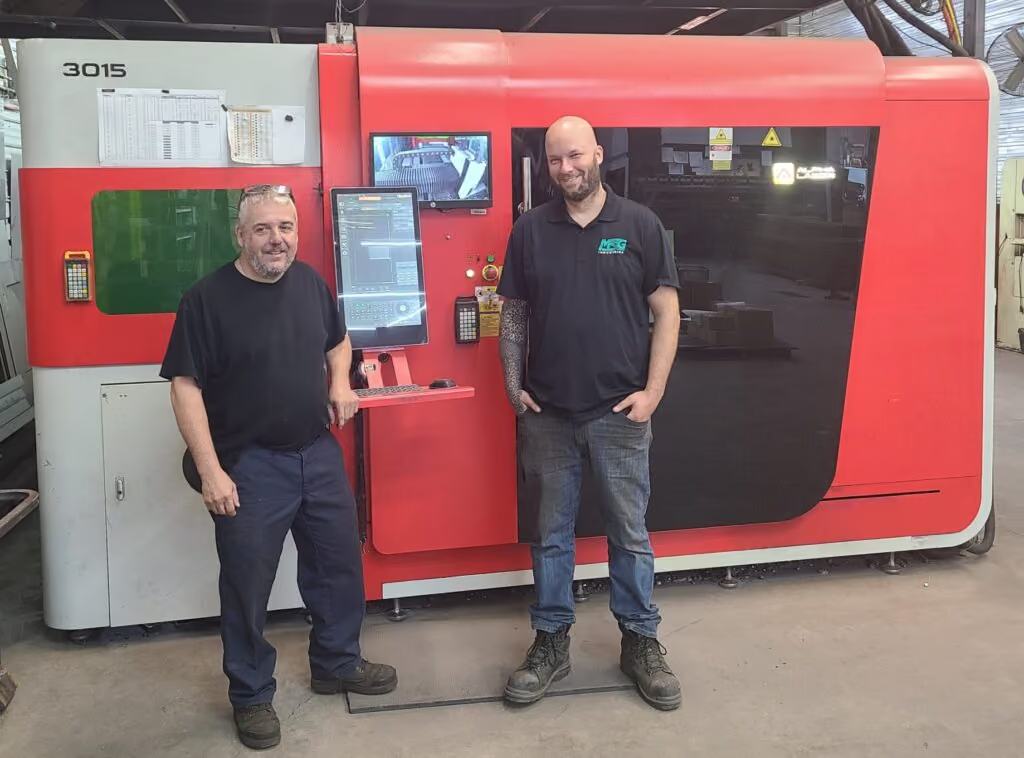
MSG Industries provides laser cutting quotes eight times faster with game-changing software
After struggling with an in-house quoting system that was costly and inefficient, MSG Industries adopted Tempus Tools and immediately cut quoting time while improving accuracy and pricing consistency. The team now relies on Tempus Tools powerful features—like PDF part extraction and upcoming pipe-cutting support—to streamline operations and better serve their growing customer base.
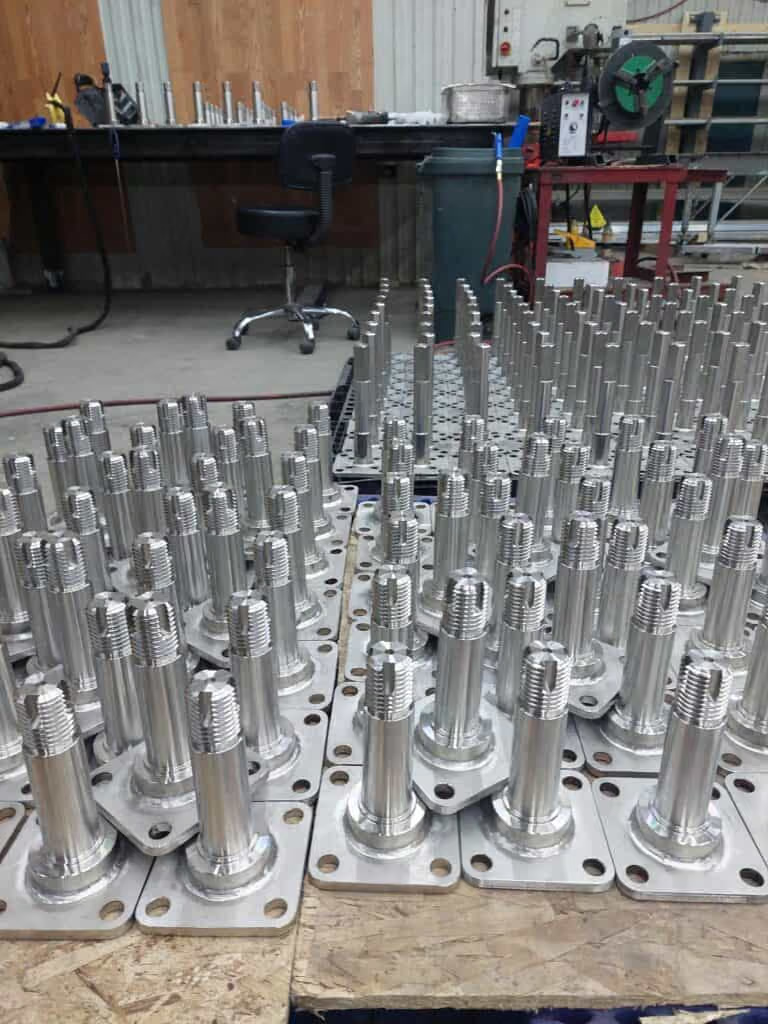
A Canadian metalworking, fabrication, welding, and laser cutting enterprise, MSG Industries, has implemented a “game-changing software” to deliver faster and more accurate laser cutting quotes to its customers.
MSG Industries Vice-President, Olivier Samson, had been working with his team on developing their own quoting tool software, but it was not a cost-effective solution to the accuracy and time pressures the growing business was facing.
“We probably spent about $15,000 (Canadian dollars) and a large investment of hours developing a home-made system, but it just wasn’t performing to the level we needed to deliver better service to our customers,” said Samson.
“We did some research and discovered Tempus Tools, and it’s a game-changing software for us. Right now, I can’t imagine how we could get through the week without it,” he added.
MSG Industries, which prides itself on innovation, integrity, and professionalism, has been growing steadily since its inception three years ago, and to cope with additional requests for quotes, the company took on two full-time employees dedicated to quoting.
Tempus Tools, is an all-in-one laser cutting quoting software that is provided using a SaaS (Software as a Service) model.
“Since implementing Tempus Tools, we’ve found it is much more accurate, reliable, and fast. Instead of two people quoting full time, we can now have one person do a better job in a quarter of the time, freeing up staff to work on other tasks that can further grow our business,” says Samson.
“As we take on more customers, and send out more quotes, Tempus Tools also gives us total pricing consistency, which means we build the trust of our customers. No one likes receiving two different prices for the same work, but if two different estimators manually prepare the quote, it can happen,” he says.
“Additionally, the service has been outstanding, which is rare these days. Every time I’ve needed assistance, the Tempus Tools team has been quick to respond and highly professional.”
New updates: pipe cutting
MSG Industries provides services to a broad range of industry, and is constantly looking at ways to innovate and expand its offering.
“Our strength has always been our versatility. We have a department dedicated to heavy structural fabrication, such as schools or hospital building pieces, another department for food factory equipment, one for hydropower products, and then we have pipe cutting and laser cutting services,” explains Samson.
“Since we have so many different departments, we need very reliable tools to help us quote, and Tempus Tools has been highly valuable to us.”
“Our major focus right now is working on our pipe cutting laser service, and Tempus Tools is already working on adding this functionality into Tempus Tools so that we can quote for this service too – it’s very exciting.”
Turning customer PDFs into quote-ready CAD files
Tempus Tools Director Felipe Lechuga says that the discovery of Tempus Tools PDF part extractor feature was a further benefit to MSG Industries.
“MSG had just been using Tempus Tools for creating new quotes, but when they discovered they could use the PDF part extractor to turn a customer’s vector PDF into a CAD file straight away with no tracing required – they were delighted with the results,” said Lechuga.
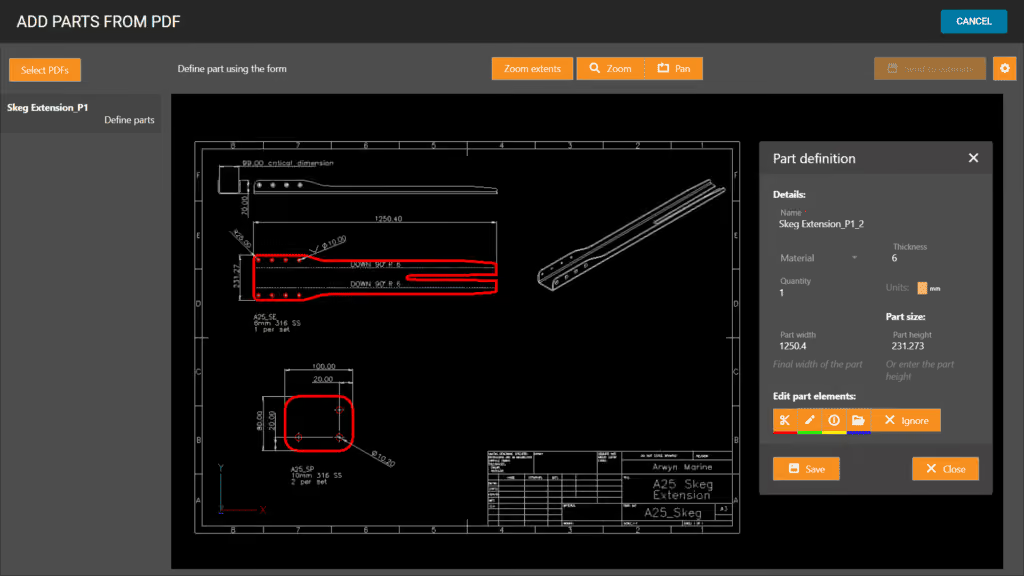
“The PDF part extractor doesn’t need any CAD package or skills to use, meaning anyone can simply click on a part and extract it into a quote. You can scale the part, plus specify details like folding and etching too.”
Olivier Samson says he can’t believe he didn’t try the PDF part extractor right away. “This is even more than we hoped for. Such a useful tool! I wish we’d tried out these features from the beginning.”
“I’ve found that Tempus Tools is reliable and fast, and Tempus Tools is actively working on updates, so we really couldn’t ask for more!” he concluded.
Read blog
Resources
Product updates
Product updates
0
min read
New integration: Tempus Tools + ECI M1 – from quote to order to ERP, seamlessly
At Tempus Tools, we know that speed and accuracy are everything in a laser cutting job shop, and today we’re announcing a new integration that makes both even easier.
We’re now fully integrated with ECI Software’s M1 ERP system.

What does that mean for your job shop?
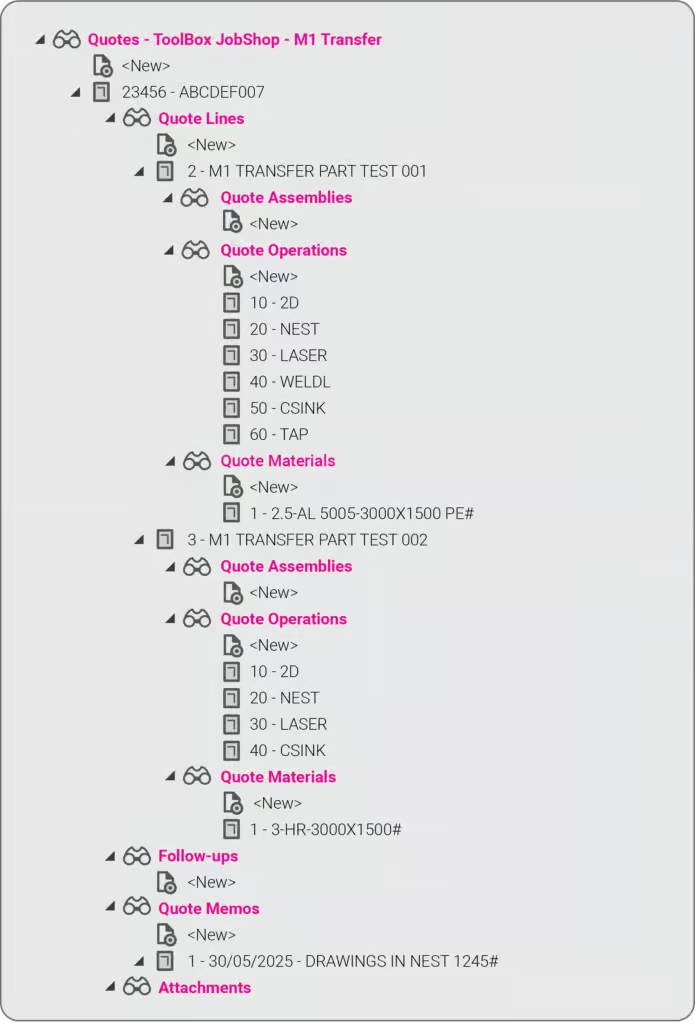
It means you can now send quotes, order details, and production-ready drawings directly from Tempus Tools into your M1 ERP — no more double handling, no more data entry errors, no more jumping between systems.
This integration eliminates any “dead zone” between quoting and production. You get the specialist laser quoting power of Tempus Tools (like lightning-fast nesting, material cost accuracy, and margin control) combined with the operational backbone of M1.
It’s quoting that talks to your shop floor.
We’ve talked about how integrations like Google Drive can supercharge job shop workflows, and this M1 integration is another great example.
Want to learn more or set it up? If you want to avoid the limitations in the generic quoting functions in ERP/MRP software, but still use the rich planning and production features in ERP/MRP software, then get in touch today.
Book a demo or email us at support@tempustools.com and we’ll help you get connected.
Tempus Tools + M1 = quoting to production, finally in sync.
Read blog
Product updates
0
min read
Tempus Tools’ Google Drive integration: 6 ways to supercharge your job shop efficiency
Tempus Tools’ new Google Drive integration automatically saves your quote data and part files to Drive, opening the door to faster, smarter workflows. In this post, we highlight six clever ways job shops are already using it to boost efficiency.
Last month Tempus Tools released a powerful new feature: seamless integration with Google Drive.
Since then, we’ve heard from lots of customers about the innovative ways they have implemented this integration in their job shops, and we wanted to share the best six with you to inspire you to use the feature in your shop.
First, a quick recap: with the Google Drive integration, all your quote data (in CSV format) and production-ready part files can be automatically saved to your chosen Google Drive folder. From here, they can be exported to any number of programs or that data can be manipulated for many use cases, opening up a world of automation, reporting and connectivity for your job shop. We’ve also put together a quick video to show the integration in action.
1. Automate quote data collection for reporting
With every quote automatically saved, you can easily compile and analyse your quote performance over time. Use Google Sheets or your favourite analytics tool to track:
- win/loss rates
- performance across material types
- average order size
- breakdown of secondary processes contributions
This data-driven approach helps you identify trends, optimise pricing and improve customer response times.
2. Connect with ERP/MRP and other business systems
Some apps have native integration with Google Drive, which makes taking in quote data and parts easy, but many need a formal API. Luckily, Google Drive comes with its own API.
Some users have used the Google Drive API to build automations that push quote data directly into ERP, MRP or order management systems. This can streamline order processing, reduce manual data entry and ensure your production schedule is always up to date.
3. Organise your orders by material type
Use the exported quote data to create a parts planner that groups jobs by common material type. This enables you to:
- batch similar jobs for more efficient material usage
- reduce changeover times on machines
- optimise purchasing and inventory management
A simple Google Sheets script or integration with a dashboard tool can make this process nearly automatic.
4. Integrate with project management tools
Connect your quote data with popular tools like ClickUp, Monday.com or Airtable. Build custom dashboards and planners for your factory, visualise job statuses and assign tasks to your team-all based on real-time quoting data. These tools don’t require coding or a developer and anyone can work wonders. These types of projects boost collaboration on the shop floor and keep everyone aligned on priorities.
5. Create a scheduling calendar from time calculations
Use the time estimates in your quote data to automatically populate a production calendar. With a Google Calendar integration, you can:
- visualise machine and operator workloads
- identify bottlenecks before they happen
- easily adjust schedules as new jobs come in
This proactive scheduling helps you deliver on time, every time.
6. Enable automated notifications and workflows
Set up Google Drive triggers (using tools like Zapier or Google Apps Script) to notify your team when new quotes are confirmed as orders, or to kick off downstream processes-like updating CRM records or ordering materials.
Getting started is easy
- Go to Settings > Organisation settings > Integrations in your Tempus Tools Tempus Tools account
- Connect your Google Drive and select your preferred folder
- Choose the quote statuses that will trigger automatic file saving
- Start building automations and workflows that fit your shop’s needs
This integration is designed to be flexible-whether you want to automate reporting, connect with business systems, or simply keep your files organised, Tempus Tools and Google Drive make it possible.
Ready to enhance your job shop efficiency? Try the new Google Drive integration today.
Read blog
Product updates
0
min read
Tempus Tool’s new laser cutting quoting experience
Tempus Tool's new quoting interface delivers faster calculations, cleaner navigation, and powerful new features—all in one unified, intuitive screen. From smarter sorting to automatic updates and richer quote details, the upgraded experience makes quoting simpler, quicker, and more efficient than ever.
After months of rigorous development and innovation, we’re thrilled to unveil the newest evolution of our quoting interface in Tempus Tools. We remain committed to enhancing your laser cutting quoting process. This fresh approach promises enhanced navigation, lightning-fast calculations, and a host of exciting new features.
We have collected your feedback and listened to your concerns and requests over the past couple of years, and our design team has used their magic to put together a quoting interface that takes Tempus Tools to the next level!
Watch our new Tempus Tools Overview video to see all changes in detail:
Read on to learn more about some of the enhancements.
Tailored sorting
You’re in complete control. Choose between the smart auto-sort feature or manually arrange parts using drag-and-drop for a seamless organisation that aligns with your preferences.
Material requirements and order summary
At a glance, get an indication of how many sheets you need of each material to fulfil the order. Additionally, the order summary details information such as the total order weight, processing time and part count.
Part notes for everyone
A dedicated section for notes, whether they come from your customers, your team, or personal reminders for a job.
Streamlined price adjustments
With our revamped interface, tweaking the prices of parts becomes an intuitive and quick task.
Extra quote details
From setting an RFQ number to determining invoice due dates, shipping options, and beyond – we’ve got it all.
Unified quoting screen
No more toggling between tabs. Every bit of information you need, all consolidated on a single, intuitive page.
Automatic calculations
Forget the constant back and forth with the Calculate and Edit buttons. Our system now recalculates on-the-fly, keeping up with your pace.
Sleeker interface
With a cleaner, fresher look, onboard new team members with ease and navigate your daily tasks faster.
Customer emailing enhancements
An integrated system to keep your customers in the loop for every quote status.
In short, quoting in Tempus Tools is now even simpler and smarter. We’ve made sure it’s user-friendly while still being packed with all the features you need. Dive in and check out all the new improvements!
Accessing the new quoting experience
If you’re new to Tempus Tools, you will get the new experience by default. Just create a Tempus Tools account to get started.
For existing users, you have a temporary period to switch back and forth between the old and new experiences using the toggle at the top of the quote page.
We believe the new quoting experience will significantly enhance your quoting efficiency, and we can’t wait for your feedback.
Read blog
Ready to take a closer look at Tempus Tools?
Find out if Tempus Tools is a good fit for your shop in just 30 minutes.
Upload your own parts for a live demo
Get answers to pricing and setup questions
No-pressure call focused on your workflow