
Buying a Nitrogen Generator for Laser Cutting: When Does It Make Sense?

01 Oct 2026

A nitrogen generator for laser cutting lets a shop make its own assist gas from compressed air instead of buying it in packs or bulk. Once it's paid off, the gas costs little more than the power to make it, and you're no longer waiting on deliveries. But the generator is only one part of the bill, and a system sized or set up badly will leave you short of pressure halfway through a job.
This guide covers why shops use nitrogen, how on-site generation compares with delivered gas, what it really costs, and how to make sure your quotes reflect what your gas costs you.
Why nitrogen is used in laser cutting
Every laser cut uses an assist gas. It's blown through the nozzle to push molten metal out of the kerf and protect the lens, and the choice of gas shapes the finished edge.
Nitrogen is inert. It doesn't react with the metal, so the cut edge comes out bright and free of oxide. That matters most on stainless steel and aluminium, where an oxidised edge looks poor, can affect corrosion resistance, and may need cleaning before welding or powder coating. Many shops also cut thin mild steel with nitrogen for speed and a clean edge.
The trade-off is volume. Nitrogen cutting runs at high pressure and high flow, so a shop that cuts a lot of stainless or aluminium, especially in thicker material, goes through a lot of gas.
Nitrogen vs oxygen in laser cutting
Oxygen reacts with mild steel as it cuts. That reaction adds heat, which lets the laser cut thick mild steel with less power and much less gas. The edge comes out with a thin oxide layer, which is fine for most structural and general mild steel work.
Nitrogen does nothing to help the cut, so the laser does all the work and the gas pressure has to be much higher. In return you get a clean, oxide-free edge.
Because nitrogen cutting uses so much more gas, it should carry a higher rate in your quotes. More on that below.
What is a nitrogen generator?
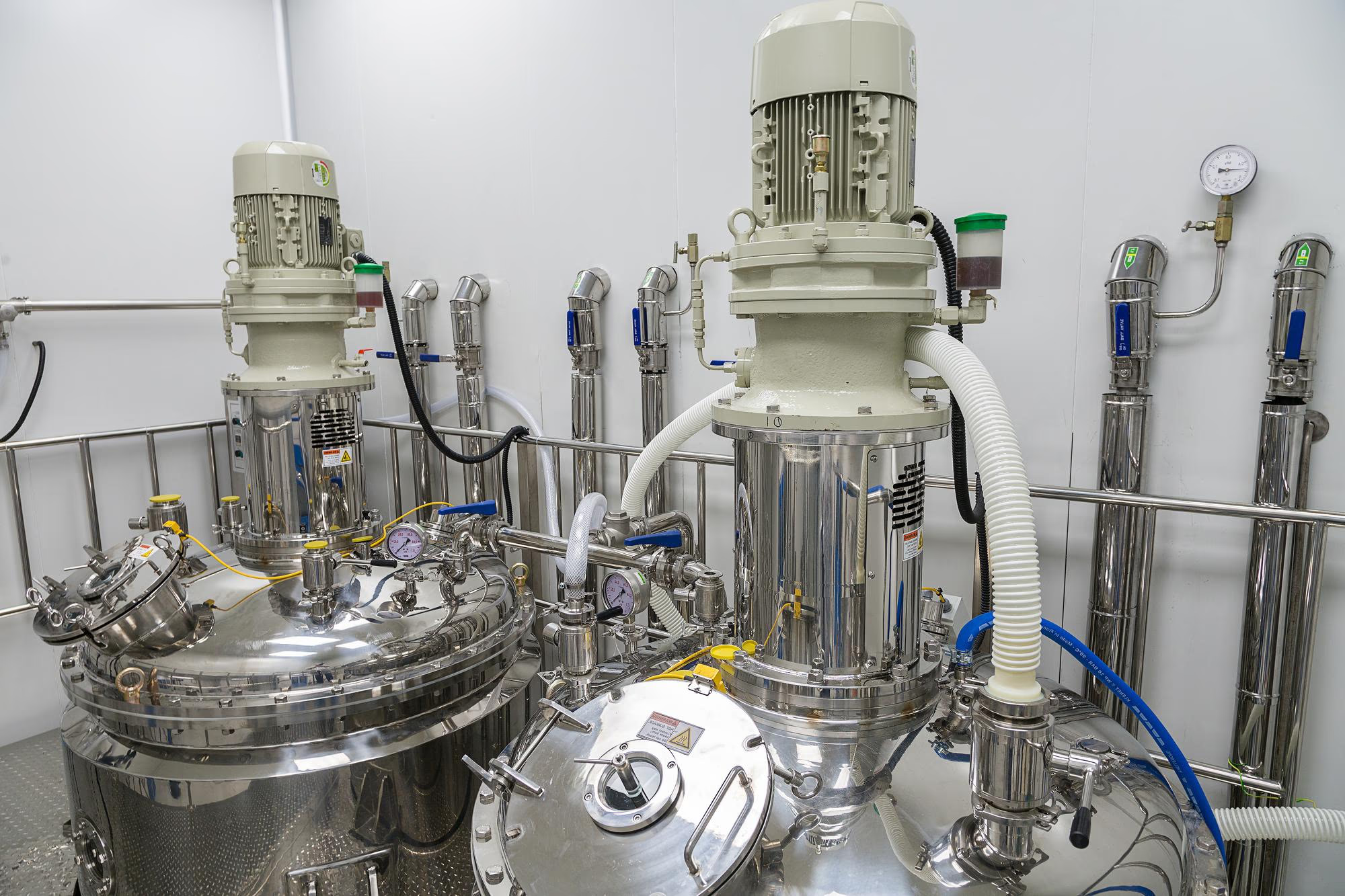
A nitrogen generator separates nitrogen from compressed air. Air is roughly 78% nitrogen. The generator, usually a pressure swing adsorption (PSA) or membrane system, strips out the oxygen and stores the nitrogen in a receiver tank, ready for the laser.
A complete system has more parts than the generator itself:
- An air compressor big enough to feed it
- Dryers and filtration to clean the air before it reaches the generator
- A storage reservoir for the nitrogen
- Often a booster, to lift the pressure high enough for laser cutting
- Pipework from the plant to the machine
Systems vary by purity, flow rate, pressure, storage capacity and energy use. Those numbers decide whether the generator can keep up with your cutting.
Why shops consider nitrogen generation
Lower cost per cubic metre
Delivered nitrogen carries the supplier's production cost, delivery, cylinder or tank rental and margin. Generated nitrogen, once the equipment is paid for, mostly costs the electricity to run the compressor. Per cubic metre, that's usually far cheaper than packs or bulk.
More price certainty
You swap one exposure for another. With a generator you're exposed to electricity prices instead of gas contracts, but you know what the gas is costing you. Supply contracts tend to creep. Fuel service levies get added to delivery charges, the price per cubic metre rises "because energy costs have gone up", and rental terms escalate.
No waiting on deliveries
A generator removes the supply chain. As long as it's maintained, the gas is there when you need it. For regional shops this can be the deciding factor. One Tempus Tools customer, who runs a small single-laser shop in a regional town, bought a generator because they could never get enough packs, there was no room for a bulk installation, and a big job could stall while they waited for the next truck.
Safer handling
Without packs, you're not moving high-pressure cylinders around on a forklift. A cylinder that's knocked over and has its valve snapped off can take off like a missile.
The real cost of a nitrogen generator
The price quoted at a trade show is usually just the generator. A $100,000 sticker price can be well short of the real project cost, which often includes:
- A bigger compressor, because the existing one can't feed the generator as well as the rest of the shop
- A new location for the compressor and generator, usually outside or in a separate room because of the noise
- New air and gas lines to the generator and on to the laser
- Dryers, filtration and drainage
- Installation and commissioning
- Floor space, which you're paying rent on
Then there are running costs:
- Electricity. This is the main ongoing cost. The figure to ask suppliers for is the specific power: the kilowatt-hours needed to produce each cubic metre of nitrogen at the purity and pressure you need. Some shops offset it with solar on the factory roof.
- Servicing. Expect a service roughly every six months for the generator, plus the compressor's own servicing.
- Filters and consumables.
- Depreciation on the generator and the compressor.
- A backup supply (see below).
What determines whether a generator will work for you
Purity
There's a big difference between 95% nitrogen and 99.99% or 99.999%. Higher purity gives a cleaner cut, but takes more energy to produce. Find out what purity the system will actually deliver from day one, not just what it can reach. The regional shop above struggled to get past 96% at first and only reached 99.99% after work on the system.
Purity also depends on the air going in. If the compressed air isn't clean and dry, the nitrogen won't be pure either. Filtration before the generator matters as much as the generator itself.
Pressure and flow at the machine
What matters is the pressure and flow at the cutting head, not at the generator. Packs usually sit right beside the laser. A generator usually sits outside near the compressor, so the gas has further to travel and loses pressure in the lines on the way. A generator that can't deliver enough pressure at the point of use is no good.
Capacity for your thickest work
Thick stainless uses gas fast. The regional shop's generator can't sustain long runs of 16 mm or 20 mm stainless. The reservoir loses its head pressure after a few hours, so they cut thick stainless for a set time, then switch to oxygen work or thinner stainless while the pressure builds back up. For big thick-stainless jobs, they bring in three to five packs to get the job done.
Your plans for the next five to ten years
A generator is a large capital investment, so it needs enough capacity for where the business is heading, not just where it is now. Size it for the cutting volume you expect, not today's.
Your premises
Generators, compressors and their pipework are effectively part of the building. As a rule of thumb, plan to pay the system off over about ten years, or two cycles of a typical five-year property lease. If you might move premises before then, the numbers get much harder to justify.
When a nitrogen generator makes sense
A generator is more likely to pay off when:
- You cut a lot of stainless and aluminium, or thin mild steel on nitrogen
- Your cutting volume is steady and growing
- Delivered gas is expensive, unreliable or hard to get where you are
- You have space, power and compressor capacity, or can add them
- You'll stay in the premises long enough to recover the infrastructure cost
- You can keep up the daily maintenance
Higher volume makes the case stronger. The regional shop runs its laser at about 50% beam-on time, around 22 hours a week, and still found it worthwhile because of supply problems. A shop in a city without those supply problems would want more cutting hours on nitrogen to justify it, but higher volumes are also more likely there.
When a nitrogen generator may not make sense
- You mostly cut mild steel on oxygen and use little nitrogen
- Your volume is low or unpredictable
- You don't have the space, power or compressor capacity, and the upgrade costs blow out the payback
- You may move premises within a few years
- Nobody will own the daily draining and filter checks
Even then, review your gas contracts. Many shops are paying more than they need to for delivered gas.
Keep a backup supply
A generator is a single point of failure. If it stops, the laser stops cutting anything that needs nitrogen. Keep at least one pack on site as a backup, and have a supply arrangement for extra packs when a large job will outrun the generator.
In practice, most shops with a generator end up running a hybrid: generated nitrogen for day-to-day cutting, with packs for backup and peak demand. As one shop owner told us: "The hybrid option is really the best option. You must keep some packs ready."
Maintenance and quality assurance
Generators aren't fussy machines. They run much like a compressor and need far less attention than a laser. The weak point is the air supply between the compressor and the cutting head.
That makes daily discipline important:
- Drain the compressor every night
- Drain the filters every night
- Keep filters and dryers serviced on schedule
If moisture or oil gets into the lines, impurities reach the gas and the cut quality drops. A bad cut usually shows quickly, but not always before you've cut a sheet of expensive stainless. Check the first parts of each run, especially after any maintenance.
Nitrogen safety
Nitrogen is odourless and displaces oxygen. A leak in an enclosed space can drop oxygen to dangerous levels with no warning, and people have died this way. The risk exists with packs, bulk tanks and generators alike, and bulk tanks hold the most gas. A bulk vessel can hold 2,000 cubic metres or more.
Simple rules reduce the risk:
- Turn the nitrogen supply off at the end of every day
- Check lines and fittings for leaks
- Keep the cutting area well ventilated, especially in well-sealed buildings
- Consider an oxygen monitor where gas is stored or used indoors
Delivered nitrogen: watch the contract
If you're staying on packs or bulk, the contract terms matter as much as the gas price.
- Pack rental. Some suppliers charge rental by the day. Negotiate a fixed number of packs on a monthly rental cycle instead.
- Price creep. Watch for fuel service levies on delivery charges and per-cubic-metre increases between contract reviews.
- Bulk venting. Liquid bulk tanks boil off gas over time and may need to vent before a refill, so you pay for gas you never use.
Our earlier article on how much nitrogen is costing your job shop covers the delivered-gas side in more detail.
How nitrogen costs affect laser cutting quotes
Assist gas is part of what it costs to cut, and on thick stainless it's a big part. Yet in our experience, many small shops don't think about gas enough.
The risk is pricing nitrogen cutting as if it were oxygen cutting. Charging $600 an hour for oxygen cutting and only $650 an hour for nitrogen on thick material can wipe out the margin. You'll still turn over money, but you won't pay off the laser. As a rough benchmark, gas should sit somewhere around 5 to 6% of revenue across all your processing. If it's well above that, check your rates.
A generator changes your cost base, and it can change where you compete. Market prices still set what you can charge. But lower gas costs let you price stainless and aluminium more competitively than shops paying for packs, especially on thicker material. The regional shop priced nitrogen cutting at around 20 to 30% above its oxygen mild steel rate. Competitors on packs were charging much more for thick stainless, so the shop built a reputation for stainless and aluminium work. Whether you pass savings on or keep them as margin, it should be a deliberate decision, not an accident of an out-of-date rate.
How to build gas costs into your quoting
- Work out your real gas cost per cutting hour for each gas. For delivered gas, include rental, delivery and levies, not just the gas. For a generator, include depreciation, power, servicing and backup packs. Our gas cost calculator gives you a cost per cut from your gas price, flow rate and cutting time.
- Feed it into your machine rate. The laser cutting hourly rate calculator shows how gas sits alongside machine, labour and overhead costs. Our guide to what goes into a laser cutting hourly rate explains the rest.
- Use separate rates for oxygen, nitrogen and air cutting, not one rate for everything, reflected in the hourly rate multiples applied to different materials and thicknesses.
- Review the rates whenever your gas setup or contract changes.
In Tempus Tools, cutting rates are set up per machine and material, so nitrogen work on stainless can carry a different rate from oxygen work on mild steel, and every quote picks up the right one automatically. See laser cutting quoting software for how pricing rules work, or our free guide on how to set laser cutting prices.
Questions to ask before buying a nitrogen generator
- How much nitrogen do we use per month, and on which materials and thicknesses?
- What purity and pressure do we need at the cutting head?
- What is our real delivered gas cost per cubic metre, including rental, delivery and levies?
- What will the full project cost, including compressor, pipework, filtration, installation and floor space?
- What is the specific power (kWh per cubic metre) at our required purity?
- Can it sustain our thickest stainless jobs, or will we need packs for those?
- What backup supply will we keep?
- Who will drain the compressor and filters every night?
- Will we be in these premises for the next ten years?
- How will this change our cutting rates and quoting assumptions?
Get the gas cost right either way
A nitrogen generator can be a strong investment for a shop that cuts plenty of stainless and aluminium, has the space and power for it, and plans to stay put. It can also be an expensive way to save on gas the shop barely uses. Get the full project cost, check purity and pressure at the machine, and keep packs on hand as backup.
Whether you buy nitrogen or make it, it's a real cost of cutting. Put an accurate number on it and make sure your quotes carry it.
Frequently asked questions
What does nitrogen do in laser cutting?
Nitrogen is an assist gas. It blows molten metal out of the cut and shields the edge from oxygen, so the cut comes out clean and oxide-free. It's used mostly for stainless steel, aluminium and thin mild steel.
Is nitrogen better than oxygen for laser cutting?
It depends on the job. Nitrogen gives a bright, oxide-free edge and suits stainless and aluminium. Oxygen reacts with mild steel to help the cut, using far less gas, and is usually the better choice for thicker mild steel where an oxide edge is acceptable.
What is a nitrogen generator for laser cutting?
A system that produces nitrogen on site from compressed air, usually with PSA or membrane technology. It includes a compressor, air treatment, the generator, storage and often a booster to reach cutting pressure.
Is a nitrogen generator worth it for laser cutting?
It can be, for shops with high and steady nitrogen use, the space and power to run it, and plans to stay in their premises for around ten years. Shops that mostly cut mild steel on oxygen, or use little nitrogen, may be better off negotiating a better gas contract.
How do nitrogen costs affect laser cutting prices?
Nitrogen cutting uses far more gas than oxygen cutting, especially on thick material. If quotes use a single rate for both, nitrogen jobs can lose money. Shops should calculate a gas cost per cutting hour and use separate rates for nitrogen and oxygen work.
What should shops calculate before buying a nitrogen generator?
Monthly nitrogen use, current delivered cost per cubic metre including rental and levies, the full project cost including compressor and pipework, power use per cubic metre, servicing, backup supply and the payback period over the time they expect to stay in their premises.
Use accurate gas and machine costs when setting your laser cutting rates. Try the gas cost calculator, or see how Tempus Tools keeps them consistent across every quote.
See how Tempus Tools helps fabricators quote faster and smarter.
Share this post
Articles

Resources
Related Posts
Product updates
0
min read
New integration: Tempus Tools + ECI M1 – from quote to order to ERP, seamlessly
At Tempus Tools, we know that speed and accuracy are everything in a laser cutting job shop, and today we’re announcing a new integration that makes both even easier.
We’re now fully integrated with ECI Software’s M1 ERP system.

What does that mean for your job shop?
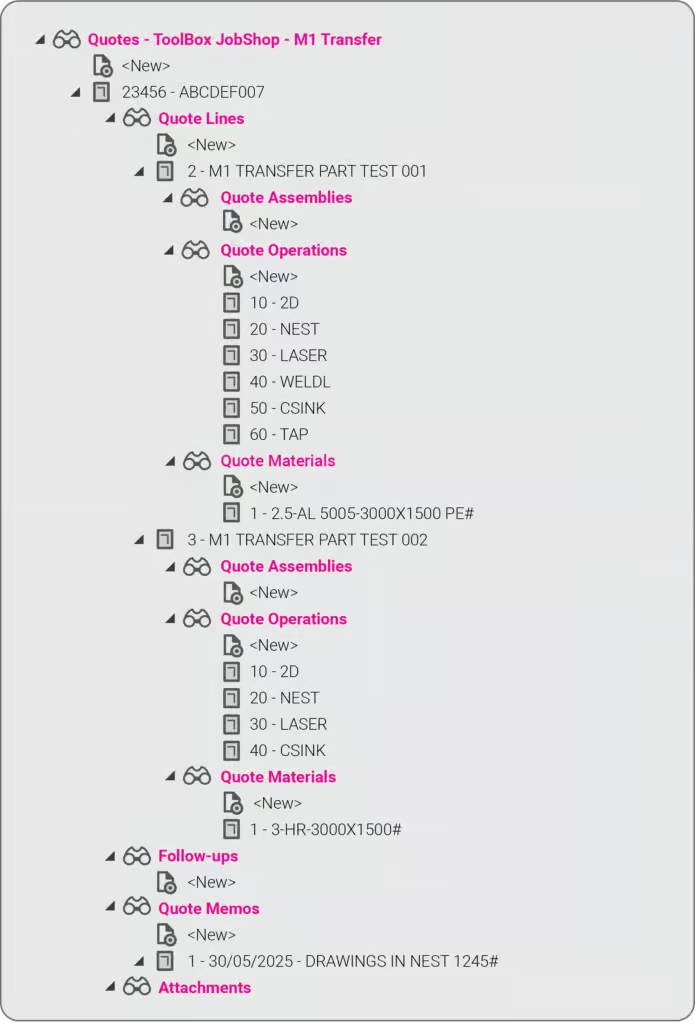
It means you can now send quotes, order details, and production-ready drawings directly from Tempus Tools into your M1 ERP — no more double handling, no more data entry errors, no more jumping between systems.
This integration eliminates any “dead zone” between quoting and production. You get the specialist laser quoting power of Tempus Tools (like lightning-fast nesting, material cost accuracy, and margin control) combined with the operational backbone of M1.
It’s quoting that talks to your shop floor.
We’ve talked about how integrations like Google Drive can supercharge job shop workflows, and this M1 integration is another great example.
Want to learn more or set it up? If you want to avoid the limitations in the generic quoting functions in ERP/MRP software, but still use the rich planning and production features in ERP/MRP software, then get in touch today.
Book a demo or email us at support@tempustools.com and we’ll help you get connected.
Tempus Tools + M1 = quoting to production, finally in sync.
Read blog
Product updates
0
min read
Tempus Tools’ Google Drive integration: 6 ways to supercharge your job shop efficiency
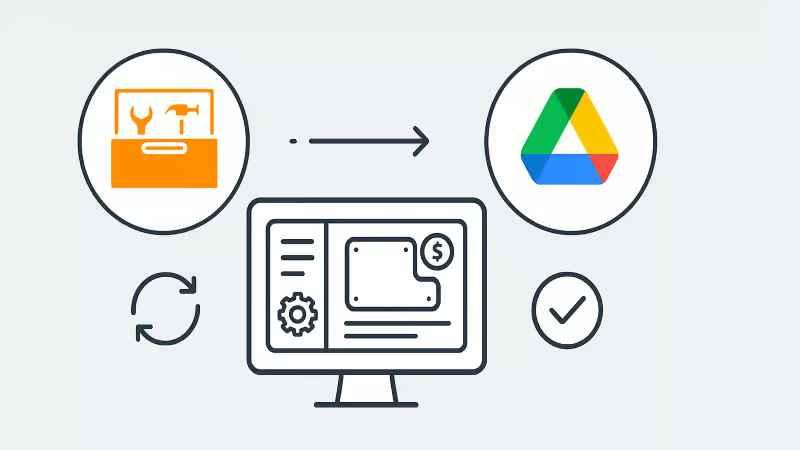
Tempus Tools’ new Google Drive integration automatically saves your quote data and part files to Drive, opening the door to faster, smarter workflows. In this post, we highlight six clever ways job shops are already using it to boost efficiency.
Last month Tempus Tools released a powerful new feature: seamless integration with Google Drive.
Since then, we’ve heard from lots of customers about the innovative ways they have implemented this integration in their job shops, and we wanted to share the best six with you to inspire you to use the feature in your shop.
First, a quick recap: with the Google Drive integration, all your quote data (in CSV format) and production-ready part files can be automatically saved to your chosen Google Drive folder. From here, they can be exported to any number of programs or that data can be manipulated for many use cases, opening up a world of automation, reporting and connectivity for your job shop. We’ve also put together a quick video to show the integration in action.
1. Automate quote data collection for reporting
With every quote automatically saved, you can easily compile and analyse your quote performance over time. Use Google Sheets or your favourite analytics tool to track:
- win/loss rates
- performance across material types
- average order size
- breakdown of secondary processes contributions
This data-driven approach helps you identify trends, optimise pricing and improve customer response times.
2. Connect with ERP/MRP and other business systems
Some apps have native integration with Google Drive, which makes taking in quote data and parts easy, but many need a formal API. Luckily, Google Drive comes with its own API.
Some users have used the Google Drive API to build automations that push quote data directly into ERP, MRP or order management systems. This can streamline order processing, reduce manual data entry and ensure your production schedule is always up to date.
3. Organise your orders by material type
Use the exported quote data to create a parts planner that groups jobs by common material type. This enables you to:
- batch similar jobs for more efficient material usage
- reduce changeover times on machines
- optimise purchasing and inventory management
A simple Google Sheets script or integration with a dashboard tool can make this process nearly automatic.
4. Integrate with project management tools
Connect your quote data with popular tools like ClickUp, Monday.com or Airtable. Build custom dashboards and planners for your factory, visualise job statuses and assign tasks to your team-all based on real-time quoting data. These tools don’t require coding or a developer and anyone can work wonders. These types of projects boost collaboration on the shop floor and keep everyone aligned on priorities.
5. Create a scheduling calendar from time calculations
Use the time estimates in your quote data to automatically populate a production calendar. With a Google Calendar integration, you can:
- visualise machine and operator workloads
- identify bottlenecks before they happen
- easily adjust schedules as new jobs come in
This proactive scheduling helps you deliver on time, every time.
6. Enable automated notifications and workflows
Set up Google Drive triggers (using tools like Zapier or Google Apps Script) to notify your team when new quotes are confirmed as orders, or to kick off downstream processes-like updating CRM records or ordering materials.
Getting started is easy
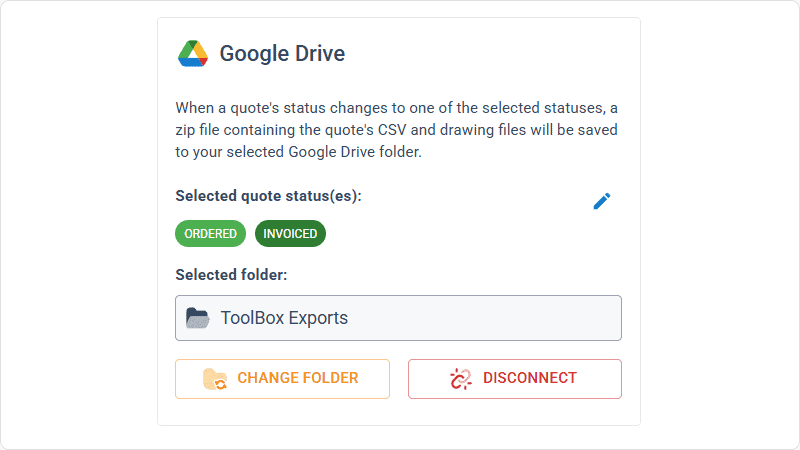
- Go to Settings > Organisation settings > Integrations in your Tempus Tools Tempus Tools account
- Connect your Google Drive and select your preferred folder
- Choose the quote statuses that will trigger automatic file saving
- Start building automations and workflows that fit your shop’s needs
This integration is designed to be flexible-whether you want to automate reporting, connect with business systems, or simply keep your files organised, Tempus Tools and Google Drive make it possible.
Ready to enhance your job shop efficiency? Try the new Google Drive integration today.
Read blog
Articles
0
min read
Is expensive, non-dedicated software holding you back from effortless laser cutting quoting?
Many laser cutting job shops still rely on generic or overly complex software, slowing down RFQ response times and creating bottlenecks that hurt profitability. Tempus Tools offers a fast, intuitive, and purpose-built quoting solution—with powerful features, simple setup, and transparent pricing—to help shops quote accurately, streamline production, and stay competitive.
Laser cutting is a precise task, requiring machinery tailored to specific requirements. Profitability is significantly boosted by the ability to be able to respond quickly to customer requests for quotes (RFQs), and efficiently deliver the product.
“With the time and energy often spent on selecting the right laser cutting machine, it’s amazing how often software is overlooked as a driver of productivity,” says Tempus Tools Head of Global Sales, Mark Washington.

“Sometimes laser cutting companies are stuck using software that wasn’t specifically designed for job shops, but it’s all that their team is used to using. Other times, expensive software is implemented, but only a small fraction of the features are actually used,” he says.
“And in many cases, it becomes so complex that a specialist is hired to manage quoting via the software – but what happens if they leave the company?”
Tempus Tools is the creator of dedicated quoting software, Tempus Tools, which can provide fast, accurate, and consistent laser cutting quotes that are professionally presented, ready to send back to the customer.
“Using software that isn’t specifically designed for laser cutting is like using a cricket bat to play tennis. It might get the job done, but it would be far more efficient and accurate with the tools designed for the job!” says Mark (pictured, right).
“In addition to providing quotes in minutes, Tempus Tools can also produce production documents with the click of a button, to add further efficiency to running a job shop floor,” he adds.
A shift in the industry
With customers demanding faster service, the industry is shifting to tailored laser cutting quoting solutions, to enhance their RFQ response times, and Mark sees this as part of a larger global trend.
“It’s evident across a number of industries – smarter players want to utilise technologies specifically targeted to their industry to out-pace competitors. And laser cutting job shops are enthusiastically getting on board with this trend,” he says.
“Tempus Tools has been specifically designed for laser cutting job shops. It’s quick to set up, intuitive, and user-friendly, so the entire team can use it with minimal training, instead of relying on one specialist.”
Tempus Tools cloud-based laser cutting quoting software can be set up with information on material price, cutting time, labour, and other relevant information, to generate quotes quickly and accurately, with repeatability.
“The Tempus Tools team has decades of experience in the laser cutting industry, from the shop floor, through to management, and running their own laser cutting enterprises, so we know the industry inside out – and we can support through setup and every step of the journey, for no additional charges,” adds Mark.
“A major inhibitor of laser cutting quoting software has often been cost, with powerful software that can do it all costing thousands per month. But if you only need dedicated laser cutting quoting software, our plans start from US$100 per month, and are packed full of features you will actually use,” he says.
Switching software – overcoming challenges
Even with the knowledge of the benefits of dedicated laser cutting quoting software, job shops can be hesitant about the time involved in switching, says Mark. He notes some of the main concerns:
- Time – often job shops have tried other software implementations and it’s taken months, and they just cannot afford to spend that time again. But Tempus Tools isn’t like other software. For a job shop with one laser, press brake, and standard secondary processes, set up takes less than 90 minutes.
- Staff training – job shops often believe their staff don’t have the time or capacity to learn a whole new software. But again, Tempus Tools is different. It’s designed to be user-friendly, easy to learn, and staff end up doing their jobs more efficiently, and enjoying the features right away.
- Hidden costs – this is a big factor for any software, and job shops are highly alert to cheap upfront costs, followed by lots of add-ons. No one likes to be “nickel and dimed”. For Tempus Tools, it’s a monthly or yearly subscription, and that’s all. No extra charges for support, upgrades, or training. Features all have a set pricing that’s clear from the outset.
- Too many programs – some job shops have two, three, or more different software programs – why add more, especially if they don’t talk to each other? That’s a totally valid concern. Tempus Tools outputs a CSV as standard with all the quote data, making integration seamless and easy.
“The Tempus Tools leadership team has decades of experience working from the shop floor to the top floor, so they understand the pain of changing software, and have designed Tempus Tools to be effortless and simple,” says Mark.
Tempus Tools features
Tempus Tools features that have been specifically designed for laser cutting job shops include:
- 3D model extractor. Identify, extract and unfold sheet-metal parts directly from 3D assemblies without a 3D software package.
- PDF to CAD convertor. Convert a vector PDF into a CAD file instantly. No tracing, no CAD package, just click on a part and extract it into your quote.
- Tube quoting. Easily drag and drop rectangular, square or round hollow sections into the tube module. It quickly calculates highly accurate cutting time and material consumption for pricing.
- Web Store. Let your customers get instant pricing and place orders from your website 24/7 with an online quoting portal.
- Secondary processes. Get accurate and consistent folding prices quickly using the built-in folding algorithm developed by specialists with decades of experience using brake presses.
- Drawing Doctor®. Upon upload of a 2D DXF or DWG file, Drawing Doctor® automatically corrects for double lines, dimensions, and small end points that are hidden in some drawings.
- Part Library. Part Library allows you to save parts that you’ve produced for a customer for re-use. Saves time on repeat orders and quotes, by dropping an existing part straight into the quote, ready to calculate, based on the latest pricing.
“These are just a few of our most popular features, but there are lots more within Tempus Tools, and our development team is constantly listening for customer feedback to determine what new features can be added,” says Mark.
“So for effortless laser cutting quoting, don’t let software hold you back, let it be the catalyst that drives business growth. We offer an obligation-free trial of Tempus Tools so that laser cutting job shops can see the difference for themselves.”
Read blog