
Why Quote Speed Can Matter More Than Price in Fabrication

06 Jul 2026

In fabrication, price matters. But getting your quote in front of the customer first often matters more.
Industry veterans who've spent decades running job shops and building quoting software have seen the pattern play out thousands of times: the shop that responds quickly wins work that slower competitors never get a chance to bid on. If you're looking to configure quotes faster, understanding why speed wins is the first step.
This article draws on practical experience working with fabrication shops to explain what drives RFQ response time, what slows shops down, and how faster quoting changes customer relationships.
Why speed matters during the RFQ stage
The customer requesting your quote is usually under time pressure themselves.
A fabricator needs laser-cut parts to complete their own quote for an end client. A maintenance engineer needs a replacement bracket to get equipment running again. A project manager has a deadline and needs to lock in suppliers.
When your quote arrives first, you're solving their problem while they're still actively thinking about it. By the time slower quotes arrive, they may have already committed — or lost interest in chasing the job at all.
This dynamic compounds down the supply chain. Your customer's customer is also under pressure. Everyone wants answers quickly. The shop that delivers clarity fastest earns trust and wins work.
When speed matters most - and when it doesn't
Speed isn't equally important for every job. The relationship between quote turnaround and win rate depends on job size, complexity, and risk.
- Small to medium jobs: Speed dominates. For routine work — standard materials, straightforward geometry, modest quantities — the first clear quote often wins. Customers don't want to wait around comparing prices when the dollars at stake don't justify the delay.
- Large jobs with significant value: Price competition intensifies. A $100,000 order for 10,000 parts is worth shopping around. The customer will wait two or three days to see what multiple vendors offer. Speed still matters for getting into the consideration set, but it won't override a meaningful price difference.
- Complex secondary operations: Rushing can cost money. Jobs involving folding, pressing, powder coating, or outside services need careful pricing. A quick quote that misses a process step or underestimates complexity creates problems downstream. Better to take an extra hour and get it right.
- Exotic materials: Higher risk demands more care. Quoting 3mm titanium isn't the same as quoting 3mm mild steel. The material costs four or five times as much, and the consequences of getting it wrong are proportionally larger. Customers understand that unusual materials may take longer to price accurately.
The pattern: smaller, simpler, more routine work favours speed. Larger, complex, or high-risk work favours accuracy — though responding reasonably quickly still matters for credibility.
Why the cheapest quote doesn't always win
Price sensitivity varies by customer and situation. But across fabrication, a pattern emerges: customers value clarity, confidence, and speed alongside cost.
A quote that arrives fast with clear line items, realistic lead times, and a professional presentation signals competence. The customer learns something about how you operate before they've even placed an order. If the quote is a mess, or takes days to arrive, they wonder what the actual work will be like.
Inconsistent pricing damages trust directly. When the same customer orders the same part twice and gets different prices, they stop believing your numbers. Industry veterans have seen customers develop "buddies" inside shops — specific estimators they always request because that person gives them reliable pricing. That's a symptom of a system that doesn't enforce consistency.
The fabricator who responds in hours with an accurate quote often beats the fabricator who responds in days with a slightly lower price. Speed signals capability. It suggests you have your operation under control.

What slows quoting down
Shops that struggle with quote turnaround usually face some combination of these bottlenecks:
The owner is doing everything
In smaller shops, the person who knows pricing best is also running the machine, managing the floor, and handling customer calls. Quotes get done when there's a gap — often after hours or on weekends.
One industry veteran described it this way: many of his customers do all their quoting at night. During the day, they're cutting and folding and loading. The quotes wait until the shop goes quiet.
This works until volume grows. Then quotes backlog, response times stretch, and work goes to competitors who answer faster.
One key person holds all the knowledge
Without documented pricing rules, quoting depends on whoever knows "how we price things." That person becomes a bottleneck. When they're out, busy, or overwhelmed, quotes wait.
Shops with quoting software that enforces rules don't have this problem. Anyone with access can generate a quote because the logic lives in the system, not in someone's head. The owner can review complex quotes without being involved in every routine estimate.
Getting accurate time estimates requires the CAM system
If the only way to get real cut time is to load the drawing into your programming software, you've tied quoting to the same resource that runs production. Every quote done this way is time the machine isn't cutting.
The alternative - eyeballing cut length and guessing - introduces error. Two estimators looking at the same drawing come up with different numbers. Consistency disappears.
Material pricing requires phone calls
Shops that don't carry much inventory have to call suppliers for pricing on larger jobs. That introduces delays - waiting for callbacks, negotiating on quantity breaks, confirming availability.
The delay multiplies for exotic materials or partial sheets. Finding an offcut of 16mm 316 stainless at a reasonable price takes time. Sometimes it's worth it to get the margin right. Sometimes it costs you the job.
Messy drawings need clarification
Customer drawings arrive in all conditions. Clean CAD files quote fast. Hand-sketched paper drawings with illegible dimensions require back-and-forth. Was that 60 or 66? Is this dimension to the edge or the centre?
Every clarification email adds delay. Tools like Drawing Doctor help with geometry problems — overlapping lines, open contours, duplicates — but missing information still requires human communication.
Quotes just pile up
When quoting is manual and time-consuming, the queue grows. This week's rush jobs get priority. Last week's requests sit waiting. By the time you respond, the customer has moved on.
The backlog becomes self-reinforcing. More quotes waiting means more pressure, which means less time per quote, which means lower quality or longer delays.

How shops can configure quotes faster without losing accuracy
Speed and accuracy aren't opposites. The shops that quote fastest are often the most consistent because they've built systems that handle the routine work automatically.
Separate the routine from the complex
Most quotes don't need senior review. Standard materials, straightforward geometry, familiar processes — these can follow established rules. Save the experienced eyes for genuinely difficult jobs: exotic materials, complex assemblies, high-value contracts.
Quoting software with configurable rules lets junior staff handle volume while flagging exceptions for review. The owner stays informed without becoming the bottleneck.
Keep material pricing current
Stale pricing causes two problems: quotes that lose money when costs have risen, and quotes that lose jobs when costs have dropped. Neither is visible until after the fact.
Build a rhythm for updating material costs. Monthly, at minimum. More often during volatile markets. Make it easy to update once and have every quote reflect the change.
Automate geometry interpretation
The biggest time sink in manual quoting is figuring out cut length, pierce count, and material usage from a drawing. Software that reads CAD geometry directly eliminates this step. Upload the file, apply your rates, get accurate numbers in seconds instead of minutes.
This also removes inconsistency. The software measures the same way every time. Different estimators get the same result.
Build a library of repeat work
Some shops see significant repeat business. When a customer reorders a part you've quoted before, finding that previous quote should take seconds, not a dig through file folders.
A part library stores previously quoted geometry with all its attributes — material, thickness, processes, customer pricing. Drop it into a new quote without re-measuring or re-cleaning.
The value compounds over time. The more parts in the library, the faster repeat quotes become.
Let customers self-serve when appropriate
The fastest quote is one you don't have to do at all. A web store that lets customers upload drawings and get instant pricing handles routine work around the clock.
Not every customer wants self-service. Some prefer the personal touch, or have complex jobs that need discussion. But for straightforward repeat orders or simple one-offs, self-serve quoting removes the bottleneck entirely — and delivers the speed that wins jobs.
Where software helps most
The value of quoting software depends on what you're comparing against.
- Against spreadsheets: The advantage is geometry. Calculating cut time, pierce count, and nesting from actual CAD data — rather than eyeballing and estimating — is transformative. Accuracy improves. Speed improves. Consistency improves.
- Against dodgy drawings: Drawing Doctor catches geometry problems before they break quoting. Overlapping lines, open contours, disconnected paths — the issues that cause spreadsheet-based shops to go back and forth with customers get flagged and fixed upfront.
- Against key-person dependency: Rules-based pricing means the logic lives in the system. Material costs, hourly rates, secondary process calculations, customer-specific discounts — all configurable, all consistent, all usable by anyone authorised to quote.
- Against quote backlog: Faster quotes mean shorter queues. The time freed up by automation lets shops respond to more RFQs, or respond to the same RFQs faster.
The customer experience of speed
From the customer's perspective, a fast quote communicates something beyond the price itself.
It says: this shop has their act together. They're not scrambling to figure out how to price my job. They have systems, capacity, and confidence.
A slow quote — or worse, a quote that requires multiple follow-ups — sends the opposite signal. If it takes them three days to tell me what it costs, how long will it take to actually make the parts?
Speed builds trust before the first order ships. It creates a positive first impression that influences everything that follows.
Frequently asked questions
Why does quote speed matter in fabrication?
The customer requesting your quote is usually under time pressure themselves. They need to respond to their own customer, hit a project deadline, or solve an urgent problem. The shop that responds first often wins work that slower competitors never get to bid on.
Does the cheapest quote always win?
Not usually. For small to medium jobs, speed and clarity often outweigh modest price differences. Customers value confidence, professionalism, and responsive communication. Inconsistent pricing damages trust regardless of the numbers.
How can fabrication shops configure quotes faster?
Automate geometry measurement by using software that reads CAD files directly. Keep material pricing current. Establish rules for routine work so it doesn't require senior review. Build a part library for repeat jobs. Let customers self-serve through a web store for simple orders.
What slows RFQ response times?
Common bottlenecks: key person dependency, manual geometry measurement, stale material pricing, messy customer drawings that need clarification, and quote backlog that grows faster than capacity to process it.
Can quoting software help shops respond faster?
Yes. Software that calculates cut time and material usage from actual geometry - rather than estimates - removes the biggest time sink in manual quoting. Rules-based pricing ensures consistency without requiring the owner's involvement in every quote.
How does quote speed affect customer perception and trust?
Fast, accurate quotes signal competence. They suggest the shop has its operation under control. Slow or inconsistent quotes raise doubts about what the actual work will be like. First impressions from the quoting stage influence the entire customer relationship.
If RFQ response time is costing you work, see how Tempus Tools helps fabrication shops configure quotes faster — accurate pricing from CAD geometry, consistent rules, and professional output in minutes instead of hours.
See how Tempus Tools helps fabricators quote faster and smarter.
Share this post
Articles

Resources
Related Posts
Product updates
0
min read
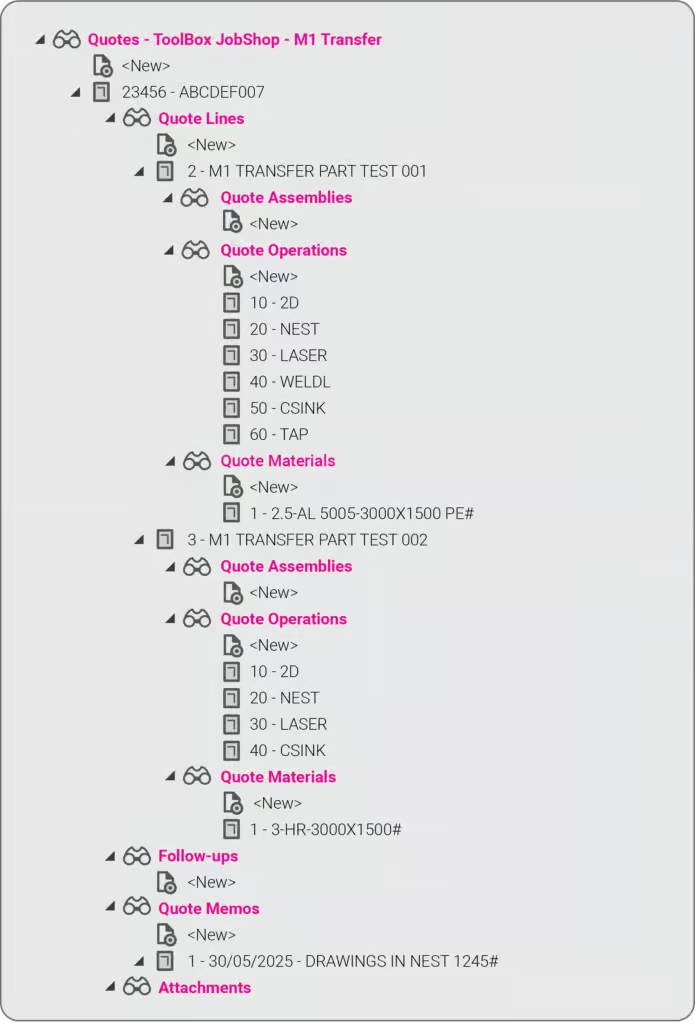
New integration: Tempus Tools + ECI M1 – from quote to order to ERP, seamlessly
At Tempus Tools, we know that speed and accuracy are everything in a laser cutting job shop, and today we’re announcing a new integration that makes both even easier.
We’re now fully integrated with ECI Software’s M1 ERP system.

What does that mean for your job shop?
It means you can now send quotes, order details, and production-ready drawings directly from Tempus Tools into your M1 ERP — no more double handling, no more data entry errors, no more jumping between systems.
This integration eliminates any “dead zone” between quoting and production. You get the specialist laser quoting power of Tempus Tools (like lightning-fast nesting, material cost accuracy, and margin control) combined with the operational backbone of M1.
It’s quoting that talks to your shop floor.
We’ve talked about how integrations like Google Drive can supercharge job shop workflows, and this M1 integration is another great example.
Want to learn more or set it up? If you want to avoid the limitations in the generic quoting functions in ERP/MRP software, but still use the rich planning and production features in ERP/MRP software, then get in touch today.
Book a demo or email us at support@tempustools.com and we’ll help you get connected.
Tempus Tools + M1 = quoting to production, finally in sync.
Read blog
Product updates
0
min read
Tempus Tools’ Google Drive integration: 6 ways to supercharge your job shop efficiency
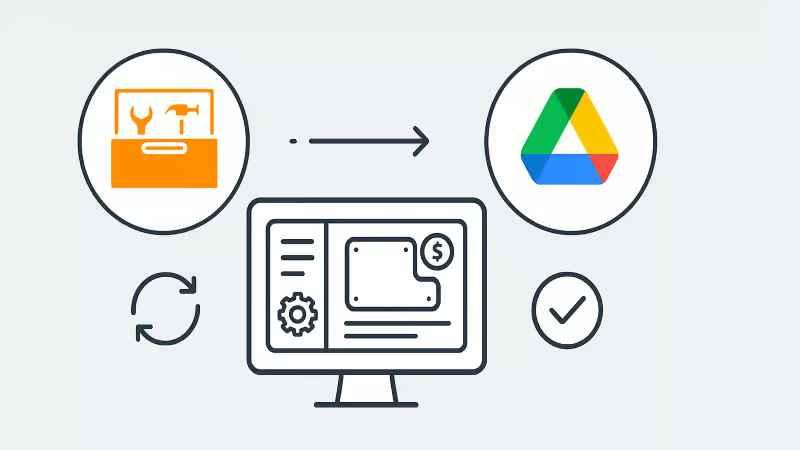
Tempus Tools’ new Google Drive integration automatically saves your quote data and part files to Drive, opening the door to faster, smarter workflows. In this post, we highlight six clever ways job shops are already using it to boost efficiency.
Last month Tempus Tools released a powerful new feature: seamless integration with Google Drive.
Since then, we’ve heard from lots of customers about the innovative ways they have implemented this integration in their job shops, and we wanted to share the best six with you to inspire you to use the feature in your shop.
First, a quick recap: with the Google Drive integration, all your quote data (in CSV format) and production-ready part files can be automatically saved to your chosen Google Drive folder. From here, they can be exported to any number of programs or that data can be manipulated for many use cases, opening up a world of automation, reporting and connectivity for your job shop. We’ve also put together a quick video to show the integration in action.
1. Automate quote data collection for reporting
With every quote automatically saved, you can easily compile and analyse your quote performance over time. Use Google Sheets or your favourite analytics tool to track:
- win/loss rates
- performance across material types
- average order size
- breakdown of secondary processes contributions
This data-driven approach helps you identify trends, optimise pricing and improve customer response times.
2. Connect with ERP/MRP and other business systems
Some apps have native integration with Google Drive, which makes taking in quote data and parts easy, but many need a formal API. Luckily, Google Drive comes with its own API.
Some users have used the Google Drive API to build automations that push quote data directly into ERP, MRP or order management systems. This can streamline order processing, reduce manual data entry and ensure your production schedule is always up to date.
3. Organise your orders by material type
Use the exported quote data to create a parts planner that groups jobs by common material type. This enables you to:
- batch similar jobs for more efficient material usage
- reduce changeover times on machines
- optimise purchasing and inventory management
A simple Google Sheets script or integration with a dashboard tool can make this process nearly automatic.
4. Integrate with project management tools
Connect your quote data with popular tools like ClickUp, Monday.com or Airtable. Build custom dashboards and planners for your factory, visualise job statuses and assign tasks to your team-all based on real-time quoting data. These tools don’t require coding or a developer and anyone can work wonders. These types of projects boost collaboration on the shop floor and keep everyone aligned on priorities.
5. Create a scheduling calendar from time calculations
Use the time estimates in your quote data to automatically populate a production calendar. With a Google Calendar integration, you can:
- visualise machine and operator workloads
- identify bottlenecks before they happen
- easily adjust schedules as new jobs come in
This proactive scheduling helps you deliver on time, every time.
6. Enable automated notifications and workflows
Set up Google Drive triggers (using tools like Zapier or Google Apps Script) to notify your team when new quotes are confirmed as orders, or to kick off downstream processes-like updating CRM records or ordering materials.
Getting started is easy
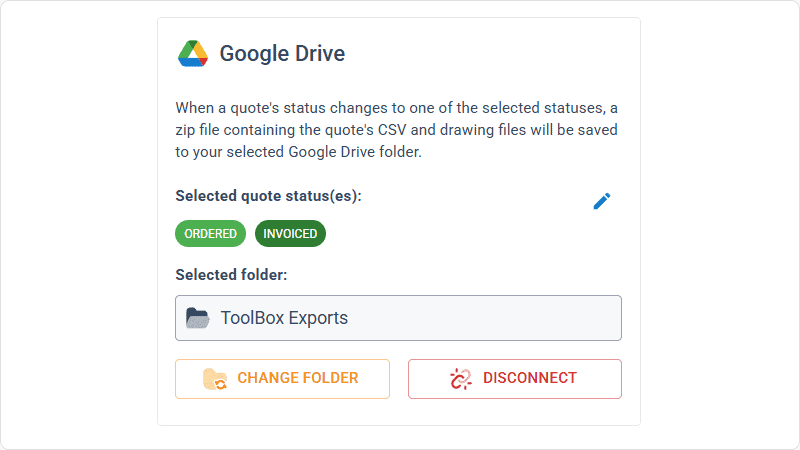
- Go to Settings > Organisation settings > Integrations in your Tempus Tools Tempus Tools account
- Connect your Google Drive and select your preferred folder
- Choose the quote statuses that will trigger automatic file saving
- Start building automations and workflows that fit your shop’s needs
This integration is designed to be flexible-whether you want to automate reporting, connect with business systems, or simply keep your files organised, Tempus Tools and Google Drive make it possible.
Ready to enhance your job shop efficiency? Try the new Google Drive integration today.
Read blog

Articles
0
min read
Is expensive, non-dedicated software holding you back from effortless laser cutting quoting?
Many laser cutting job shops still rely on generic or overly complex software, slowing down RFQ response times and creating bottlenecks that hurt profitability. Tempus Tools offers a fast, intuitive, and purpose-built quoting solution—with powerful features, simple setup, and transparent pricing—to help shops quote accurately, streamline production, and stay competitive.
Laser cutting is a precise task, requiring machinery tailored to specific requirements. Profitability is significantly boosted by the ability to be able to respond quickly to customer requests for quotes (RFQs), and efficiently deliver the product.
“With the time and energy often spent on selecting the right laser cutting machine, it’s amazing how often software is overlooked as a driver of productivity,” says Tempus Tools Head of Global Sales, Mark Washington.

“Sometimes laser cutting companies are stuck using software that wasn’t specifically designed for job shops, but it’s all that their team is used to using. Other times, expensive software is implemented, but only a small fraction of the features are actually used,” he says.
“And in many cases, it becomes so complex that a specialist is hired to manage quoting via the software – but what happens if they leave the company?”
Tempus Tools is the creator of dedicated quoting software, Tempus Tools, which can provide fast, accurate, and consistent laser cutting quotes that are professionally presented, ready to send back to the customer.
“Using software that isn’t specifically designed for laser cutting is like using a cricket bat to play tennis. It might get the job done, but it would be far more efficient and accurate with the tools designed for the job!” says Mark (pictured, right).
“In addition to providing quotes in minutes, Tempus Tools can also produce production documents with the click of a button, to add further efficiency to running a job shop floor,” he adds.
A shift in the industry
With customers demanding faster service, the industry is shifting to tailored laser cutting quoting solutions, to enhance their RFQ response times, and Mark sees this as part of a larger global trend.
“It’s evident across a number of industries – smarter players want to utilise technologies specifically targeted to their industry to out-pace competitors. And laser cutting job shops are enthusiastically getting on board with this trend,” he says.
“Tempus Tools has been specifically designed for laser cutting job shops. It’s quick to set up, intuitive, and user-friendly, so the entire team can use it with minimal training, instead of relying on one specialist.”
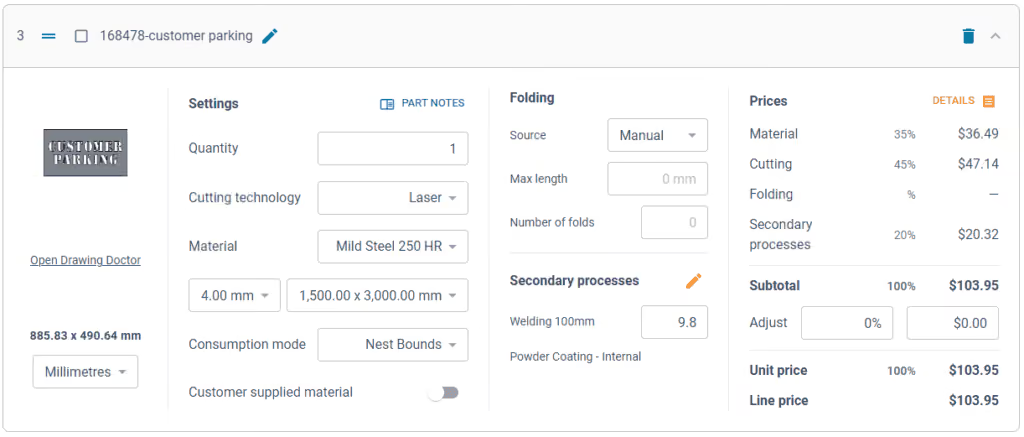
Tempus Tools cloud-based laser cutting quoting software can be set up with information on material price, cutting time, labour, and other relevant information, to generate quotes quickly and accurately, with repeatability.
“The Tempus Tools team has decades of experience in the laser cutting industry, from the shop floor, through to management, and running their own laser cutting enterprises, so we know the industry inside out – and we can support through setup and every step of the journey, for no additional charges,” adds Mark.
“A major inhibitor of laser cutting quoting software has often been cost, with powerful software that can do it all costing thousands per month. But if you only need dedicated laser cutting quoting software, our plans start from US$100 per month, and are packed full of features you will actually use,” he says.
Switching software – overcoming challenges
Even with the knowledge of the benefits of dedicated laser cutting quoting software, job shops can be hesitant about the time involved in switching, says Mark. He notes some of the main concerns:
- Time – often job shops have tried other software implementations and it’s taken months, and they just cannot afford to spend that time again. But Tempus Tools isn’t like other software. For a job shop with one laser, press brake, and standard secondary processes, set up takes less than 90 minutes.
- Staff training – job shops often believe their staff don’t have the time or capacity to learn a whole new software. But again, Tempus Tools is different. It’s designed to be user-friendly, easy to learn, and staff end up doing their jobs more efficiently, and enjoying the features right away.
- Hidden costs – this is a big factor for any software, and job shops are highly alert to cheap upfront costs, followed by lots of add-ons. No one likes to be “nickel and dimed”. For Tempus Tools, it’s a monthly or yearly subscription, and that’s all. No extra charges for support, upgrades, or training. Features all have a set pricing that’s clear from the outset.
- Too many programs – some job shops have two, three, or more different software programs – why add more, especially if they don’t talk to each other? That’s a totally valid concern. Tempus Tools outputs a CSV as standard with all the quote data, making integration seamless and easy.
“The Tempus Tools leadership team has decades of experience working from the shop floor to the top floor, so they understand the pain of changing software, and have designed Tempus Tools to be effortless and simple,” says Mark.
Tempus Tools features
Tempus Tools features that have been specifically designed for laser cutting job shops include:
- 3D model extractor. Identify, extract and unfold sheet-metal parts directly from 3D assemblies without a 3D software package.
- PDF to CAD convertor. Convert a vector PDF into a CAD file instantly. No tracing, no CAD package, just click on a part and extract it into your quote.
- Tube quoting. Easily drag and drop rectangular, square or round hollow sections into the tube module. It quickly calculates highly accurate cutting time and material consumption for pricing.
- Web Store. Let your customers get instant pricing and place orders from your website 24/7 with an online quoting portal.
- Secondary processes. Get accurate and consistent folding prices quickly using the built-in folding algorithm developed by specialists with decades of experience using brake presses.
- Drawing Doctor®. Upon upload of a 2D DXF or DWG file, Drawing Doctor® automatically corrects for double lines, dimensions, and small end points that are hidden in some drawings.
- Part Library. Part Library allows you to save parts that you’ve produced for a customer for re-use. Saves time on repeat orders and quotes, by dropping an existing part straight into the quote, ready to calculate, based on the latest pricing.
“These are just a few of our most popular features, but there are lots more within Tempus Tools, and our development team is constantly listening for customer feedback to determine what new features can be added,” says Mark.
“So for effortless laser cutting quoting, don’t let software hold you back, let it be the catalyst that drives business growth. We offer an obligation-free trial of Tempus Tools so that laser cutting job shops can see the difference for themselves.”
Read blog