
How to maximise the profitability of your laser cutting job shop – Material price, scrap metal, nesting types, quoting, and other top tips

13 Feb 2023

The laser cutting industry is a complex one to master. The early years can be particularly difficult if you don’t set up your job shop operations and quoting systems in an optimal way.
As someone who’s been in the industry for decades, both at the practical, hands-on factory floor level, as well as management and ownership level, here’s my advice on how to maximise your profitability. There are great tips for startups and new players here, but the advice will ring true for laser cutting businesses of any age.
Material pricing is always changing
And you’ll need to change your quotes to match it. If you’re quoting a job based on an old part price, and your supplier varies the price of materials, you could end up losing money on the job or charging a price that’s too high for the market. Ultimately, you may end up losing customers, so it’s a fine line to tread. Using a rules-based laser cutting quoting software that ensures current material market pricing can help deliver accuracy and consistency every time. More on this later, but first, how are you quoting?
Is quoting costing you money in the production area?
It’s a common issue amongst job shops. If your customer service staff are preparing the quote, they typically don’t have the experience to know how long different processes will take – from welding, to bending, to folding, to the cutting itself.
So you find yourself in a situation where customer service staff are heading out to the shop floor to ask each specialist how long tasks will take. These specialists (usually some of the higher paid staff) then have to take time away from their work to answer questions or run simulations to determine accurate times.
What you really need is a job shop estimating software system that accurately and consistently quotes the job, including all secondary processes. This way, your customer will receive consistent part prices every time, because nothing annoys them more than receiving two different prices from two different sales staff within the same business! The customer then doubts the pricing, can lose confidence in the pricing, which can then lead the customer to verify pricing by seeking a quote from an alternate supplier.
Have you factored in scrap metal and material wastage?
A recent survey of 100 of our customers worldwide showed that over a two year period approximately 56% of revenue in laser job shops was derived from the sale of material.
The problem of how much material is consumed in a month is always a very complicated calculation and depends on the value of material in work-in-progress, the value of the full sheets in your stores, and the value of the remnants of material you are holding.
It’s crucial that material wastage is considered in your part price calculations, or once again, you could lose money on jobs. Most cutting jobs produce a significant amount of scrap – and even with an optimal set-up, there will always be some material wastage. The key is to set up your material pricing correctly, so the customers are contributing.
There are three common methods for calculating material consumption and, therefore, part price and each creates a different result.
1. Area of a single part. Area-based material consumption is where the area of the part (the part itself, not the bounds) is calculated and then divided into the sheet. It doesn’t allow for any web and is quite inaccurate. In most cases, it gives a lower price per part than is actually consumed.
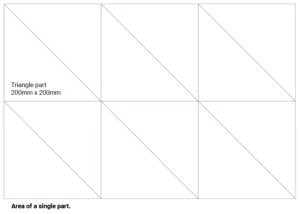
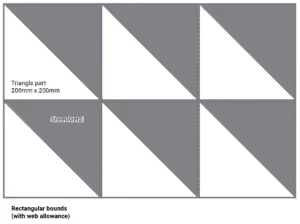
2. Rectangular bounds (with web allowance). Rectangular nesting is the safest in terms of making sure that you have charged for all the material that is used, given that the rectangular boundary around the part is always larger than the part itself. This means that a larger percentage of scrap is calculated in the part price. This generally results in a lower win rate of quotes, due to the material cost being higher than competitors that are using other methods.
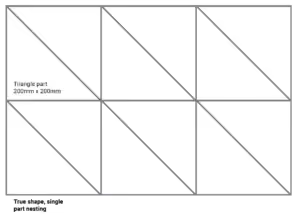
3. True shape single-part nesting. This method uses the best of both worlds. Its main aim is to work out how many copies of a single part can be cut from a single sheet. The calculation for the material component of the part price allows you to apply rules that decide how you should price any remnant associated with the calculated sheet. This is vital as you may be willing to absorb a bit of scrap, knowing there is a good chance of filling it when it comes to production. But in a situation where you are, say, cutting disks that are 65% of the sheet height, and you are cutting a lot of them, you can potentially be stuck with a huge amount of remnant. It is important to understand who is paying for that.
A small change in nesting can mean a big change in annual revenue
Let’s take a simple example of a triangular part with a 100mm base, 300mm apex, and 10mm thickness (we will use the material thickness as the web). We use a triangle here to represent a complex non-rectangular shape, although they are simple to nest and price. If we use three different costing methods (based on a sheet 3000x1500mm with a price of $500), we get three different results.
- Area of a single part results in 300 parts per sheet, with a cost per part of $1.67.
- Rectangular bounds (with web allowance) results in 131 parts per sheet, with a cost per part of $3.82
- True shape single-part nesting (with web allowance) results in 262 parts per sheet, with a cost per part of $1.91
If you use the first method without a significant markup, you run a real risk of losing money on the material component of your quote as there is zero allowance for web and scrap.
In this case, if you use the second method, you will be unlikely to win any work. The third method is the closest to what you will achieve in production and is the safest, most competitive method.
It does not make sense, at the quoting stage, to use multi-part nesting, because you do not know the final mix of parts to be cut, so you cannot be certain you are calculating the optimal price. Single-part nesting, on the other hand, is a highly effective way to calculate the price.
Drawing on Tempus Tools’ experience of more than one million parts quoted, our customers have found that true shape single-part nesting delivers the best economic returns to their laser job shop.
The choice of nesting method also influences where you should set your material markup.
These variations may not be significant for low-quantity jobs, but if you consider that an average laser cutting machine can generate in excess of $1 million in material revenues in a year, you are looking at potential lost revenue opportunities from $50,000 – $150,000, depending on which material nesting you select for your quotations.
The preferred method of calculating the material price for a part price is true shape nesting, as it will rotate and interleave parts to make the best nest, with a close approximation to the CAM system that you’ll actually be cutting the parts with.
Cutting different shapes changes cutting times
In addition to choosing the right nesting type, something that is often overlooked is the cutting times of different shapes. A CAM system will calculate cutting times based on the geometry to be cut, but if you compare a square plate to a circle with the exact same cut length, the circle will be quicker for the machine to cut, because the laser mechanical system does not need to slow down when changing directions.
Ensure your laser cutting quoting software has built-in algorithms that take care of acceleration/deceleration tolerances. Every second of laser cutting time lost is revenue lost.
Make your quoting system work for you
You can see how easy it is for an inaccurate quote to mean that you can lose money, or lose customers. Getting the right quoting system in place is crucial to your job shop’s ongoing success and profitability.
Tempus Tools, a laser cutting quoting software, was developed as a rules-based SAAS solution with tools specifically designed for smaller job shops to simplify all facets of the quoting process.
Any staff can use Tempus Tools – no CAD or CAM training or software is required. With Tempus Tools, you’re not only delivering accurate and consistent quotes every time, but you’re doing it much more efficiently, which means you can respond faster to a Request For Quote, and you’re subsequently more likely to win the business.
Using our own data of more than one million cut parts, we found that an average quote incorporates 5.5 parts. The industry average to quote 5.5 parts is approximately 30 minutes, but with Tempus Tools, 5.5 parts can be quoted in just two minutes. That’s 15 times faster than the industry average, and it’s totally repeatable every time.
If you’re looking for a rules-based, front-end, sales-focused laser cutting quoting software, Tempus Toolscould be the ideal solution to help grow your business.
Try Tempus Tools for free for the first 14 days to see just how easy it can be.
See how Tempus Tools helps fabricators quote faster and smarter.
Share this post
Guides

Resources
Related Posts
Product updates
0
min read
New integration: Tempus Tools + ECI M1 – from quote to order to ERP, seamlessly
At Tempus Tools, we know that speed and accuracy are everything in a laser cutting job shop, and today we’re announcing a new integration that makes both even easier.
We’re now fully integrated with ECI Software’s M1 ERP system.

What does that mean for your job shop?
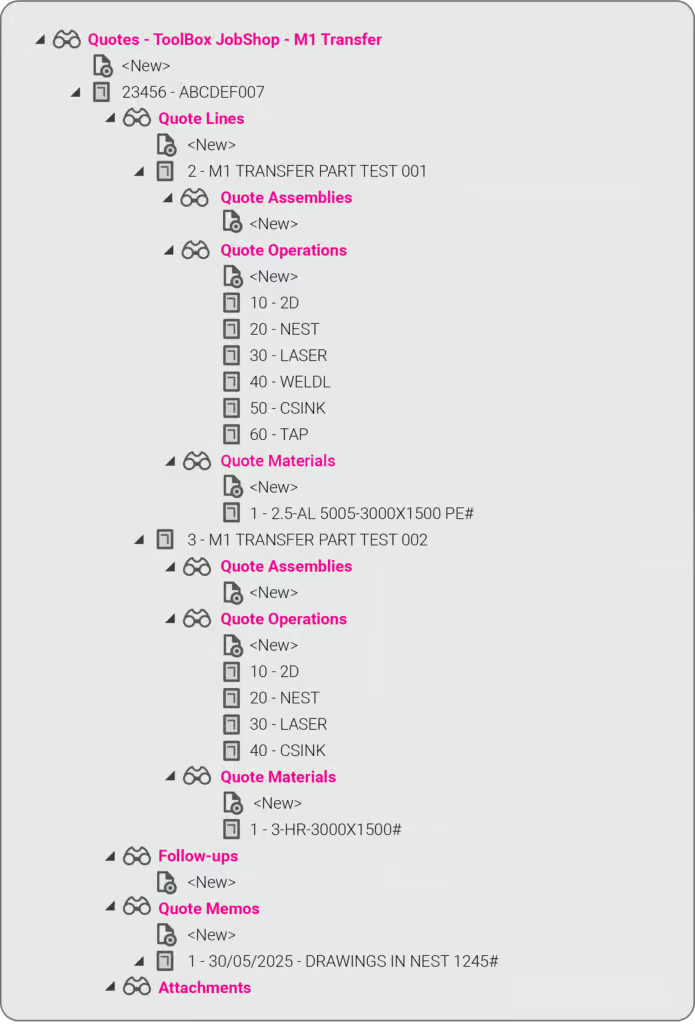
It means you can now send quotes, order details, and production-ready drawings directly from Tempus Tools into your M1 ERP — no more double handling, no more data entry errors, no more jumping between systems.
This integration eliminates any “dead zone” between quoting and production. You get the specialist laser quoting power of Tempus Tools (like lightning-fast nesting, material cost accuracy, and margin control) combined with the operational backbone of M1.
It’s quoting that talks to your shop floor.
We’ve talked about how integrations like Google Drive can supercharge job shop workflows, and this M1 integration is another great example.
Want to learn more or set it up? If you want to avoid the limitations in the generic quoting functions in ERP/MRP software, but still use the rich planning and production features in ERP/MRP software, then get in touch today.
Book a demo or email us at support@tempustools.com and we’ll help you get connected.
Tempus Tools + M1 = quoting to production, finally in sync.
Read blog
Product updates
0
min read
Tempus Tools’ Google Drive integration: 6 ways to supercharge your job shop efficiency
Tempus Tools’ new Google Drive integration automatically saves your quote data and part files to Drive, opening the door to faster, smarter workflows. In this post, we highlight six clever ways job shops are already using it to boost efficiency.
Last month Tempus Tools released a powerful new feature: seamless integration with Google Drive.
Since then, we’ve heard from lots of customers about the innovative ways they have implemented this integration in their job shops, and we wanted to share the best six with you to inspire you to use the feature in your shop.
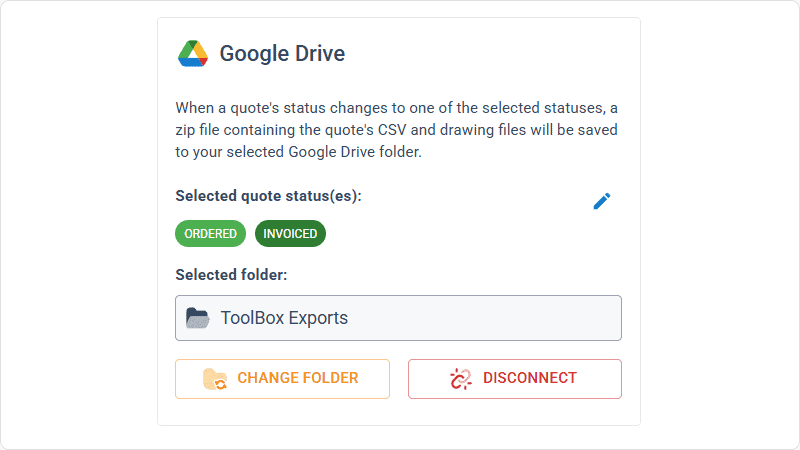
First, a quick recap: with the Google Drive integration, all your quote data (in CSV format) and production-ready part files can be automatically saved to your chosen Google Drive folder. From here, they can be exported to any number of programs or that data can be manipulated for many use cases, opening up a world of automation, reporting and connectivity for your job shop. We’ve also put together a quick video to show the integration in action.
1. Automate quote data collection for reporting
With every quote automatically saved, you can easily compile and analyse your quote performance over time. Use Google Sheets or your favourite analytics tool to track:
- win/loss rates
- performance across material types
- average order size
- breakdown of secondary processes contributions
This data-driven approach helps you identify trends, optimise pricing and improve customer response times.
2. Connect with ERP/MRP and other business systems
Some apps have native integration with Google Drive, which makes taking in quote data and parts easy, but many need a formal API. Luckily, Google Drive comes with its own API.
Some users have used the Google Drive API to build automations that push quote data directly into ERP, MRP or order management systems. This can streamline order processing, reduce manual data entry and ensure your production schedule is always up to date.
3. Organise your orders by material type
Use the exported quote data to create a parts planner that groups jobs by common material type. This enables you to:
- batch similar jobs for more efficient material usage
- reduce changeover times on machines
- optimise purchasing and inventory management
A simple Google Sheets script or integration with a dashboard tool can make this process nearly automatic.
4. Integrate with project management tools
Connect your quote data with popular tools like ClickUp, Monday.com or Airtable. Build custom dashboards and planners for your factory, visualise job statuses and assign tasks to your team-all based on real-time quoting data. These tools don’t require coding or a developer and anyone can work wonders. These types of projects boost collaboration on the shop floor and keep everyone aligned on priorities.
5. Create a scheduling calendar from time calculations
Use the time estimates in your quote data to automatically populate a production calendar. With a Google Calendar integration, you can:
- visualise machine and operator workloads
- identify bottlenecks before they happen
- easily adjust schedules as new jobs come in
This proactive scheduling helps you deliver on time, every time.
6. Enable automated notifications and workflows
Set up Google Drive triggers (using tools like Zapier or Google Apps Script) to notify your team when new quotes are confirmed as orders, or to kick off downstream processes-like updating CRM records or ordering materials.
Getting started is easy
- Go to Settings > Organisation settings > Integrations in your Tempus Tools Tempus Tools account
- Connect your Google Drive and select your preferred folder
- Choose the quote statuses that will trigger automatic file saving
- Start building automations and workflows that fit your shop’s needs
This integration is designed to be flexible-whether you want to automate reporting, connect with business systems, or simply keep your files organised, Tempus Tools and Google Drive make it possible.
Ready to enhance your job shop efficiency? Try the new Google Drive integration today.
Read blog

Articles
0
min read
Is expensive, non-dedicated software holding you back from effortless laser cutting quoting?
Many laser cutting job shops still rely on generic or overly complex software, slowing down RFQ response times and creating bottlenecks that hurt profitability. Tempus Tools offers a fast, intuitive, and purpose-built quoting solution—with powerful features, simple setup, and transparent pricing—to help shops quote accurately, streamline production, and stay competitive.
Laser cutting is a precise task, requiring machinery tailored to specific requirements. Profitability is significantly boosted by the ability to be able to respond quickly to customer requests for quotes (RFQs), and efficiently deliver the product.
“With the time and energy often spent on selecting the right laser cutting machine, it’s amazing how often software is overlooked as a driver of productivity,” says Tempus Tools Head of Global Sales, Mark Washington.

“Sometimes laser cutting companies are stuck using software that wasn’t specifically designed for job shops, but it’s all that their team is used to using. Other times, expensive software is implemented, but only a small fraction of the features are actually used,” he says.
“And in many cases, it becomes so complex that a specialist is hired to manage quoting via the software – but what happens if they leave the company?”
Tempus Tools is the creator of dedicated quoting software, Tempus Tools, which can provide fast, accurate, and consistent laser cutting quotes that are professionally presented, ready to send back to the customer.
“Using software that isn’t specifically designed for laser cutting is like using a cricket bat to play tennis. It might get the job done, but it would be far more efficient and accurate with the tools designed for the job!” says Mark (pictured, right).
“In addition to providing quotes in minutes, Tempus Tools can also produce production documents with the click of a button, to add further efficiency to running a job shop floor,” he adds.
A shift in the industry
With customers demanding faster service, the industry is shifting to tailored laser cutting quoting solutions, to enhance their RFQ response times, and Mark sees this as part of a larger global trend.
“It’s evident across a number of industries – smarter players want to utilise technologies specifically targeted to their industry to out-pace competitors. And laser cutting job shops are enthusiastically getting on board with this trend,” he says.
“Tempus Tools has been specifically designed for laser cutting job shops. It’s quick to set up, intuitive, and user-friendly, so the entire team can use it with minimal training, instead of relying on one specialist.”
Tempus Tools cloud-based laser cutting quoting software can be set up with information on material price, cutting time, labour, and other relevant information, to generate quotes quickly and accurately, with repeatability.
“The Tempus Tools team has decades of experience in the laser cutting industry, from the shop floor, through to management, and running their own laser cutting enterprises, so we know the industry inside out – and we can support through setup and every step of the journey, for no additional charges,” adds Mark.
“A major inhibitor of laser cutting quoting software has often been cost, with powerful software that can do it all costing thousands per month. But if you only need dedicated laser cutting quoting software, our plans start from US$100 per month, and are packed full of features you will actually use,” he says.
Switching software – overcoming challenges
Even with the knowledge of the benefits of dedicated laser cutting quoting software, job shops can be hesitant about the time involved in switching, says Mark. He notes some of the main concerns:
- Time – often job shops have tried other software implementations and it’s taken months, and they just cannot afford to spend that time again. But Tempus Tools isn’t like other software. For a job shop with one laser, press brake, and standard secondary processes, set up takes less than 90 minutes.
- Staff training – job shops often believe their staff don’t have the time or capacity to learn a whole new software. But again, Tempus Tools is different. It’s designed to be user-friendly, easy to learn, and staff end up doing their jobs more efficiently, and enjoying the features right away.
- Hidden costs – this is a big factor for any software, and job shops are highly alert to cheap upfront costs, followed by lots of add-ons. No one likes to be “nickel and dimed”. For Tempus Tools, it’s a monthly or yearly subscription, and that’s all. No extra charges for support, upgrades, or training. Features all have a set pricing that’s clear from the outset.
- Too many programs – some job shops have two, three, or more different software programs – why add more, especially if they don’t talk to each other? That’s a totally valid concern. Tempus Tools outputs a CSV as standard with all the quote data, making integration seamless and easy.
“The Tempus Tools leadership team has decades of experience working from the shop floor to the top floor, so they understand the pain of changing software, and have designed Tempus Tools to be effortless and simple,” says Mark.
Tempus Tools features
Tempus Tools features that have been specifically designed for laser cutting job shops include:
- 3D model extractor. Identify, extract and unfold sheet-metal parts directly from 3D assemblies without a 3D software package.
- PDF to CAD convertor. Convert a vector PDF into a CAD file instantly. No tracing, no CAD package, just click on a part and extract it into your quote.
- Tube quoting. Easily drag and drop rectangular, square or round hollow sections into the tube module. It quickly calculates highly accurate cutting time and material consumption for pricing.
- Web Store. Let your customers get instant pricing and place orders from your website 24/7 with an online quoting portal.
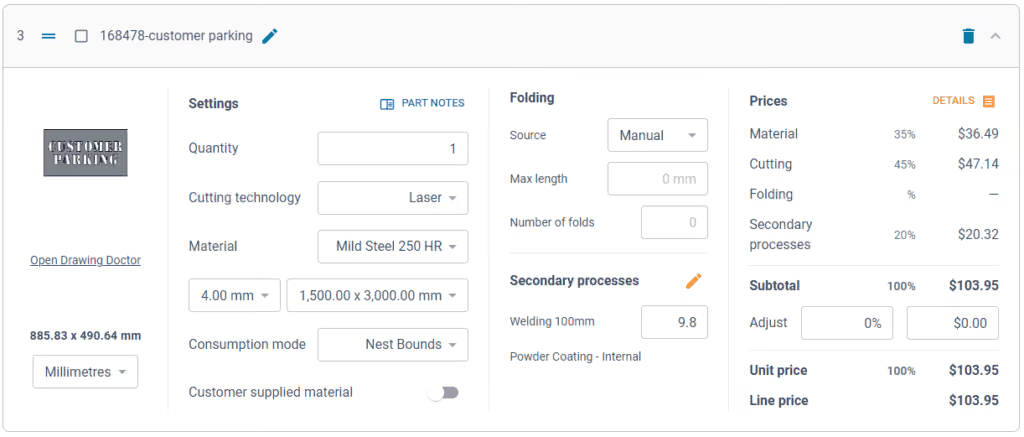
- Secondary processes. Get accurate and consistent folding prices quickly using the built-in folding algorithm developed by specialists with decades of experience using brake presses.
- Drawing Doctor®. Upon upload of a 2D DXF or DWG file, Drawing Doctor® automatically corrects for double lines, dimensions, and small end points that are hidden in some drawings.
- Part Library. Part Library allows you to save parts that you’ve produced for a customer for re-use. Saves time on repeat orders and quotes, by dropping an existing part straight into the quote, ready to calculate, based on the latest pricing.
“These are just a few of our most popular features, but there are lots more within Tempus Tools, and our development team is constantly listening for customer feedback to determine what new features can be added,” says Mark.
“So for effortless laser cutting quoting, don’t let software hold you back, let it be the catalyst that drives business growth. We offer an obligation-free trial of Tempus Tools so that laser cutting job shops can see the difference for themselves.”
Read blog