
How Fabrication Shops Calculate Laser Cutting Costs in Excel

09 Jul 2026

Most fabrication shops start quoting jobs the same way: open Excel, build a formula, and start estimating. If you've searched for a laser cutting cost calculation formula in Excel, you're in good company. Spreadsheets remain the most common quoting tool in small to mid-sized metal fabrication because they're flexible, familiar, and already installed on the office computer.
But spreadsheet quoting has limits. This guide walks through how shops typically structure laser cutting cost calculations in Excel, what variables drive pricing, and where the spreadsheet approach starts to break down as operations grow.
What goes into a laser cutting cost calculation?
At its core, laser cutting pricing comes down to two things: time and material.
Time includes:
- Cut time (how long the laser is actually firing)
- Pierce time (each hole or internal feature requires a pierce)
- Travel time (head movement between cuts)
- Setup time (loading sheets, programming, job changeover)
Material includes:
- Sheet cost (material type, grade, thickness, finish)
- Material usage (how much of the sheet your parts consume)
- Scrap/waste factor (the drops and offcuts left over)
Everything else builds on top of these fundamentals:
- Machine hourly rate: Your cost to run the laser per hour, including depreciation, maintenance, power, gas, and operator labour
- Secondary processes: Folding, welding, powder coating, drilling, tapping – each adds cost based on the specific operation
- Quantity breaks: Setup costs spread across more parts reduce per-piece pricing
- Markup and margin: Your profit above direct costs
The challenge is measuring these variables accurately and applying them consistently across every quote.
How fabrication shops calculate laser cutting costs in Excel
A typical Excel quoting setup evolves organically. Someone creates a workbook, adds formulas that make sense at the time, and builds on it as the business grows. After a few years, the spreadsheet becomes a complex, customised system that only its creator fully understands.
Here's how many shops structure their spreadsheets:
The master workbook approach
One common pattern: a master Excel file that gets copied for each new quote. The workbook contains multiple tabs - material pricing, cutting rates by thickness, secondary operation costs, customer details, and the quote calculation itself.
To generate a quote, the estimator:
- Copies the master file and saves it with a customer or job name
- Enters part dimensions, material type, and thickness
- Estimates or looks up cutting time
- Calculates material usage (often by drawing a rectangle around the part)
- Adds secondary operations manually
- Applies markup and generates a total
Some shops get more sophisticated. They build lookup tables for feed rates by material and thickness, create formulas that calculate cut length from entered dimensions, and link material costs to a separate pricing sheet they try to keep updated.
The time estimate problem
Accurate cut time is the hardest variable to pin down in a spreadsheet.
Eyeballing: The simplest approach - look at the drawing, estimate the cut length, multiply by a rate. An experienced estimator might look at a bracket and think "about 900 millimetres of cutting, maybe 10 seconds total." This works until someone else does the same estimate and comes up with a different number.
Manual measurement: Some estimators type in each feature - "5 holes at 50mm diameter, outside profile is 6 lines totalling 1.2 metres" - and let Excel add it up. More accurate than pure guessing, but time-consuming and still prone to error.
CAM system lookup: For high-value or risky quotes, estimators load the drawing into their programming system to get an actual cycle time. This is accurate, but it ties up the CAM station - often the same computer that runs the laser. Every quote done this way is time the machine isn't cutting.
The exposure to error scales with the risk. Small, simple jobs get eyeballed. Large or complex jobs get programmed. Everything in between falls somewhere on the accuracy spectrum.
The material estimate problem
Material consumption is usually calculated by wrapping a bounding rectangle around the part. Length times width times material cost per square metre - simple enough.
But nested parts don't consume material that way. Two triangles nested point-to-point use far less sheet than their combined bounding boxes suggest. Parts with internal cutouts return material as usable drops – or don't, depending on shop practices.
Without actual nesting, every material estimate carries error. Some shops add a waste factor (10%, 20%) to compensate. Others just accept that material costs are approximate until the job hits the floor.
Example laser cutting pricing structure
A simplified Excel pricing structure might look like this:
Inputs:
- Part dimensions (L × W × thickness)
- Material type and grade
- Estimated cut length
- Number of pierces
- Quantity
- Secondary operations (bend count, weld time, etc.)
Lookup tables:
- Material cost per kg or per square metre by type and thickness
- Feed rate (mm/min) by material and thickness
- Pierce time by thickness
- Hourly machine rate
Calculations:
Cut time = Cut length ÷ Feed rate
Pierce time = Number of pierces × Time per pierce
Machine time = Cut time + Pierce time + Setup allowance
Machine cost = Machine time × Hourly rate

Material area = L × W × (1 + Waste factor)
Material cost = Material area × Cost per unit area

Secondary costs = [Sum of each operation]

Part cost = Machine cost + Material cost + Secondary costs
Quote price = Part cost × (1 + Markup)
Total = Quote price × Quantity
This looks logical on paper. The problems emerge in practice.

Common problems with spreadsheet quoting
Industry veterans who've worked with hundreds of fabrication shops see the same issues repeatedly.
Inconsistent estimates
Two estimators looking at the same drawing will come up with different numbers. One sees 900mm of cutting; the other sees 1100mm. One accounts for acceleration and deceleration; the other doesn't. The prices diverge, and neither knows who's right until the job runs.
Worse, the same estimator quoting the same part a month later might produce a different price. The conditions change - they're rushed, distracted, or simply estimate differently this time. Consistency disappears.
Outdated pricing
Material costs change. Steel prices swing with the market. Sheet suppliers update their lists quarterly. But the price in the spreadsheet is whatever someone entered six months - or two years - ago.
When material costs rise and spreadsheet prices don't follow, margin erodes invisibly. When costs drop, you're leaving money on the table or losing jobs to more responsive competitors.
Version control chaos
Every quote lives as a separate file. Customer name, date, maybe a revision number in the filename. Stored somewhere on the server – probably in a customer folder, hopefully organised.
Six months later, the customer returns asking to proceed with "that quote from February." Which one? The original, or the revised version after they asked for changes? The estimator digs through folders, opens likely candidates, and hopes they're looking at the right file.
If the customer asks for pricing on a larger quantity, the estimator might start from scratch rather than hunt for the original calculation.
No drawing-to-quote connection
A spreadsheet holds numbers. It doesn't store the actual part geometry. The drawing that generated those numbers lives elsewhere - maybe in an email attachment, maybe on a shared drive, maybe only on the CAD station.
When the customer reorders, the drawing they send might be version 3 while the quote was based on version 1. Without a direct link between drawing and quote, nobody catches the change until production.
Professional document limitations
Excel produces documents that look like spreadsheets. Grid lines, awkward page breaks, no visual representation of the parts quoted. Some shops invest hours formatting their quote outputs. Others just send the spreadsheet and hope it's good enough.
The professional presentation that helps win work – part thumbnails, clean layouts, clear line items - requires either significant formatting effort or different tools entirely.
Secondary operations are guesswork
For secondary processes like folding, welding, or powder coating, most spreadsheet-based shops pick a number. "$2 per inch of bend" or "$50 per hour of welding time" become fixed rules that originated from someone's gut feel years ago.
Without actual calculation based on part geometry - fold complexity, weld length, surface area for coating – secondary pricing remains approximate. Some jobs make more margin than expected; others lose money for reasons that never get tracked.
Why quoting accuracy matters more as shops grow
A one-person shop doing a handful of quotes per week can manage the inconsistency. They know their spreadsheet, they remember the jobs, and they catch errors before they become expensive.
Scale the operation and the cracks widen.
- Multiple estimators means multiple interpretations. Each person develops their own habits – how they measure, what they include, how they round. Price consistency across the team requires either strict procedures (rarely followed under time pressure) or a system that enforces consistency automatically.
- Higher quote volume means less time per quote. What took 20 minutes of careful estimation becomes 5 minutes of quick guessing. Error rates climb with speed.
- Repeat customers and part libraries create expectations. If the same part was quoted last month, the customer expects roughly the same price. Finding that previous quote - and verifying the inputs haven't changed - takes time that feels wasteful but protects relationships.
- Online quote requests demand rapid response. When requests come through a website instead of phone calls, customer expectations shift. They want a price instantly, not in days. Spreadsheet workflows that require manual input for every calculation can't keep pace.
- Machine investments raise the stakes. A second laser doubles capacity but also doubles the scheduling complexity. Quoted work needs to route to the right machine with the right capabilities. Spreadsheets don't handle resource allocation.
Signs that a shop may be outgrowing Excel
No single event signals the transition point. It's a gradual accumulation of friction.
- You're the quoting bottleneck. Work piles up waiting for estimates. The owner or senior estimator becomes the limiting factor on how fast the business can respond to customers.
- Quote accuracy is unknown. Jobs finish, but nobody compares actual costs to quoted costs. You're profitable overall - probably - but which jobs made money and which ones lost it? The feedback loop that would improve future quotes doesn't exist.
- Material prices are out of date. You know the spreadsheet has old numbers. You keep meaning to update it. But updates take time, and today there's quoting to do.
- You're double-handling work. First the estimate, then the CAM programming, then the production paperwork. Information entered in the spreadsheet gets re-entered elsewhere. Every handoff is an opportunity for error.
- Customers are waiting. Response time stretches. Simple quotes that should take minutes take hours because someone has to open the file, find the right tabs, enter the data, and format the output.
- You can't trust the numbers. Different people quote differently. The same person quotes differently on different days. Pricing feels more like art than science, and you're not sure whether you're winning work because you're competitive or because you're underpriced.
How software changes the quoting workflow
Dedicated quoting software doesn't eliminate the fundamental calculation – it still comes down to time and material. But it changes how those inputs are gathered and applied.
- Geometry drives the calculation. Instead of eyeballing cut length, the software measures actual part geometry from the CAD file. Cut length, pierce count, and material usage come from the drawing itself – no estimation required.
- Pricing rules stay consistent. Material costs, hourly rates, and secondary process formulas live in one place. Update the price of 3mm mild steel once, and every quote reflects the change. Different estimators applying the same rules get the same results.
- Quotes link to drawings. The part geometry, the calculation, and the quote document connect. Reorder the same part and the system finds the original. Customer sends a revised drawing and the revision is visible.
- Secondary processes calculate automatically. Folding time based on bend count and complexity. Powder coating based on surface area. Configurable rules that apply the same logic every time instead of requiring manual calculation.
- Quote history is searchable. Find last month's quote for that customer. See what you quoted six months ago for a similar part. The information exists in a structured system, not scattered across file folders.
- Professional output is built in. Part thumbnails, formatted line items, and clean presentation without manual formatting. The quote document represents the business professionally without additional effort.
Tools like Tempus Tools approach quoting this way – upload CAD files, apply your shop's pricing rules, and generate accurate quotes in minutes instead of hours. The calculation logic is yours to configure, but the system handles measurement, consistency, and documentation.

When spreadsheets still make sense
Excel isn't wrong for every situation.
- Early-stage shops with low quote volume and a single estimator can manage the limitations. The investment in learning new software and migrating pricing data may not be justified when you're still figuring out your business model.
- Very simple operations with narrow material ranges and minimal secondary processing have fewer variables to track. The spreadsheet complexity stays manageable.
- Supplement to other systems sometimes makes sense. Specialty calculations that don't fit standard software might live in a spreadsheet that feeds data elsewhere.
The question isn't whether spreadsheets can work. They clearly do – thousands of shops run on them daily. The question is whether they're costing more than they save as operations grow.
Frequently asked questions
How do you calculate laser cutting cost?
At minimum: (Cut time × Machine hourly rate) + (Material consumed × Material cost) + Secondary process costs + Markup. The challenge is measuring cut time and material accurately. Spreadsheets typically estimate these values; quoting software calculates them from actual part geometry.
What should be included in a laser cutting quote?
Material costs (type, grade, thickness, quantity), cutting time, pierce count, setup costs, secondary operations (folding, welding, finishing), and markup. Good quotes also specify revision numbers, lead times, and any assumptions about drawing quality or tolerances.
How do fabrication shops calculate hourly machine rates?
Total the annual costs of running the machine – depreciation, maintenance, consumables, power, gas, allocated labour, and overhead – then divide by productive hours. A $500,000 laser running 2,000 productive hours annually with $150,000 in annual operating costs has an hourly rate around $325. See our hourly rate calculator for a structured approach.
Is Excel good for laser cutting quotes?
Excel is accessible, flexible, and familiar. It works well for low-volume quoting where a single person controls the process. It struggles with consistency across multiple estimators, accurate geometry measurement, drawing-to-quote traceability, and keeping pricing current. Most shops outgrow spreadsheets before they realise it.
When should a fabrication shop move beyond spreadsheets?
When quote volume exceeds what one person can handle accurately. When inconsistent pricing becomes visible - different estimators producing different numbers. When time spent estimating competes with time running the machine. When you can't answer "did we make money on that job?" with confidence. At that point, the hidden costs of spreadsheet quoting likely exceed the cost of proper tooling.
If you're spending hours in Excel for every batch of quotes – or wondering whether your estimates match reality – see how Tempus Tools automates the calculation from CAD geometry to finished quote. Same pricing logic you control, without the guesswork.
See how Tempus Tools helps fabricators quote faster and smarter.
Share this post
Articles

Resources
Related Posts
Product updates
0
min read
New integration: Tempus Tools + ECI M1 – from quote to order to ERP, seamlessly
At Tempus Tools, we know that speed and accuracy are everything in a laser cutting job shop, and today we’re announcing a new integration that makes both even easier.
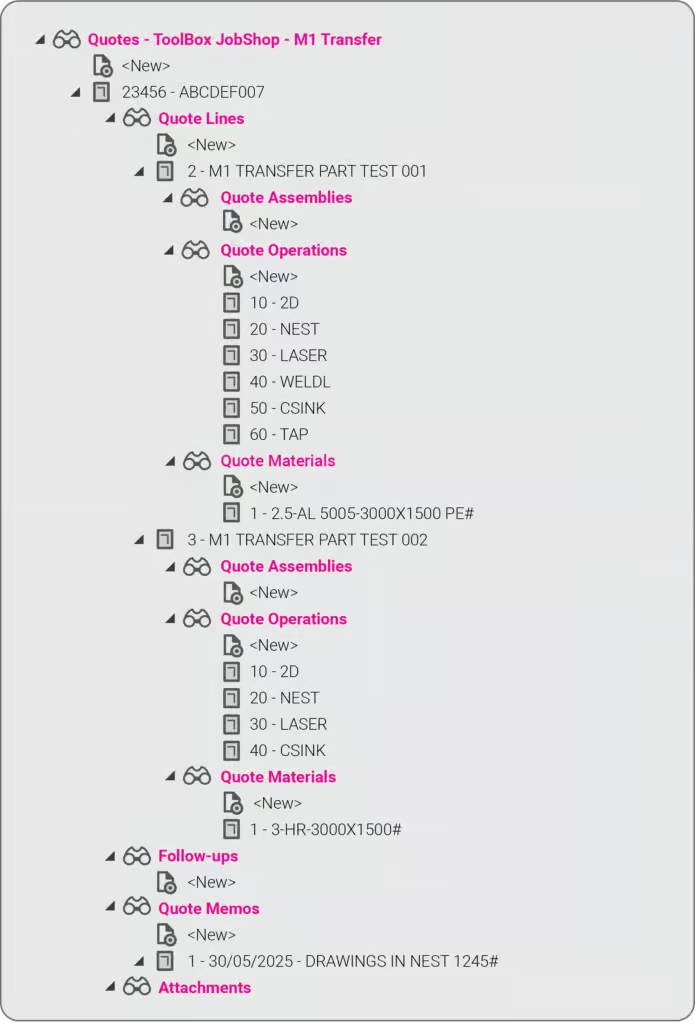
We’re now fully integrated with ECI Software’s M1 ERP system.

What does that mean for your job shop?
It means you can now send quotes, order details, and production-ready drawings directly from Tempus Tools into your M1 ERP — no more double handling, no more data entry errors, no more jumping between systems.
This integration eliminates any “dead zone” between quoting and production. You get the specialist laser quoting power of Tempus Tools (like lightning-fast nesting, material cost accuracy, and margin control) combined with the operational backbone of M1.
It’s quoting that talks to your shop floor.
We’ve talked about how integrations like Google Drive can supercharge job shop workflows, and this M1 integration is another great example.
Want to learn more or set it up? If you want to avoid the limitations in the generic quoting functions in ERP/MRP software, but still use the rich planning and production features in ERP/MRP software, then get in touch today.
Book a demo or email us at support@tempustools.com and we’ll help you get connected.
Tempus Tools + M1 = quoting to production, finally in sync.
Read blog
Product updates
0
min read
Tempus Tools’ Google Drive integration: 6 ways to supercharge your job shop efficiency
Tempus Tools’ new Google Drive integration automatically saves your quote data and part files to Drive, opening the door to faster, smarter workflows. In this post, we highlight six clever ways job shops are already using it to boost efficiency.
Last month Tempus Tools released a powerful new feature: seamless integration with Google Drive.
Since then, we’ve heard from lots of customers about the innovative ways they have implemented this integration in their job shops, and we wanted to share the best six with you to inspire you to use the feature in your shop.
First, a quick recap: with the Google Drive integration, all your quote data (in CSV format) and production-ready part files can be automatically saved to your chosen Google Drive folder. From here, they can be exported to any number of programs or that data can be manipulated for many use cases, opening up a world of automation, reporting and connectivity for your job shop. We’ve also put together a quick video to show the integration in action.
1. Automate quote data collection for reporting
With every quote automatically saved, you can easily compile and analyse your quote performance over time. Use Google Sheets or your favourite analytics tool to track:
- win/loss rates
- performance across material types
- average order size
- breakdown of secondary processes contributions
This data-driven approach helps you identify trends, optimise pricing and improve customer response times.
2. Connect with ERP/MRP and other business systems
Some apps have native integration with Google Drive, which makes taking in quote data and parts easy, but many need a formal API. Luckily, Google Drive comes with its own API.
Some users have used the Google Drive API to build automations that push quote data directly into ERP, MRP or order management systems. This can streamline order processing, reduce manual data entry and ensure your production schedule is always up to date.
3. Organise your orders by material type
Use the exported quote data to create a parts planner that groups jobs by common material type. This enables you to:
- batch similar jobs for more efficient material usage
- reduce changeover times on machines
- optimise purchasing and inventory management
A simple Google Sheets script or integration with a dashboard tool can make this process nearly automatic.
4. Integrate with project management tools
Connect your quote data with popular tools like ClickUp, Monday.com or Airtable. Build custom dashboards and planners for your factory, visualise job statuses and assign tasks to your team-all based on real-time quoting data. These tools don’t require coding or a developer and anyone can work wonders. These types of projects boost collaboration on the shop floor and keep everyone aligned on priorities.
5. Create a scheduling calendar from time calculations
Use the time estimates in your quote data to automatically populate a production calendar. With a Google Calendar integration, you can:
- visualise machine and operator workloads
- identify bottlenecks before they happen
- easily adjust schedules as new jobs come in
This proactive scheduling helps you deliver on time, every time.
6. Enable automated notifications and workflows
Set up Google Drive triggers (using tools like Zapier or Google Apps Script) to notify your team when new quotes are confirmed as orders, or to kick off downstream processes-like updating CRM records or ordering materials.
Getting started is easy
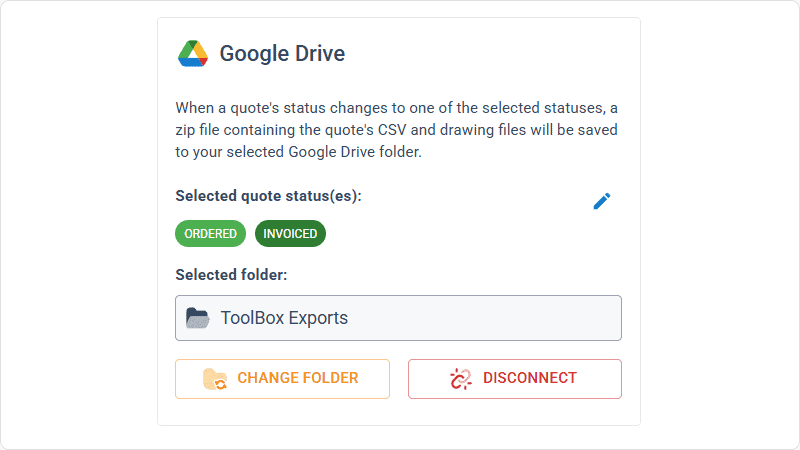
- Go to Settings > Organisation settings > Integrations in your Tempus Tools Tempus Tools account
- Connect your Google Drive and select your preferred folder
- Choose the quote statuses that will trigger automatic file saving
- Start building automations and workflows that fit your shop’s needs
This integration is designed to be flexible-whether you want to automate reporting, connect with business systems, or simply keep your files organised, Tempus Tools and Google Drive make it possible.
Ready to enhance your job shop efficiency? Try the new Google Drive integration today.
Read blog

Articles
0
min read
Is expensive, non-dedicated software holding you back from effortless laser cutting quoting?
Many laser cutting job shops still rely on generic or overly complex software, slowing down RFQ response times and creating bottlenecks that hurt profitability. Tempus Tools offers a fast, intuitive, and purpose-built quoting solution—with powerful features, simple setup, and transparent pricing—to help shops quote accurately, streamline production, and stay competitive.
Laser cutting is a precise task, requiring machinery tailored to specific requirements. Profitability is significantly boosted by the ability to be able to respond quickly to customer requests for quotes (RFQs), and efficiently deliver the product.
“With the time and energy often spent on selecting the right laser cutting machine, it’s amazing how often software is overlooked as a driver of productivity,” says Tempus Tools Head of Global Sales, Mark Washington.

“Sometimes laser cutting companies are stuck using software that wasn’t specifically designed for job shops, but it’s all that their team is used to using. Other times, expensive software is implemented, but only a small fraction of the features are actually used,” he says.
“And in many cases, it becomes so complex that a specialist is hired to manage quoting via the software – but what happens if they leave the company?”
Tempus Tools is the creator of dedicated quoting software, Tempus Tools, which can provide fast, accurate, and consistent laser cutting quotes that are professionally presented, ready to send back to the customer.
“Using software that isn’t specifically designed for laser cutting is like using a cricket bat to play tennis. It might get the job done, but it would be far more efficient and accurate with the tools designed for the job!” says Mark (pictured, right).
“In addition to providing quotes in minutes, Tempus Tools can also produce production documents with the click of a button, to add further efficiency to running a job shop floor,” he adds.
A shift in the industry
With customers demanding faster service, the industry is shifting to tailored laser cutting quoting solutions, to enhance their RFQ response times, and Mark sees this as part of a larger global trend.
“It’s evident across a number of industries – smarter players want to utilise technologies specifically targeted to their industry to out-pace competitors. And laser cutting job shops are enthusiastically getting on board with this trend,” he says.
“Tempus Tools has been specifically designed for laser cutting job shops. It’s quick to set up, intuitive, and user-friendly, so the entire team can use it with minimal training, instead of relying on one specialist.”
Tempus Tools cloud-based laser cutting quoting software can be set up with information on material price, cutting time, labour, and other relevant information, to generate quotes quickly and accurately, with repeatability.
“The Tempus Tools team has decades of experience in the laser cutting industry, from the shop floor, through to management, and running their own laser cutting enterprises, so we know the industry inside out – and we can support through setup and every step of the journey, for no additional charges,” adds Mark.
“A major inhibitor of laser cutting quoting software has often been cost, with powerful software that can do it all costing thousands per month. But if you only need dedicated laser cutting quoting software, our plans start from US$100 per month, and are packed full of features you will actually use,” he says.
Switching software – overcoming challenges
Even with the knowledge of the benefits of dedicated laser cutting quoting software, job shops can be hesitant about the time involved in switching, says Mark. He notes some of the main concerns:
- Time – often job shops have tried other software implementations and it’s taken months, and they just cannot afford to spend that time again. But Tempus Tools isn’t like other software. For a job shop with one laser, press brake, and standard secondary processes, set up takes less than 90 minutes.
- Staff training – job shops often believe their staff don’t have the time or capacity to learn a whole new software. But again, Tempus Tools is different. It’s designed to be user-friendly, easy to learn, and staff end up doing their jobs more efficiently, and enjoying the features right away.
- Hidden costs – this is a big factor for any software, and job shops are highly alert to cheap upfront costs, followed by lots of add-ons. No one likes to be “nickel and dimed”. For Tempus Tools, it’s a monthly or yearly subscription, and that’s all. No extra charges for support, upgrades, or training. Features all have a set pricing that’s clear from the outset.
- Too many programs – some job shops have two, three, or more different software programs – why add more, especially if they don’t talk to each other? That’s a totally valid concern. Tempus Tools outputs a CSV as standard with all the quote data, making integration seamless and easy.
“The Tempus Tools leadership team has decades of experience working from the shop floor to the top floor, so they understand the pain of changing software, and have designed Tempus Tools to be effortless and simple,” says Mark.
Tempus Tools features
Tempus Tools features that have been specifically designed for laser cutting job shops include:
- 3D model extractor. Identify, extract and unfold sheet-metal parts directly from 3D assemblies without a 3D software package.
- PDF to CAD convertor. Convert a vector PDF into a CAD file instantly. No tracing, no CAD package, just click on a part and extract it into your quote.
- Tube quoting. Easily drag and drop rectangular, square or round hollow sections into the tube module. It quickly calculates highly accurate cutting time and material consumption for pricing.
- Web Store. Let your customers get instant pricing and place orders from your website 24/7 with an online quoting portal.
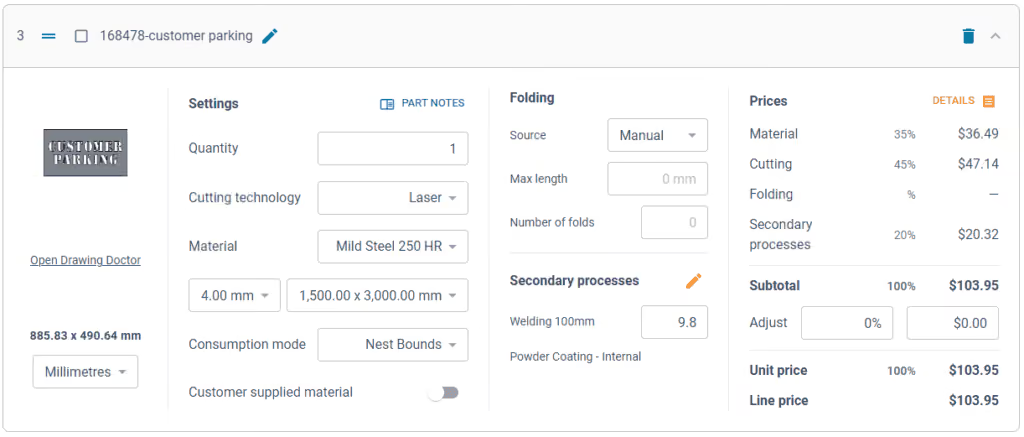
- Secondary processes. Get accurate and consistent folding prices quickly using the built-in folding algorithm developed by specialists with decades of experience using brake presses.
- Drawing Doctor®. Upon upload of a 2D DXF or DWG file, Drawing Doctor® automatically corrects for double lines, dimensions, and small end points that are hidden in some drawings.
- Part Library. Part Library allows you to save parts that you’ve produced for a customer for re-use. Saves time on repeat orders and quotes, by dropping an existing part straight into the quote, ready to calculate, based on the latest pricing.
“These are just a few of our most popular features, but there are lots more within Tempus Tools, and our development team is constantly listening for customer feedback to determine what new features can be added,” says Mark.
“So for effortless laser cutting quoting, don’t let software hold you back, let it be the catalyst that drives business growth. We offer an obligation-free trial of Tempus Tools so that laser cutting job shops can see the difference for themselves.”
Read blog